Chargeway icon

Phone

Chargeway

Maps & Navigation Chargeway Inc ⭐ 4.30 10,000+
Version 2026.14.1 Everyone

Screenshots

Chargeway screenshot
Permissions Explained 6 permissions requested View details

This app requests 6 permissions. The table below explains what each permission may allow and what users should review before installing.

Status Permission What it means Why it may be used User safety note
ℹ️ Review Approximate Location (network Based) approximate location (network-based) This is an Android permission or app-specific permission requested by the app. The app may use this permission for features related to its category, device support, background behavior, storage, connectivity, or system integration. Review this permission before installing, especially if it does not match the app’s expected purpose.
ℹ️ Review Precise Location (gps And Network Based) precise location (GPS and network-based) This is an Android permission or app-specific permission requested by the app. The app may use this permission for features related to its category, device support, background behavior, storage, connectivity, or system integration. Review this permission before installing, especially if it does not match the app’s expected purpose.
ℹ️ Review View Network Connections view network connections This is an Android permission or app-specific permission requested by the app. The app may use this permission for features related to its category, device support, background behavior, storage, connectivity, or system integration. Review this permission before installing, especially if it does not match the app’s expected purpose.
ℹ️ Review Full Network Access full network access This is an Android permission or app-specific permission requested by the app. The app may use this permission for features related to its category, device support, background behavior, storage, connectivity, or system integration. Review this permission before installing, especially if it does not match the app’s expected purpose.
ℹ️ Review Prevent Device From Sleeping prevent device from sleeping This is an Android permission or app-specific permission requested by the app. The app may use this permission for features related to its category, device support, background behavior, storage, connectivity, or system integration. Review this permission before installing, especially if it does not match the app’s expected purpose.
ℹ️ Review Read Google Service Configuration read Google service configuration This is an Android permission or app-specific permission requested by the app. The app may use this permission for features related to its category, device support, background behavior, storage, connectivity, or system integration. Review this permission before installing, especially if it does not match the app’s expected purpose.

About Chargeway

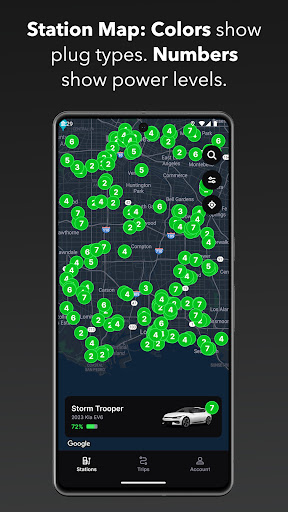
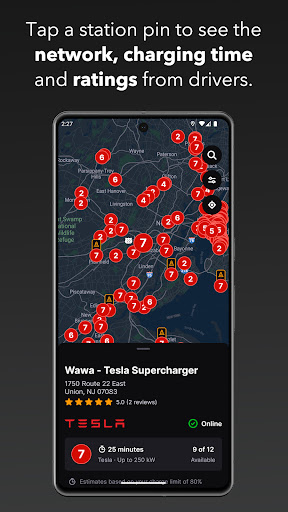
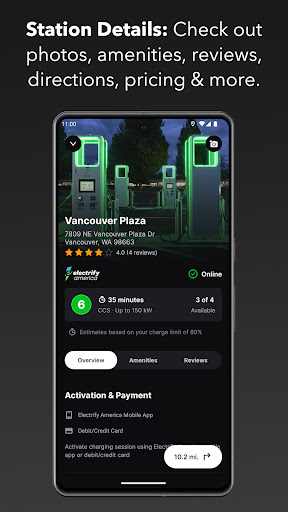
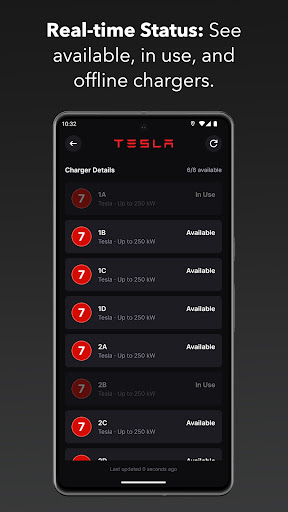
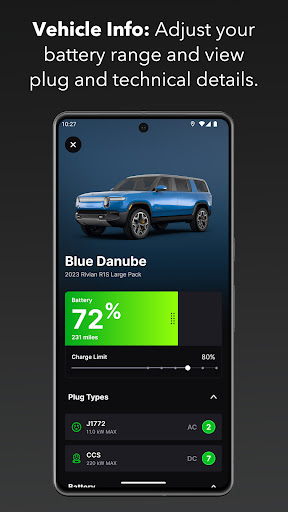
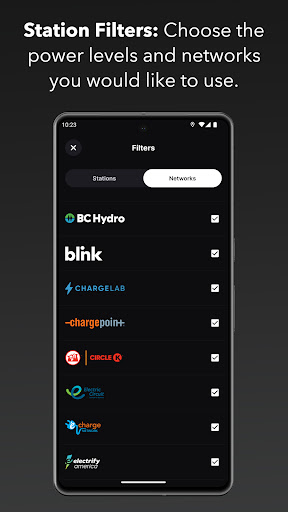
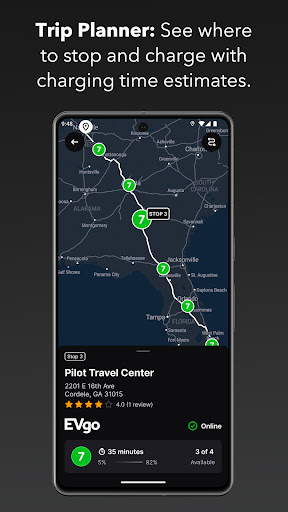
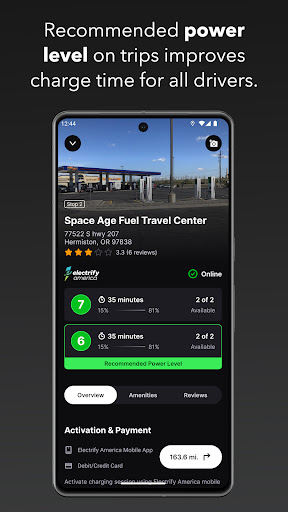
Download Chargeway®, the first electric car charging app that is personalized to your driving needs. Car & Driver Magazine proclaims, “Chargeway is absolutely game changing as it cuts through the clutter.” Chargeway® makes driving an electric car and using “electric fuel” easy for everyone. Simply choose your vehicle and Chargeway® will answer the questions that all drivers want to know when they need to re-fuel: - Where do I fill up? - How long does it take? - Where can I travel to? Chargeway® guides drivers to charging stations throughout the United States from networks including Greenlots, EVgo, SemaConnect, EVConnect, Chargepoint, Flo, Blink, OpConnect, Electrify America, AeroVironment, Volta, GE Wattstation and Tesla. Designed with the individual driver in mind, Chargeway® simplifies the electric car charging experience ensuring that you see only the stations that work for your car. Features include: Station Locator: - Plug specific color-coding so you know which stations match your car (Green, Blue or Red) - Power levels 1 through 7 show your vehicle and stations max charging speed - Automatic station location map filtering for the vehicles you choose - Easy to adjust filters for station power levels and networks you want to use - Add reviews and photos to stations that you visit - See shops and restaurants near a station that you can enjoy while you charge - One-click directions to help you get to any station location Timer: - Charging time estimator to help you learn how charging time can vary - Simply select the power level and your remaining range to estimate how much time your charge will take - If you have more than one electric car, simply swipe left or right change vehicles Trip Planner: - Chargeway® detects the fastest route and charging station locations for your trip - Set the outside temperature and your desired speed for more accurate planning - Add in multiple stops between your starting point and destination for custom routes - Charging times for every stop are estimated to help you plan your time better - Select "All Stations" on planned trips to view every charging option along your route - If a certain route doesn’t have enough stations Chargeway® will let you know so you can choose another route Vehicle Info: - Click the vehicle image or name on the Stations screen to see more info - Adjust your vehicles total range to more accurately plan trips and estimate charging times - Technical specifications for each car listed under "More Info" - Add more vehicles to your account by swiping all the way to the left There are numerous electric cars available today that are perfect for every day driving as well as traveling. Download Chargeway® to discover how driving on “electric fuel” will work for you!

What Chargeway Is Used For

Chargeway is a Maps & Navigation app that appears to help electric vehicle drivers find and plan charging stops. Based on the metadata, it is designed around the needs of a specific vehicle, so users may use it to locate compatible charging stations, compare charging power levels, and estimate how long a charge could take.

The app also seems useful for trip planning. It may help drivers map routes with charging stops along the way, review nearby shops or restaurants while waiting, and adjust filters for station networks or charging speeds. The location permissions listed suggest it relies on the phone’s approximate or precise location to show nearby stations and support navigation-focused features. Because it includes network access and can prevent the device from sleeping, it may update station data and keep trip or charging tools active while being used on the road.

Overall, Chargeway appears aimed at everyday EV use on a phone, especially when a driver needs quick answers about where to charge, how fast charging may be, and whether a route has suitable station options.

Common uses

  • Find nearby EV charging stations that match a chosen vehicle
  • Filter stations by charging speed and network
  • Estimate charging time from remaining range and power level
  • Plan longer trips with charging stops along the route
  • View nearby places to visit while charging
  • Use location-based results for station search and navigation
  • Adjust options for different electric vehicles
Best for:
EV drivers Trip planning Charging station lookup Phone navigation Route planning

App Details

Package:
net.chargeway.chargeway
Developer:
Chargeway Inc
Version:
2026.14.1
Updated:
Mar 28, 2026
Min Android:
6.0
Age Rating:
Everyone
Contains Ads:
No
In-App Purchases:
Yes

Official Listing

  • Official listing available on Google Play
  • Package name: net.chargeway.chargeway
  • Age rating: Everyone

Explore More

Browse more apps in Maps & Navigation or explore the Phone hub .

Related Maps & Navigation Apps

How to Download Chargeway

If this app is not hosted directly on APKApps official link, then for the safest and most up-to-date version, install it from its official Google Play listing.