StormWatch+ icon

Phone

StormWatch+

Weather Cirrus Weather Solutions, LLC ⭐ 3.40 10,000+
Version 8.2.1 Everyone

Screenshots

StormWatch+ screenshot
Permissions Explained 13 permissions requested View details

This app requests 13 permissions. The table below explains what each permission may allow and what users should review before installing.

Status Permission What it means Why it may be used User safety note
ℹ️ Review Approximate Location (network Based) approximate location (network-based) This is an Android permission or app-specific permission requested by the app. The app may use this permission for features related to its category, device support, background behavior, storage, connectivity, or system integration. Review this permission before installing, especially if it does not match the app’s expected purpose.
ℹ️ Review Precise Location (gps And Network Based) precise location (GPS and network-based) This is an Android permission or app-specific permission requested by the app. The app may use this permission for features related to its category, device support, background behavior, storage, connectivity, or system integration. Review this permission before installing, especially if it does not match the app’s expected purpose.
ℹ️ Review Read The Contents Of Your Usb Storage read the contents of your USB storage This is an Android permission or app-specific permission requested by the app. The app may use this permission for features related to its category, device support, background behavior, storage, connectivity, or system integration. Review this permission before installing, especially if it does not match the app’s expected purpose.
ℹ️ Review Modify Or Delete The Contents Of Your Usb Storage modify or delete the contents of your USB storage This is an Android permission or app-specific permission requested by the app. The app may use this permission for features related to its category, device support, background behavior, storage, connectivity, or system integration. Review this permission before installing, especially if it does not match the app’s expected purpose.
ℹ️ Review Take Pictures And Videos take pictures and videos This is an Android permission or app-specific permission requested by the app. The app may use this permission for features related to its category, device support, background behavior, storage, connectivity, or system integration. Review this permission before installing, especially if it does not match the app’s expected purpose.
ℹ️ Review View Wi Fi Connections view Wi-Fi connections This is an Android permission or app-specific permission requested by the app. The app may use this permission for features related to its category, device support, background behavior, storage, connectivity, or system integration. Review this permission before installing, especially if it does not match the app’s expected purpose.
ℹ️ Review View Network Connections view network connections This is an Android permission or app-specific permission requested by the app. The app may use this permission for features related to its category, device support, background behavior, storage, connectivity, or system integration. Review this permission before installing, especially if it does not match the app’s expected purpose.
ℹ️ Review Full Network Access full network access This is an Android permission or app-specific permission requested by the app. The app may use this permission for features related to its category, device support, background behavior, storage, connectivity, or system integration. Review this permission before installing, especially if it does not match the app’s expected purpose.
ℹ️ Review Change Your Audio Settings change your audio settings This is an Android permission or app-specific permission requested by the app. The app may use this permission for features related to its category, device support, background behavior, storage, connectivity, or system integration. Review this permission before installing, especially if it does not match the app’s expected purpose.
ℹ️ Review Run At Startup run at startup This is an Android permission or app-specific permission requested by the app. The app may use this permission for features related to its category, device support, background behavior, storage, connectivity, or system integration. Review this permission before installing, especially if it does not match the app’s expected purpose.
ℹ️ Review Control Vibration control vibration This is an Android permission or app-specific permission requested by the app. The app may use this permission for features related to its category, device support, background behavior, storage, connectivity, or system integration. Review this permission before installing, especially if it does not match the app’s expected purpose.
ℹ️ Review Prevent Device From Sleeping prevent device from sleeping This is an Android permission or app-specific permission requested by the app. The app may use this permission for features related to its category, device support, background behavior, storage, connectivity, or system integration. Review this permission before installing, especially if it does not match the app’s expected purpose.
ℹ️ Review Receive Data From Internet receive data from Internet This is an Android permission or app-specific permission requested by the app. The app may use this permission for features related to its category, device support, background behavior, storage, connectivity, or system integration. Review this permission before installing, especially if it does not match the app’s expected purpose.

About StormWatch+

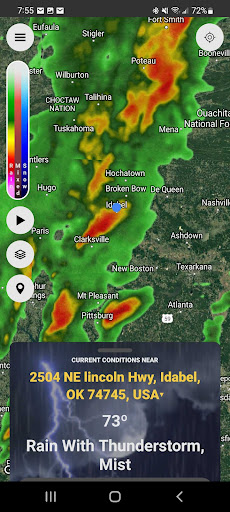
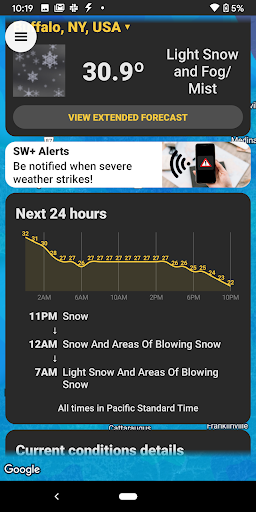
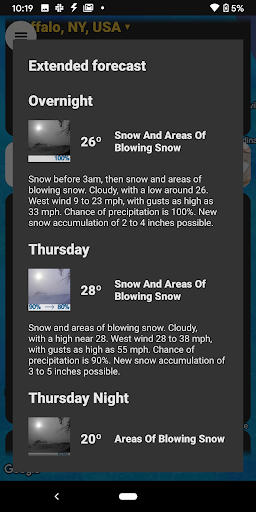
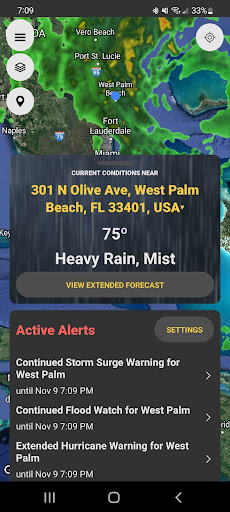
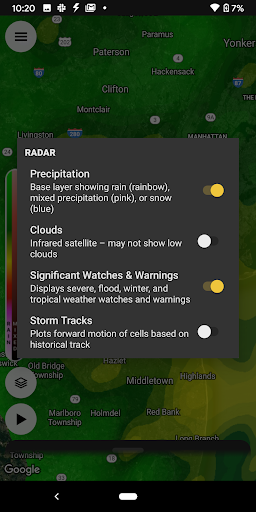
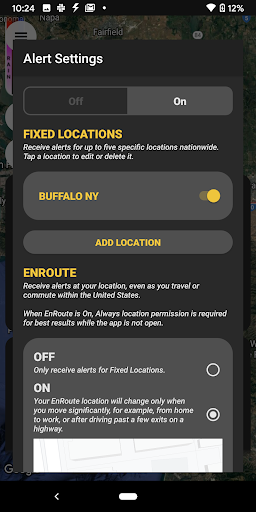
Refreshed for 2023, StormWatch+ aspires to be your daily weather app of choice, no matter the weather! Access the most pertinent weather information - like current conditions, hourly and extended forecast, and local or national radar - quickly, then get on with your day! Finally a weather forecast you can trust! Harnessing the local knowledge and dedication of more than 2,000 National Weather Service meteorologists nationwide, our goal is for StormWatch+ to replace the fickle computer-generated, single-icon forecast in most weather apps on as many devices as possible! SW+ ALERTS IN-APP UPGRADE For the ultimate severe weather preparation tool, check out our alerting technology, SW+ Alerts. SW+ Alerts is a life-saving service that sends you push notifications whenever hazardous weather threatens your specific location. Once again relying on the expertise of over 2,000 NWS meteorologists nationwide, SW+ Alerts compares multiple specific locations you select with weather watches and warnings issued by your local NWS office. Alerts are sent to the app ONLY if you are in the path of hazardous weather, eliminating the confusion associated with county-wide warning sirens or NOAA Weather Radio alerts. Simply tapping on a push alert will show your location with respect to the warning boundaries on a map, as well as display the full text of the alert. In addition, “wake-me-up” audio and voice alerts will sound for the most severe warnings.^ In addition to monitoring fixed locations, the “EnRoute” feature allows you to receive severe weather alerts while on the go! Simply enable EnRoute and the app will track your location and alert you if you drive into a warned area, whether you know your exact location or not! Features of StormWatch+ Alerts include: * Your choice of push notifications in the event of: - Tornado Watches and Warnings - Severe Thunderstorm Watches and Warnings - Flash Flood Watches and Warnings - A suite of Tropical weather alerts - A suite of Winter weather alerts * Notifications sent even if the app is not running and your device is not in use * Push notifications accompanied by audio alerts that will wake you up (for Tornado and Severe Thunderstorm Warnings)^ * Alerts for up to 5 fixed locations, which can be changed at any time * EnRoute, which uses your device's GPS location to actively monitor for severe weather as you travel * Map showing warned area and your location * Quiet time – to temporarily stop alerts during a specified time of day * Status buttons to disable individual locations StormWatch+ provides personalized weather alerts in the palm of your hand! ^ NOTE: Audio alerts cannot be heard if your device is manually silenced or in "Do Not Disturb" mode. ****************************** For additional information, visit www.stormwatchplus.com or follow us on Twitter @stormwatchplus Questions for our support team can be directed to [email protected] or by using the "Contact Support" link within the app. Please contact us…

What StormWatch+ Is Used For

StormWatch+ is a weather app for phones that appears to focus on quick access to current conditions, hourly forecasts, extended forecasts, and radar views. Based on the metadata, it is commonly used by people who want a more weather-focused home screen experience than a general-purpose app, with information that can be checked before leaving home, commuting, or planning outdoor activities.

The app description also suggests a stronger emphasis on severe weather monitoring. It may be used to receive alerts for watches and warnings such as tornadoes, severe thunderstorms, flash floods, and some winter or tropical events. Location permissions and network access appear to support local forecasts, radar, and location-based alerting, while startup, vibration, audio, and sleep-related permissions suggest alerts can be delivered promptly and may include audible warnings when hazardous weather is approaching.

Because it is a phone app, StormWatch+ seems suited to everyday mobile use rather than a large-screen workflow. People who want to track one or more places, follow changing weather patterns, or keep an eye on severe weather while traveling may find it relevant. The in-app purchase note also suggests some alert features may be part of an upgrade rather than the base app.

Common uses

  • Check current weather conditions at a glance
  • Review hourly and extended forecasts
  • View local or national radar maps
  • Follow weather alerts for selected locations
  • Monitor severe weather while driving or away from home
  • Use audio or vibration alerts for urgent warnings
  • Keep the app running in the background for timely notifications
Best for:
daily weather checks severe weather alerts phone app commuters travelers outdoor planning

App Details

Package:
net.cirrusweather.swplus
Category:
Weather
Developer:
Cirrus Weather Solutions, LLC
Version:
8.2.1
Updated:
Oct 24, 2025
Min Android:
7.0
Age Rating:
Everyone
Contains Ads:
No
In-App Purchases:
Yes

Official Listing

  • Official listing available on Google Play
  • Package name: net.cirrusweather.swplus
  • Age rating: Everyone

Explore More

Browse more apps in Weather or explore the Phone hub .

Related Weather Apps

1Weather Forecasts & Radar icon

1Weather Forecasts & Radar

Weather OneLouder Apps

Hyperlocal Forecasts, Live Radar, Severe Weather alerts & Homescreen Widgets

Version 12.4.1 81.5 MB ⭐ 4.30 100,000,000+ installs
The Weather Channel - Radar icon

The Weather Channel - Radar

Weather The Weather Channel

Prepare for severe weather with notifications, future radar, and live alerts.

Version 15.18.0 85.2 MB ⭐ 4.70 100,000,000+ installs
Weather & Radar Forecast icon

Weather & Radar Forecast

Weather WetterOnline

Local forecast, alerts, rain, snow and wind radar, air quality & weather widget

Version Varies with device 67.7 MB ⭐ 4.70 100,000,000+ installs
AccuWeather: Weather Radar icon

AccuWeather: Weather Radar

Weather AccuWeather

Your local weather forecast, storm tracker, radar maps & live weather news

Version Varies with device 46.1 MB ⭐ 3.50 100,000,000+ installs
Weather icon

Weather

Weather OneLouder Apps
Version 0.7.5.0 ⭐ 4.70 50,000,000+ installs

How to Download StormWatch+

If this app is not hosted directly on APKApps official link, then for the safest and most up-to-date version, install it from its official Google Play listing.