About Mullvad VPN
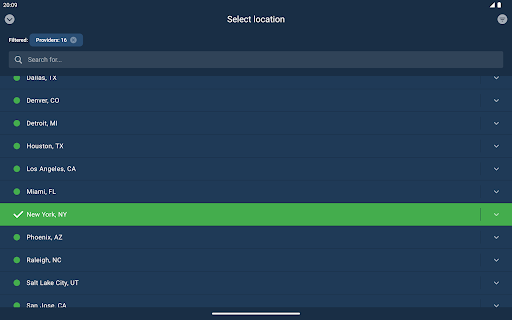
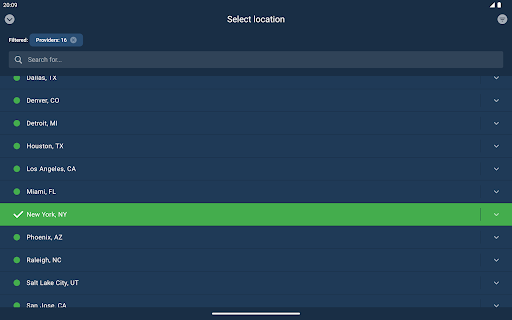
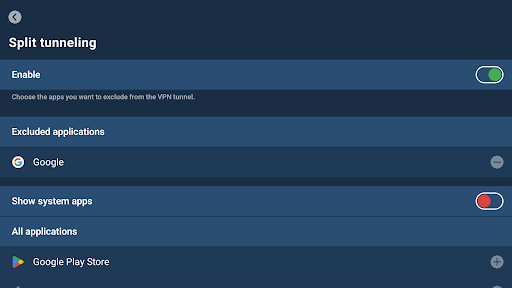
Free the internet from data collection with Mullvad VPN – a service that helps keep your online activity, identity, and location private. Only €5/month. GET STARTED 1. Install the app. 2. Create an account. 3. Add time to your account via in-app purchases or vouchers. To make sure to block third-party cookies and other tracking technologies – use Mullvad VPN together with Mullvad Browser (free of charge). ANONYMOUS ACCOUNTS – NO ACTIVITY LOGS • Creating an account requires no personal info - not even an email address. • We keep no activity logs. • We offer the possibility to pay anonymously with cash or cryptocurrency. • Bypass geographical restrictions with our global network of VPN servers. • Our app uses WireGuard, a superior VPN protocol that connects fast and doesn’t drain your battery. HOW DOES MULLVAD VPN WORK? With Mullvad VPN, your traffic travels through an encrypted tunnel to one of our VPN servers and then onward to the website you are visiting. In this way, websites will only see our server’s identity instead of yours. Same goes for your ISP (internet service provider); they’ll see that you’re connected to Mullvad, but not your activity. It also means that all the third-party actors with technology integrated into the various websites you visit can’t sniff out your IP address and use it to track you from one site to another. Using a trustworthy VPN is a great first step to reclaim your privacy online. In combination with Mullvad Browser you make sure to block third-party cookies and other tracking technologies. FREE THE INTERNET FROM MASS SURVEILLANCE AND DATA COLLECTION A free and open society is a society where people have the right to privacy. That’s why we fight for a free internet. Free from mass surveillance and censorship. Free from big data markets where your personal information is up for sale. Free from authorities mass monitoring every click you make. Free from an infrastructure mapping your whole life. Mullvad VPN and Mullvad Browser is our contribution to the fight. TELEMETRY AND CRASH REPORTS The app collects a very minimal amount of telemetry, and it does not in any way tie it to an account number, IP or other identifiable information. Account numbers are used for authentication. App logs are never sent automatically but are rather explicitly sent by the user. App version checks are performed every 24 hours to tell the app if there are any upgrades available and if the currently running version is still supported. If the split tunneling feature is used, then the app queries your system for a list of all installed applications. This list is only retrieved in the split tunneling view. The list of installed applications is never sent from the device.
What Mullvad VPN Is Used For
Mullvad VPN is a phone app in the Tools category that appears to be used for private internet access through a VPN connection. Based on the metadata, it routes your traffic through encrypted servers so websites and internet providers may see the VPN server instead of your direct IP address. People commonly use apps like this to reduce tracking, hide location details from websites, and create a more private connection on public or shared networks.
The app also appears designed for users who want a low-friction account setup, since the description says an account can be created without personal information. Its permissions for full network access and viewing network connections fit a VPN’s core function, while run at startup suggests it may stay ready to connect when the phone restarts. The metadata also mentions use with Mullvad Browser for additional tracking protection, which may be relevant for users looking for a privacy-focused setup rather than just a network tool.
Common uses
- Connects your phone’s traffic through a VPN tunnel
- May help mask your IP address from websites and apps
- Can be used on public Wi‑Fi for more private browsing
- May help access content through different server locations
- Appears suited to users who want an account without personal details
- Runs as a background network tool with startup support
- Can be paired with a browser for broader tracking reduction
App Details
Package:
net.mullvad.mullvadvpn
Developer:
Mullvad VPN AB
Version:
2026.3
Updated:
Mar 23, 2026
Min Android:
8.0
Age Rating:
Everyone
Contains Ads:
No
In-App Purchases:
Yes
Official Listing
-
Official listing available on
Google Play
-
Package name:
net.mullvad.mullvadvpn
-
Age rating:
Everyone
Related Tools Apps
Tools
•
Innovative Connecting
Enjoy fast streaming, secure & private internet with super unlimited VPN Turbo
Version 4.2.9.8
25.3 MB
⭐ 4.70
100,000,000+ installs
Tools
•
AVG Mobile
Scam & Malware protection, Virus Cleaner, Hack Alerts, App Locker, Photo Vault
Version 26.6.0
56.3 MB
⭐ 4.60
100,000,000+ installs
Tools
•
Avast Software
Android Mobile Security with Antivirus, Virus cleaner, App Lock & Phone cleaner
Version 26.2.3.260318122
56.8 MB
⭐ 4.60
100,000,000+ installs
Tools
•
F-Secure Corporation
Antivirus, Virus Cleaner & Malware Scan | Mobile Security & Hacker Protection
Version 10.57-ff32089
17.9 MB
⭐ 4.20
100,000,000+ installs
Tools
•
Flextech Inc.
Get 1TB Cloud Storage Space with One-Click. Unlock AI Tools in One Smart Space.
Version 4.13.7
112.7 MB
⭐ 4.40
100,000,000+ installs
Tools
•
Secure Signal Inc.
Access favorite websites and apps more securely on the go.
Version 4.3.11
5.6 MB
⭐ 4.70
100,000,000+ installs
How to Download Mullvad VPN
If this app is not hosted directly on APKApps official link,
then for the safest and most up-to-date version, install it from its official Google Play listing.