Photo Exif Editor Pro - Metada icon

Phone

Photo Exif Editor Pro - Metada

Photography Banana Studio ⭐ 4.40 50,000+

Photo Exif Editor allows to view, add and modify EXIF data of multiple photos

Version 2.5.0 3.5 MB Everyone

Screenshots

Photo Exif Editor Pro - Metada screenshot
Permissions Explained 8 permissions requested View details

This app requests 8 permissions. The table below explains what each permission may allow and what users should review before installing.

Status Permission What it means Why it may be used User safety note
⚠️ Sensitive Read external storage android.permission.READ_EXTERNAL_STORAGE Allows the app to read files from shared device storage. Used by media players, file managers, backup apps, editors, upload tools, and document apps. Sensitive permission. Review carefully if the app does not need access to files or media.
⚠️ Sensitive Modify external storage android.permission.WRITE_EXTERNAL_STORAGE Allows the app to write or modify files in shared device storage. Used for saving downloads, media files, exports, edited documents, backups, or cached content. Sensitive permission. Make sure file access matches the app’s purpose.
Common View network status android.permission.ACCESS_NETWORK_STATE Allows the app to check whether the device is connected to Wi-Fi, mobile data, or another network. Often used to avoid loading content when offline or to adjust loading based on connection quality. Generally low risk by itself.
ℹ️ Review Access Wifi State android.permission.ACCESS_WIFI_STATE This is an Android permission or app-specific permission requested by the app. The app may use this permission for features related to its category, device support, background behavior, storage, connectivity, or system integration. Review this permission before installing, especially if it does not match the app’s expected purpose.
Common Internet access android.permission.INTERNET Allows the app to open network connections and communicate with online services. Commonly used for streaming, syncing, login, ads, analytics, downloads, cloud features, and app updates. Common permission. Review the app’s behavior if it does not appear to need online access.
ℹ️ Review Providers Gsf Permission Read Gservices com.google.android.providers.gsf.permission.READ_GSERVICES This is an Android permission or app-specific permission requested by the app. The app may use this permission for features related to its category, device support, background behavior, storage, connectivity, or system integration. Review this permission before installing, especially if it does not match the app’s expected purpose.
⚠️ Sensitive Approximate location android.permission.ACCESS_COARSE_LOCATION Allows the app to access an approximate device location. Used for weather, local content, regional features, nearby services, or location-based settings. Sensitive permission. Review whether the app needs location access.
⚠️ Sensitive Precise location android.permission.ACCESS_FINE_LOCATION Allows the app to access the device’s precise location when granted by the user. Used for maps, navigation, local recommendations, weather, rideshare, nearby devices, or location-based content. Sensitive permission. Grant only when location access matches the app’s purpose.

About Photo Exif Editor Pro - Metada

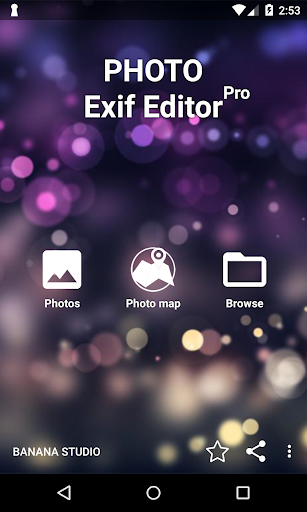
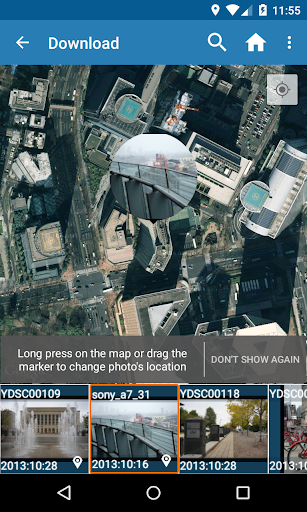
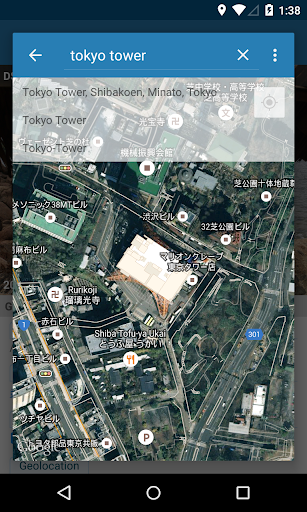
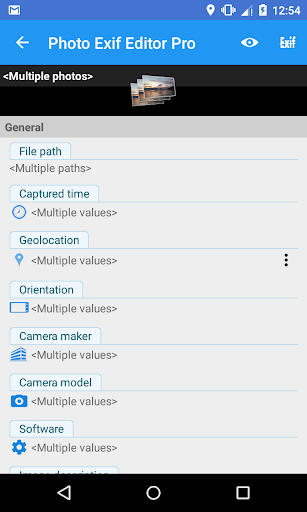
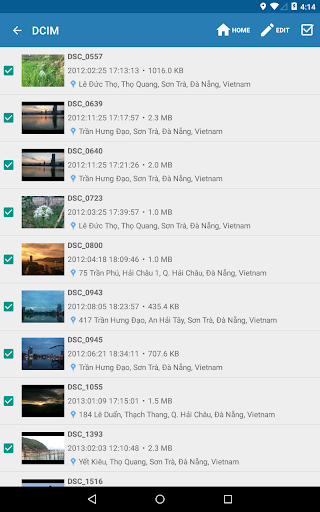
Photo Exif Editor allows you to view and modify the Exif data of your pictures. With the clear user interface, Photo Exif Editor is an easy to use tool that helps you to correct the missing information of your favorite photos. This is Pro version with: • No ad. • The ability to show the full raw data of the picture. NOTICE All the features of our app "EXIF Pro - ExifTool for Android" will be merged into this application soon. It will include the abilities to edit pictures (JPG, PNG, RAW...), audio, video, please be patient! Android 4.4 (Kitkat) does not allow non-system application to write file to the external sdcard. Please read more at: https://metactrl.com/docs/sdcard-on-kitkat/ To open Camera, long tap on the Gallery button What is the Exif data of picture? • It contains Camera settings, for example, static information such as the camera model and make, and information that varies with each image such as orientation (rotation), aperture, shutter speed, focal length, metering mode, and ISO speed information. • It also includes the GPS ( Global Positioning System) tag for holding location information where the photo was taken. What can Photo Exif Editor do? •Browse and view Exif information from Android Gallery or from Photo Exif Editor's integrated photo browser. •Add or correct the location where photo was taken using Google Maps. •Batch editing multiple photos. •Add, modify EXIF tags: - Camera model - Camera maker - Captured time - Orientation (rotation) - Aperture - Shutter speed - Focal length - ISO speed - White balance. - Much more another tags... If you're facing any problem, want new feature or have feedback to improve this application, don't hesitate to send it to us via the support email: [email protected] Permission explanation: - WiFi Permission: This application requires network connection to load the Map (Google Map). - Location permission: This is an optional permission to allow the Map to identify your current location. For example in the case of application Maps", there is a button on the map, when you taps on it, the map moves to your current location. On Android 6.0 and above, you can choose to deny this location permission.

What Photo Exif Editor Pro - Metada Is Used For

Photo Exif Editor Pro - Metada appears to be a phone app for viewing and editing EXIF metadata in photos. Based on the metadata, it is commonly used when someone wants to check camera details, correct missing information, or adjust photo tags such as capture time, orientation, and location. It can also be useful for organizing image collections where the stored metadata matters more than the visual image itself.

The app description suggests it supports browsing photos from the Android gallery or its built-in browser, and it may allow batch editing across multiple images. Because it references GPS and Google Maps, it appears to be used for adding or correcting where a photo was taken, which can matter for travel albums, archives, or imported pictures with missing location data. The listed storage permissions fit that use case, since the app needs access to read and write image files, while the network and location permissions seem tied to map-based location selection and optional current-location features.

Common uses

  • View EXIF details from photos on the device
  • Edit photo metadata such as date, camera model, or orientation
  • Add or correct GPS location information for pictures
  • Apply changes to multiple photos at once
  • Inspect raw metadata for more detailed photo information
  • Use the built-in browser or gallery access to select images
  • Work with image files stored on external storage or internal storage
Best for:
Photo metadata editing EXIF viewing Location tagging Batch photo updates Phone app

App Details

Package:
net.xnano.android.photoexifeditor.pro
Category:
Photography
Developer:
Banana Studio
Version:
2.5.0
Updated:
Nov 5, 2025
Min Android:
5.0
Age Rating:
Everyone
Contains Ads:
No
In-App Purchases:
Yes

Official Listing

  • Official listing available on Google Play
  • Package name: net.xnano.android.photoexifeditor.pro
  • Age rating: Everyone

Explore More

Browse more apps in Photography or explore the Phone hub .

Related Photography Apps

PhotoPills icon

PhotoPills

Photography PhotoPills, SL
Version 1.8.20 ⭐ 4.70 100,000+ installs

How to Download Photo Exif Editor Pro - Metada

If this app is not hosted directly on APKApps official link, then for the safest and most up-to-date version, install it from its official Google Play listing.