Dash - Meeting Room Display icon

Phone

Dash - Meeting Room Display

Business Apt Software Ltd. ⭐ 0.00 5,000+
Version 1.5.22 Everyone

Screenshots

Dash - Meeting Room Display screenshot
Permissions Explained 7 permissions requested View details

This app requests 7 permissions. The table below explains what each permission may allow and what users should review before installing.

Status Permission What it means Why it may be used User safety note
ℹ️ Review Read Calendar Events Plus Confidential Information read calendar events plus confidential information This is an Android permission or app-specific permission requested by the app. The app may use this permission for features related to its category, device support, background behavior, storage, connectivity, or system integration. Review this permission before installing, especially if it does not match the app’s expected purpose.
ℹ️ Review Add Or Modify Calendar Events And Send Email To Guests Without Owners' Knowledge add or modify calendar events and send email to guests without owners' knowledge This is an Android permission or app-specific permission requested by the app. The app may use this permission for features related to its category, device support, background behavior, storage, connectivity, or system integration. Review this permission before installing, especially if it does not match the app’s expected purpose.
ℹ️ Review Read The Contents Of Your Usb Storage read the contents of your USB storage This is an Android permission or app-specific permission requested by the app. The app may use this permission for features related to its category, device support, background behavior, storage, connectivity, or system integration. Review this permission before installing, especially if it does not match the app’s expected purpose.
ℹ️ Review Modify Or Delete The Contents Of Your Usb Storage modify or delete the contents of your USB storage This is an Android permission or app-specific permission requested by the app. The app may use this permission for features related to its category, device support, background behavior, storage, connectivity, or system integration. Review this permission before installing, especially if it does not match the app’s expected purpose.
ℹ️ Review View Wi Fi Connections view Wi-Fi connections This is an Android permission or app-specific permission requested by the app. The app may use this permission for features related to its category, device support, background behavior, storage, connectivity, or system integration. Review this permission before installing, especially if it does not match the app’s expected purpose.
ℹ️ Review View Network Connections view network connections This is an Android permission or app-specific permission requested by the app. The app may use this permission for features related to its category, device support, background behavior, storage, connectivity, or system integration. Review this permission before installing, especially if it does not match the app’s expected purpose.
ℹ️ Review Full Network Access full network access This is an Android permission or app-specific permission requested by the app. The app may use this permission for features related to its category, device support, background behavior, storage, connectivity, or system integration. Review this permission before installing, especially if it does not match the app’s expected purpose.

About Dash - Meeting Room Display

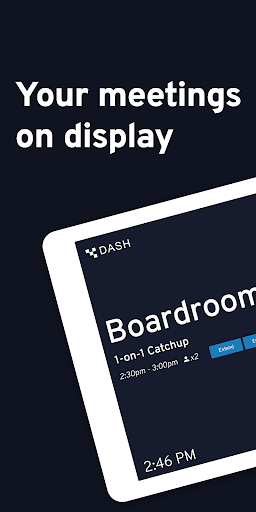
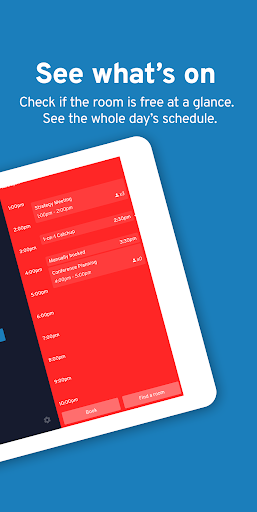
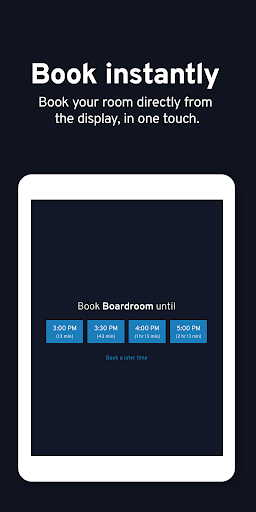
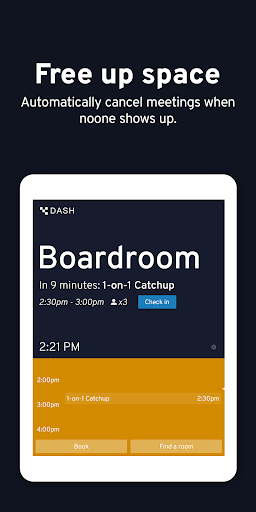
Cut time spent looking for a place to meet and maximize collaboration with Dash, the simple meeting room display and booking system. Instantly see what's on in your conference room, book it if it's free or find another space close by if it's full. Dash works with your existing hardware and software - compatible with almost any Android tablet or phone, it integrates seamlessly with Google Calendar, Google Workspace, Microsoft 365, Exchange, and more. Always safe and secure, there's no server needed as Dash reads the calendar information directly from your device. Dash is simple to set up and use. It offers you a read only view of your meetings for free, or subscribe to our business plan for the following advanced features: • Room booking - Book your meeting room directly from the display, and extend meetings or end them early if your plans change. • Meeting check-in - Require users to check in to their meeting when they arrive at the room. Meetings not checked-in to are ended after ten minutes, freeing up your valuable meeting resource. • Find free rooms - If the meeting room is booked, easily find and book a free room nearby. • Custom branding - Fully customize the colorscheme, and choose a custom background image containing your logo. If you're looking for more, a Dash Enterprise subscription lets you centrally manage and configure your Dash display devices and gain insights into your meeting room usage with room analytics. For more information, please visit us at https://www.get-dash.com

What Dash - Meeting Room Display Is Used For

Dash - Meeting Room Display appears to be a business app for turning an Android tablet or phone into a meeting room display and booking tool. Based on the metadata, it is commonly used to show what is scheduled in a conference room, help people see whether a room is available, and support quick room selection when a space is already occupied. It is aimed at shared workplace environments where teams need a simple way to coordinate meetings.

The app also appears to connect with calendar systems such as Google Calendar, Google Workspace, Microsoft 365, and Exchange, so it may be used as a front-end display for existing workplace scheduling data. Its permissions suggest it can read calendar data, manage calendar events, access storage, and use network connections, which fits a device that stays on in a meeting area and syncs with online calendars. The description also mentions optional booking, meeting check-in, room finding, and branding features, which suggests it can be used not just for display but also for room management workflows in offices and meeting spaces.

Common uses

  • Display scheduled meetings in a conference room or shared space
  • Check whether a room is free before booking it
  • Book, extend, or end meetings from the room display when enabled
  • Find another available room nearby if the current one is occupied
  • Require meeting check-in to help release unused rooms
  • Connect to workplace calendar services for room scheduling
  • Use on Android phones or tablets as a dedicated room display
Best for:
office teams meeting rooms calendar display tablet display workspace scheduling

App Details

Package:
nz.co.aptsoftware
Category:
Business
Developer:
Apt Software Ltd.
Version:
1.5.22
Updated:
Nov 30, 2025
Min Android:
5.0
Age Rating:
Everyone
Contains Ads:
No
In-App Purchases:
Yes

Official Listing

  • Official listing available on Google Play
  • Package name: nz.co.aptsoftware
  • Age rating: Everyone

Explore More

Browse more apps in Business or explore the Phone hub .

Related Business Apps

LinkedIn: Community & Network icon

LinkedIn: Community & Network

Business LinkedIn

Smarter career moves start here. AI job alerts, insights & the right tools.

Version 4.1.1185.1 90.3 MB ⭐ 4.10 1,000,000,000+ installs
Zoom Workplace icon

Zoom Workplace

Business zoom.com
Version Varies with device 181.9 MB ⭐ 4.10 1,000,000,000+ installs
Microsoft Teams icon

Microsoft Teams

Business Microsoft Corporation

Chat, meet, and collaborate to achieve more together, all in one place on Teams

Version 1416/1.0.0.2026044202 346.8 MB ⭐ 4.70 500,000,000+ installs
Adobe Scan AI PDF Scanner, OCR icon

Adobe Scan AI PDF Scanner, OCR

Business Adobe

Scan and save to multiple files types like PDF, Microsoft Word, JPEG and more.

Version Varies with device 79.3 MB ⭐ 4.70 100,000,000+ installs
File Commander Manager & Vault icon

File Commander Manager & Vault

Business MobiSystems

File manager | Explorer for cloud storage files & folders | Hide private photos.

Version Varies with device 23.1 MB ⭐ 4.20 100,000,000+ installs

How to Download Dash - Meeting Room Display

If this app is not hosted directly on APKApps official link, then for the safest and most up-to-date version, install it from its official Google Play listing.