CPT® QuickRef icon

Phone

CPT® QuickRef

Medical American Medical Association Apps ⭐ 2.50 10,000+
Version Varies with device Everyone

Screenshots

CPT® QuickRef screenshot
Permissions Explained 10 permissions requested View details

This app requests 10 permissions. The table below explains what each permission may allow and what users should review before installing.

Status Permission What it means Why it may be used User safety note
ℹ️ Review Read The Contents Of Your Usb Storage read the contents of your USB storage This is an Android permission or app-specific permission requested by the app. The app may use this permission for features related to its category, device support, background behavior, storage, connectivity, or system integration. Review this permission before installing, especially if it does not match the app’s expected purpose.
ℹ️ Review Modify Or Delete The Contents Of Your Usb Storage modify or delete the contents of your USB storage This is an Android permission or app-specific permission requested by the app. The app may use this permission for features related to its category, device support, background behavior, storage, connectivity, or system integration. Review this permission before installing, especially if it does not match the app’s expected purpose.
ℹ️ Review Take Pictures And Videos take pictures and videos This is an Android permission or app-specific permission requested by the app. The app may use this permission for features related to its category, device support, background behavior, storage, connectivity, or system integration. Review this permission before installing, especially if it does not match the app’s expected purpose.
ℹ️ Review View Network Connections view network connections This is an Android permission or app-specific permission requested by the app. The app may use this permission for features related to its category, device support, background behavior, storage, connectivity, or system integration. Review this permission before installing, especially if it does not match the app’s expected purpose.
ℹ️ Review Full Network Access full network access This is an Android permission or app-specific permission requested by the app. The app may use this permission for features related to its category, device support, background behavior, storage, connectivity, or system integration. Review this permission before installing, especially if it does not match the app’s expected purpose.
ℹ️ Review Run At Startup run at startup This is an Android permission or app-specific permission requested by the app. The app may use this permission for features related to its category, device support, background behavior, storage, connectivity, or system integration. Review this permission before installing, especially if it does not match the app’s expected purpose.
ℹ️ Review Control Vibration control vibration This is an Android permission or app-specific permission requested by the app. The app may use this permission for features related to its category, device support, background behavior, storage, connectivity, or system integration. Review this permission before installing, especially if it does not match the app’s expected purpose.
ℹ️ Review Prevent Device From Sleeping prevent device from sleeping This is an Android permission or app-specific permission requested by the app. The app may use this permission for features related to its category, device support, background behavior, storage, connectivity, or system integration. Review this permission before installing, especially if it does not match the app’s expected purpose.
ℹ️ Review Read Google Service Configuration read Google service configuration This is an Android permission or app-specific permission requested by the app. The app may use this permission for features related to its category, device support, background behavior, storage, connectivity, or system integration. Review this permission before installing, especially if it does not match the app’s expected purpose.
ℹ️ Review Receive Data From Internet receive data from Internet This is an Android permission or app-specific permission requested by the app. The app may use this permission for features related to its category, device support, background behavior, storage, connectivity, or system integration. Review this permission before installing, especially if it does not match the app’s expected purpose.

About CPT® QuickRef

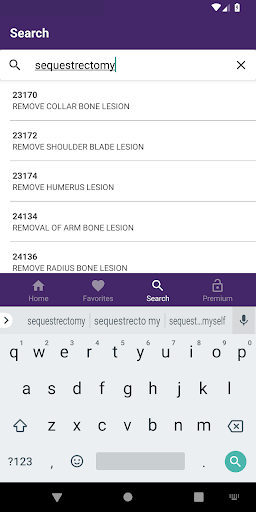
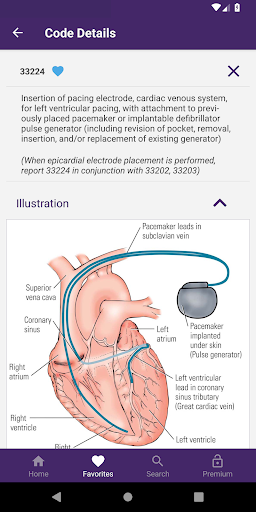
CPT® QuickRef from the American Medical Association The CPT QuickRef app puts all the coding and billing tools that you need in the palm of your hand. Developed by the American Medical Association (AMA), this on-the-go reference guide quickly helps you determine the appropriate Current Procedural Terminology (CPT®) codes to use for accurate billing. (This app provides suggested codes. Final code selection remains the responsibility of the individual user.) CPT QuickRef is the only official mobile app from the AMA – the source of the CPT codeset, and experts to provide authoritative information about CPT codes and proper use. E/M codes are the most frequently used codes and arguably the most difficult to assign. The E/M Wizard (included in the free trial and with any single or multiyear Coding & Billing Pack purchase) will help physicians and qualified health care professionals select the right code according to AMA and CMS coding guidelines The app includes a 14-day trial of full access, after which in-app purchase or activation is required. Choose a single year Coding and Billing Pack, • Updated E/M Wizard – New 2021 guidelines for coding office & outpatient visits by time and medical decision making (coming in October) • The latest information — Receive automatic when new relative value units (RVUs) and proprietary laboratory analysis (PLA) codes are released or when technical corrections are made to 2021 CPT codes • Favorites — Select the codes you use most and save them to your favorites list • Facility and non-facility RVUs — Use federal data on facility and non-facility work and practice expense values • GPCIs — Set your region’s geographic practice cost index to calculate accurate Medicare payment for each procedure • Global days — Reference the number of global days CMS assigns to a given procedure • Color illustrations — Better understand complex procedures with 200+ procedural illustrations • Clear references to CPT® Assistant articles — View article titles and tap for direct access with the CPT Assistant Archive add-on • Over 4,400 Vignettes – understand exactly what procedures each code represents with typical patient and service descriptions

What CPT® QuickRef Is Used For

CPT® QuickRef appears to be a medical reference app for looking up Current Procedural Terminology (CPT®) codes and related billing information on a phone. Based on the metadata, it is commonly used by physicians, coders, and other health care professionals who need a quick way to identify suggested procedure codes, review code details, and check supporting references while working away from a desk.

The app also seems oriented toward coding and billing workflows. Its features mention help with E/M code selection, code favorites, RVUs, GPCIs, global days, and color illustrations, which suggests it may be useful when comparing procedures, estimating payment-related details, and reviewing coding guidance tied to AMA and CMS rules. Because it can access network resources and includes update-related functions, it likely supports reference lookup and content updates rather than just static offline notes. The storage permissions may indicate it can save app data or downloaded content on the device.

Common uses

  • Look up CPT® procedure codes during clinical or billing work
  • Review suggested codes when preparing claims or documentation
  • Use the E/M Wizard to compare evaluation and management code options
  • Save frequently used codes in a favorites list for faster access
  • Check RVUs, GPCIs, and global days for payment-related reference
  • Open code vignettes and illustrations to better understand procedure context
  • Use on a phone for quick reference away from a workstation
Best for:
medical coders billing staff physicians health care professionals phone app

App Details

Package:
org.ama_assn.cptquickref
Category:
Medical
Developer:
American Medical Association Apps
Version:
Varies with device
Min Android:
Varies with device
Age Rating:
Everyone
Contains Ads:
No
In-App Purchases:
Yes

Official Listing

  • Official listing available on Google Play
  • Package name: org.ama_assn.cptquickref
  • Age rating: Everyone

Explore More

Browse more apps in Medical or explore the Phone hub .

Related Medical Apps

My Heart: Blood Pressure Log icon

My Heart: Blood Pressure Log

Medical Klimaszewski Szymon

Your portable blood pressure tracker. Record, monitor, and analyze BP anytime.

Version Google-7.4.0 11.8 MB ⭐ 4.20 10,000,000+ installs
Meds & Pill Reminder MyTherapy icon

Meds & Pill Reminder MyTherapy

Medical MyTherapy

Our health app helps with a medication reminder, pill counter & mood tracker

Version 3.259.3 85.7 MB ⭐ 4.60 5,000,000+ installs
Anatomy 3D Atlas icon

Anatomy 3D Atlas

Medical Catfish Animation Studio

Learn human anatomy interactively

Version 7.0.6 10.7 MB ⭐ 4.20 5,000,000+ installs

How to Download CPT® QuickRef

If this app is not hosted directly on APKApps official link, then for the safest and most up-to-date version, install it from its official Google Play listing.