Voice & Transcribe - QuickVox icon

Phone

Voice & Transcribe - QuickVox

Productivity B1 Group Software ⭐ 4.20 50,000+
Version 1.0.60 Everyone

Screenshots

Voice & Transcribe - QuickVox screenshot
Permissions Explained 10 permissions requested View details

This app requests 10 permissions. The table below explains what each permission may allow and what users should review before installing.

Status Permission What it means Why it may be used User safety note
ℹ️ Review Read The Contents Of Your Usb Storage read the contents of your USB storage This is an Android permission or app-specific permission requested by the app. The app may use this permission for features related to its category, device support, background behavior, storage, connectivity, or system integration. Review this permission before installing, especially if it does not match the app’s expected purpose.
ℹ️ Review Modify Or Delete The Contents Of Your Usb Storage modify or delete the contents of your USB storage This is an Android permission or app-specific permission requested by the app. The app may use this permission for features related to its category, device support, background behavior, storage, connectivity, or system integration. Review this permission before installing, especially if it does not match the app’s expected purpose.
ℹ️ Review Record Audio record audio This is an Android permission or app-specific permission requested by the app. The app may use this permission for features related to its category, device support, background behavior, storage, connectivity, or system integration. Review this permission before installing, especially if it does not match the app’s expected purpose.
ℹ️ Review View Network Connections view network connections This is an Android permission or app-specific permission requested by the app. The app may use this permission for features related to its category, device support, background behavior, storage, connectivity, or system integration. Review this permission before installing, especially if it does not match the app’s expected purpose.
ℹ️ Review Full Network Access full network access This is an Android permission or app-specific permission requested by the app. The app may use this permission for features related to its category, device support, background behavior, storage, connectivity, or system integration. Review this permission before installing, especially if it does not match the app’s expected purpose.
ℹ️ Review Control Near Field Communication control Near Field Communication This is an Android permission or app-specific permission requested by the app. The app may use this permission for features related to its category, device support, background behavior, storage, connectivity, or system integration. Review this permission before installing, especially if it does not match the app’s expected purpose.
ℹ️ Review Run At Startup run at startup This is an Android permission or app-specific permission requested by the app. The app may use this permission for features related to its category, device support, background behavior, storage, connectivity, or system integration. Review this permission before installing, especially if it does not match the app’s expected purpose.
ℹ️ Review Control Vibration control vibration This is an Android permission or app-specific permission requested by the app. The app may use this permission for features related to its category, device support, background behavior, storage, connectivity, or system integration. Review this permission before installing, especially if it does not match the app’s expected purpose.
ℹ️ Review Prevent Device From Sleeping prevent device from sleeping This is an Android permission or app-specific permission requested by the app. The app may use this permission for features related to its category, device support, background behavior, storage, connectivity, or system integration. Review this permission before installing, especially if it does not match the app’s expected purpose.
ℹ️ Review Read Google Service Configuration read Google service configuration This is an Android permission or app-specific permission requested by the app. The app may use this permission for features related to its category, device support, background behavior, storage, connectivity, or system integration. Review this permission before installing, especially if it does not match the app’s expected purpose.

About Voice & Transcribe - QuickVox

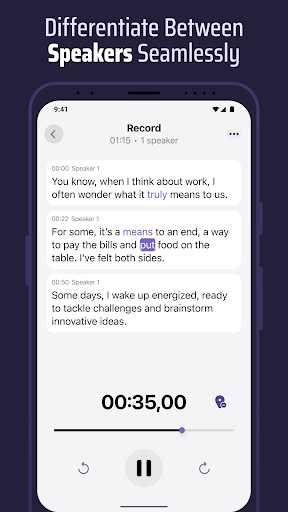
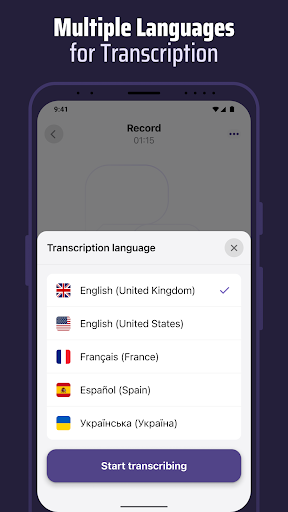
Experience powerful Speech to Text performance with Voice & Transcribe - QuickVox, your intelligent tool for Live Transcribe, voice recorder, and voice memo management. Easily transcribe audio to text from conversations, meetings, or calls with unmatched accuracy and clarity. Enjoy smooth voice recording, voice to text, and dictation across multiple languages in real time. QuickVox transforms how you capture, store, and understand information. Record high‑quality audio for any purpose — from interviews and brainstorming sessions to personal notes — and convert it instantly into clear text. The built‑in transcription engine is powered by advanced AI for accuracy, context awareness, and natural formatting. Key Features: - Live Transcribe: Real‑time voice to text conversion with precise results. - Voice Recorder: Crystal‑clear voice recording for calls, meetings, and memos. - Transcribe Audio to Text: Transform recordings into editable text in seconds. - Speech Recognition: Highly accurate recognition powered by intelligent AI. - Multi‑Language Translation: Transcribe in one language and translate instantly. - Speaker Identification: Detect and separate voices in multi‑person conversations. - Offline Transcription: Convert audio recording to text even without a connection. - Audio Editing: Trim, refine, and enhance recordings before transcription. Organize your voice memos and transcriptions effortlessly — everything stays accessible in one place. Whether for business, studies, or creative projects, QuickVox helps you keep track of every important word and idea. Elevate your productivity with seamless Speech to Text tools and real‑time Live Transcribe performance. Record with a professional‑grade voice recorder and instantly transcribe audio to text for instant clarity. Transform any voice memo, voice recording, or dictation into actionable transcription with Voice & Transcribe - QuickVox — your smart companion for accurate and effortless text creation.

What Voice & Transcribe - QuickVox Is Used For

Voice & Transcribe - QuickVox appears to be a productivity app focused on speech-to-text tasks on Android phones. Based on the metadata, it may be used to record speech, turn spoken audio into written text, and manage voice memos in one place. This kind of app is commonly helpful for people who want a faster way to capture notes from conversations, meetings, interviews, lectures, or personal reminders without typing everything manually.

The listed permissions suggest the app can record audio, store files on device storage, connect to the internet, and run at startup. That fits a workflow where recordings are saved locally and then processed into transcripts, possibly with cloud-backed features or updates. The metadata also mentions offline transcription, multi-language support, speaker identification, and audio editing, so it may be used for organizing spoken content and refining recordings before or after transcription. Since it is a phone app, it seems aimed at everyday mobile note-taking and on-the-go documentation rather than large-screen or TV use.

Common uses

  • Record voice memos and spoken notes on a phone
  • Convert meetings, interviews, or calls into text
  • Capture dictation for later editing or review
  • Organize recordings and transcripts in one place
  • Work with audio files stored on device storage
  • Use offline transcription when a connection is not available
  • Review multi-speaker conversations with voice separation
Best for:
students professionals note takers voice memos phone app

App Details

Package:
org.b1.quickvox
Category:
Productivity
Developer:
B1 Group Software
Version:
1.0.60
Updated:
Mar 13, 2026
Min Android:
7.0
Age Rating:
Everyone
Contains Ads:
Yes
In-App Purchases:
Yes

Official Listing

  • Official listing available on Google Play
  • Package name: org.b1.quickvox
  • Age rating: Everyone

Explore More

Browse more apps in Productivity or explore the Phone hub .

Related Productivity Apps

How to Download Voice & Transcribe - QuickVox

If this app is not hosted directly on APKApps official link, then for the safest and most up-to-date version, install it from its official Google Play listing.