BedrockTogether (Pro) icon

Phone

BedrockTogether (Pro)

Tools BedrockTogether ⭐ 4.70 10,000+
Version 1.26.0 Everyone

Screenshots

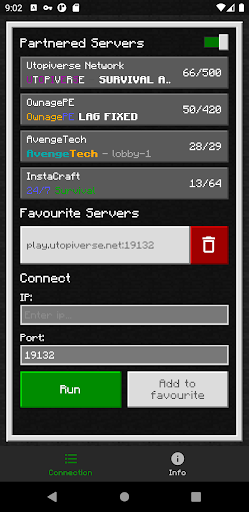
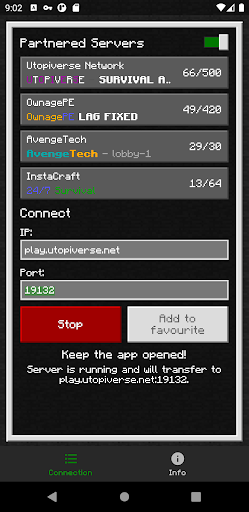
BedrockTogether (Pro) screenshot
Permissions Explained 5 permissions requested View details

This app requests 5 permissions. The table below explains what each permission may allow and what users should review before installing.

Status Permission What it means Why it may be used User safety note
ℹ️ Review View Network Connections view network connections This is an Android permission or app-specific permission requested by the app. The app may use this permission for features related to its category, device support, background behavior, storage, connectivity, or system integration. Review this permission before installing, especially if it does not match the app’s expected purpose.
ℹ️ Review Full Network Access full network access This is an Android permission or app-specific permission requested by the app. The app may use this permission for features related to its category, device support, background behavior, storage, connectivity, or system integration. Review this permission before installing, especially if it does not match the app’s expected purpose.
ℹ️ Review Run At Startup run at startup This is an Android permission or app-specific permission requested by the app. The app may use this permission for features related to its category, device support, background behavior, storage, connectivity, or system integration. Review this permission before installing, especially if it does not match the app’s expected purpose.
ℹ️ Review Prevent Device From Sleeping prevent device from sleeping This is an Android permission or app-specific permission requested by the app. The app may use this permission for features related to its category, device support, background behavior, storage, connectivity, or system integration. Review this permission before installing, especially if it does not match the app’s expected purpose.
ℹ️ Review Google Play License Check Google Play license check This is an Android permission or app-specific permission requested by the app. The app may use this permission for features related to its category, device support, background behavior, storage, connectivity, or system integration. Review this permission before installing, especially if it does not match the app’s expected purpose.

About BedrockTogether (Pro)

Ad-free version of BedrockTogether. App allows any Bedrock Edition server to show up as a LAN server on Xbox or PlayStation clients running Minecraft Bedrock Edition and permits a simple connection without the use of DNS rerouting. Realms and compatibility with Nintendo Switch are currently not supported while using Bedrock Together. How to connect: 1. Enter your desired server IP and port. 2. Click the “Run” button. 3. Open game and navigate to the “Friends” tab. 4. Connect to the server using the LAN tab. 5. Close the BedrockTogether app after the client has joined the server. Troubleshooting: Make sure that 1. Your gaming console and mobile device are connected to the same LAN network. If you find any bugs, join the discord to report them in the #bugs channel: https://discord.gg/3NxZEt8 or telegram: t.me/extollite The application icon made by nataliagemel.pl Disclaimer: BedrockTogether is a third-party application. BedrockTogether is not an endorsed extension of or affiliated with Minecraft, its creators or proprietors, Mojang AB, Microsoft, Xbox, or Xbox Live in any way.

What BedrockTogether (Pro) Is Used For

BedrockTogether (Pro) appears to be a helper tool for people who want to connect to Minecraft Bedrock Edition servers from a console on the same local network. Based on the metadata, it may make a Bedrock server appear as a LAN session on Xbox or PlayStation, which can simplify joining a custom server without changing DNS settings. This places the app in a utility-style role rather than a gameplay role.

The app’s instructions suggest a phone-based workflow: enter a server IP and port, start the connection, then open Minecraft and join through the Friends or LAN area. The listed permissions, such as full network access and view network connections, fit an app that needs to communicate over your network and keep the connection active during setup. The metadata also notes that Realms and Nintendo Switch are not supported in this mode, so it seems aimed at specific Bedrock multiplayer setups rather than every device or server type. It may be most relevant for users who manage their own server connections or play on a console while coordinating with a mobile device on the same LAN.

Common uses

  • May be used to present a Bedrock server as a LAN option on supported consoles.
  • Helps connect a phone and console on the same local network for multiplayer setup.
  • Uses IP and port entry to point the app at a specific server.
  • May be useful for Xbox or PlayStation players joining Bedrock servers.
  • Appears designed for quick launch-and-connect use rather than long-term background tasks.
  • Does not appear to support Realms or Nintendo Switch in this mode.
  • Network permissions suggest it needs access to local and internet connections to work.
Best for:
console players bedrock server users local network setup phone app multiplayer helper

App Details

Package:
pl.extollite.bedrocktogetherapppro
Category:
Tools
Developer:
BedrockTogether
Version:
1.26.0
Updated:
Feb 2, 2026
Min Android:
8.0
Age Rating:
Everyone
Contains Ads:
No
In-App Purchases:
No

Official Listing

  • Official listing available on Google Play
  • Package name: pl.extollite.bedrocktogetherapppro
  • Age rating: Everyone

Explore More

Browse more apps in Tools or explore the Phone hub .

Related Tools Apps

UDisc Disc Golf App icon

UDisc Disc Golf App

Sports UDisc LLC

Keep score, find disc golf courses, track your stats, measure throws, and more!

Version Varies with device 33.0 MB ⭐ 4.80 1,000,000+ installs
Six Flags icon

Six Flags

Travel & Local Six Flags Entertainment Corp.

The reimagined Six Flags app allows you to discover our parks like never before.

Version 4.13.21 13.4 MB ⭐ 4.32 1,000,000+ installs

How to Download BedrockTogether (Pro)

If this app is not hosted directly on APKApps official link, then for the safest and most up-to-date version, install it from its official Google Play listing.