Remote Control for RokuTV icon

Phone

Remote Control for RokuTV

Tools EVOLLY.APP ⭐ 4.30 5,000,000+
Version 1.4.5 Everyone

Screenshots

Remote Control for RokuTV screenshot
Permissions Explained 9 permissions requested View details

This app requests 9 permissions. The table below explains what each permission may allow and what users should review before installing.

Status Permission What it means Why it may be used User safety note
ℹ️ Review Read The Contents Of Your Usb Storage read the contents of your USB storage This is an Android permission or app-specific permission requested by the app. The app may use this permission for features related to its category, device support, background behavior, storage, connectivity, or system integration. Review this permission before installing, especially if it does not match the app’s expected purpose.
ℹ️ Review Modify Or Delete The Contents Of Your Usb Storage modify or delete the contents of your USB storage This is an Android permission or app-specific permission requested by the app. The app may use this permission for features related to its category, device support, background behavior, storage, connectivity, or system integration. Review this permission before installing, especially if it does not match the app’s expected purpose.
ℹ️ Review Take Pictures And Videos take pictures and videos This is an Android permission or app-specific permission requested by the app. The app may use this permission for features related to its category, device support, background behavior, storage, connectivity, or system integration. Review this permission before installing, especially if it does not match the app’s expected purpose.
ℹ️ Review View Wi Fi Connections view Wi-Fi connections This is an Android permission or app-specific permission requested by the app. The app may use this permission for features related to its category, device support, background behavior, storage, connectivity, or system integration. Review this permission before installing, especially if it does not match the app’s expected purpose.
ℹ️ Review View Network Connections view network connections This is an Android permission or app-specific permission requested by the app. The app may use this permission for features related to its category, device support, background behavior, storage, connectivity, or system integration. Review this permission before installing, especially if it does not match the app’s expected purpose.
ℹ️ Review Allow Wi Fi Multicast Reception allow Wi-Fi Multicast reception This is an Android permission or app-specific permission requested by the app. The app may use this permission for features related to its category, device support, background behavior, storage, connectivity, or system integration. Review this permission before installing, especially if it does not match the app’s expected purpose.
ℹ️ Review Full Network Access full network access This is an Android permission or app-specific permission requested by the app. The app may use this permission for features related to its category, device support, background behavior, storage, connectivity, or system integration. Review this permission before installing, especially if it does not match the app’s expected purpose.
ℹ️ Review Control Vibration control vibration This is an Android permission or app-specific permission requested by the app. The app may use this permission for features related to its category, device support, background behavior, storage, connectivity, or system integration. Review this permission before installing, especially if it does not match the app’s expected purpose.
ℹ️ Review Prevent Device From Sleeping prevent device from sleeping This is an Android permission or app-specific permission requested by the app. The app may use this permission for features related to its category, device support, background behavior, storage, connectivity, or system integration. Review this permission before installing, especially if it does not match the app’s expected purpose.

About Remote Control for RokuTV

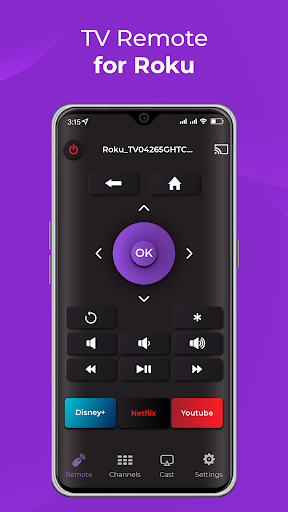
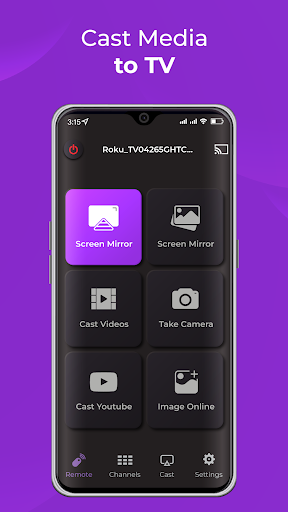
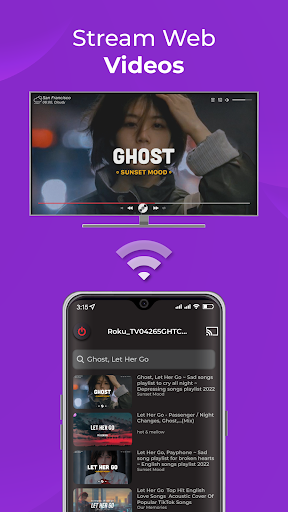
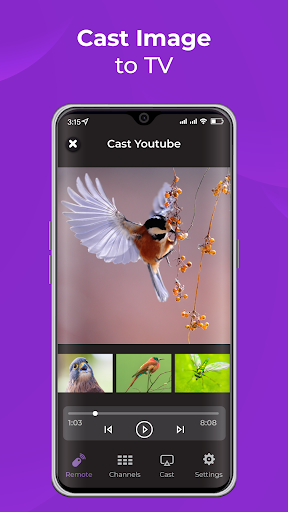
The mobile remote app for RokuTV is a convenient and user-friendly application that enables users to control their RokuTV using their smartphone or tablet. With this app, users can effortlessly navigate their RokuTV interface, search for content, and launch their favorite streaming services from their mobile device. The app also features a virtual keyboard for easy text input and a voice search function for hands-free control. Whether you're across the room or across the house, the mobile remote app for RokuTV provides easy access to the power of your RokuTV at your fingertips. Key features of the app include: - Automatic detection of RokuTV and RokuTV Player - Compatibility with all RokuTV versions - A spacious touchpad for effortless menu and content navigation - Ability to launch channels directly from the app - Fast and user-friendly keyboard for easy text input. This application is not an official product of Roku, Inc.

What Remote Control for RokuTV Is Used For

Remote Control for RokuTV appears to be a phone-based remote app for controlling a Roku TV or Roku TV player from an Android device. Based on the metadata, people may use it to navigate menus, open streaming channels, and search for content without using the physical remote. It is described as supporting automatic device detection, which suggests it is intended for nearby Roku devices on the same network.

The app also seems geared toward everyday living-room use, especially when text entry is needed. Its virtual keyboard and voice search features may make it easier to type account names, search terms, or app titles on the TV. The listed network permissions fit an app that discovers and connects to devices over Wi‑Fi, while storage access may relate to app operation or local data handling. Since this is a tools app for phones, it is most relevant when you want remote-style control from a smartphone or tablet rather than on the TV itself.

Common uses

  • Control a Roku TV from a phone or tablet
  • Navigate menus with a touchpad-style interface
  • Search for shows, apps, or channels from the mobile device
  • Use the virtual keyboard for easier text entry
  • Try voice search for hands-free input
  • Launch streaming channels directly from the app
  • Use it as a replacement when the physical remote is out of reach
Best for:
Roku TV owners Phone remote control Living room navigation Voice and keyboard input

App Details

Package:
remote.control.for.roku
Category:
Tools
Developer:
EVOLLY.APP
Version:
1.4.5
Updated:
Oct 12, 2025
Min Android:
6.0
Age Rating:
Everyone
Contains Ads:
Yes
In-App Purchases:
Yes

Official Listing

  • Official listing available on Google Play
  • Package name: remote.control.for.roku
  • Age rating: Everyone

Explore More

Browse more apps in Tools or explore the Phone hub .

Related Tools Apps

Roku icon

Roku

Entertainment Roku, Inc. & its affiliates

Turn your mobile device into the ultimate streaming companion

Version 10.2.1.3458848 39.2 MB ⭐ 4.70 50,000,000+ installs
Smart Home icon

Smart Home

House & Home Roku, Inc. & its affiliates

Set up your devices, customize settings, and monitor your home—from anywhere

Version 2.7.2.249 152.0 MB ⭐ 4.33 1,000,000+ installs
Nest icon

Nest

Lifestyle Nest Labs Inc.

Your home in your hand

Version 5.76.0.8 79.4 MB ⭐ 3.85 10,000,000+ installs

How to Download Remote Control for RokuTV

If this app is not hosted directly on APKApps official link, then for the safest and most up-to-date version, install it from its official Google Play listing.