IPTV Pro icon

Phone

IPTV Pro

Video Players & Editors Alexandr Sofronov ⭐ 4.40 500,000+
Version Varies with device Everyone

Screenshots

IPTV Pro screenshot
IPTV Pro screenshot
IPTV Pro screenshot
IPTV Pro screenshot
IPTV Pro screenshot
Permissions Explained 10 permissions requested View details

This app requests 10 permissions. The table below explains what each permission may allow and what users should review before installing.

Status Permission What it means Why it may be used User safety note
ℹ️ Review Read The Contents Of Your Usb Storage read the contents of your USB storage This is an Android permission or app-specific permission requested by the app. The app may use this permission for features related to its category, device support, background behavior, storage, connectivity, or system integration. Review this permission before installing, especially if it does not match the app’s expected purpose.
ℹ️ Review Modify Or Delete The Contents Of Your Usb Storage modify or delete the contents of your USB storage This is an Android permission or app-specific permission requested by the app. The app may use this permission for features related to its category, device support, background behavior, storage, connectivity, or system integration. Review this permission before installing, especially if it does not match the app’s expected purpose.
ℹ️ Review View Wi Fi Connections view Wi-Fi connections This is an Android permission or app-specific permission requested by the app. The app may use this permission for features related to its category, device support, background behavior, storage, connectivity, or system integration. Review this permission before installing, especially if it does not match the app’s expected purpose.
ℹ️ Review View Network Connections view network connections This is an Android permission or app-specific permission requested by the app. The app may use this permission for features related to its category, device support, background behavior, storage, connectivity, or system integration. Review this permission before installing, especially if it does not match the app’s expected purpose.
ℹ️ Review Allow Wi Fi Multicast Reception allow Wi-Fi Multicast reception This is an Android permission or app-specific permission requested by the app. The app may use this permission for features related to its category, device support, background behavior, storage, connectivity, or system integration. Review this permission before installing, especially if it does not match the app’s expected purpose.
ℹ️ Review Full Network Access full network access This is an Android permission or app-specific permission requested by the app. The app may use this permission for features related to its category, device support, background behavior, storage, connectivity, or system integration. Review this permission before installing, especially if it does not match the app’s expected purpose.
ℹ️ Review Run At Startup run at startup This is an Android permission or app-specific permission requested by the app. The app may use this permission for features related to its category, device support, background behavior, storage, connectivity, or system integration. Review this permission before installing, especially if it does not match the app’s expected purpose.
ℹ️ Review Draw Over Other Apps draw over other apps This is an Android permission or app-specific permission requested by the app. The app may use this permission for features related to its category, device support, background behavior, storage, connectivity, or system integration. Review this permission before installing, especially if it does not match the app’s expected purpose.
ℹ️ Review Prevent Device From Sleeping prevent device from sleeping This is an Android permission or app-specific permission requested by the app. The app may use this permission for features related to its category, device support, background behavior, storage, connectivity, or system integration. Review this permission before installing, especially if it does not match the app’s expected purpose.
ℹ️ Review Google Play License Check Google Play license check This is an Android permission or app-specific permission requested by the app. The app may use this permission for features related to its category, device support, background behavior, storage, connectivity, or system integration. Review this permission before installing, especially if it does not match the app’s expected purpose.

About IPTV Pro

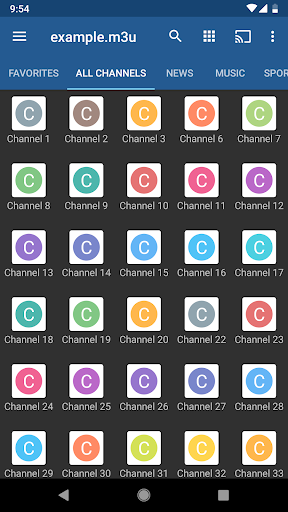
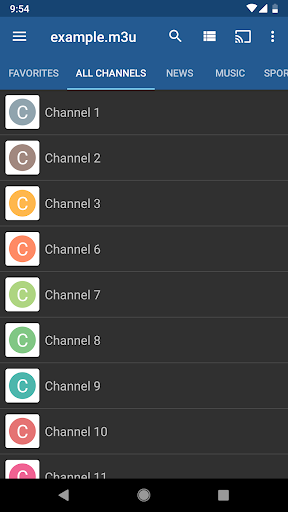
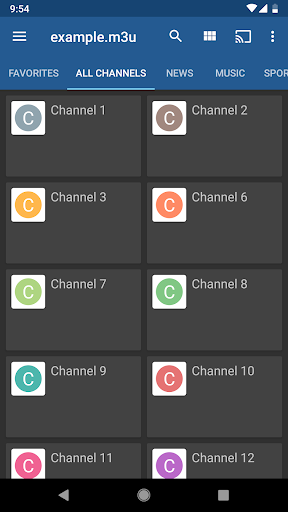
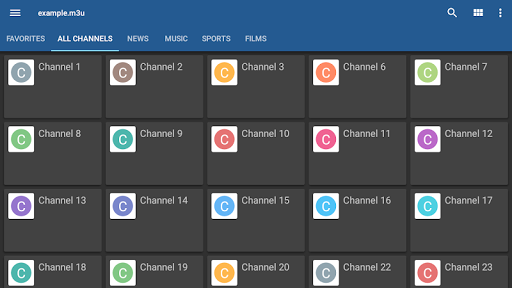
This is the paid version of IPTV app. Pro features (comparing with free version): ✔ Ad free ✔ Start app on device boot option, useful for set-top boxes. ✔ Auto-play last channel option ✔ Extended playlists history Watch IPTV from your Internet service provider or free live TV channels from any other source in the web. Features: ✔ M3U and XSPF playlists support ✔ Playlists history ✔ Playing multicast streams with UDP proxy (proxy need to be installed in your LAN) ✔ Grid, list or tile view of TV channels ✔ EPG support in XMLTV and JTV formats ✔ Internal and external video players ✔ Parental control This app doesn't contain any built-in channels, you should have your playlist with TV channels to use this app. For multicast streams it's recommended to use UDP proxy: * for Windows: download and install UDP-to-HTTP proxy from http://borpas.info/download/UdpProxy.exe or check the corresponding option while installing IP-TV Player http://borpas.info/iptvplayer * for Linux: install udpxy (http://udpxy.com/index-en.html, http://sourceforge.net/projects/udpxy/) * the best solution would be installing udpxy on your WLAN router, this can be done for DD-WRT (http://www.dd-wrt.com) and OpenWrt (https://openwrt.org) firmware * some WLAN routers have built-in udpxy in manufacturer's firmware Please join translations project at https://crowdin.com/project/iptv/invite if you want to add new or improve existing translation. Disclaimer: - IPTV Pro app doesn't supply or include any media content - Users must provide their own content - We have no affiliation with any content providers and can't be responsible for the content provided by third parties - We do not endorse the streaming of any copyright protected material without the permission of the copyright holder

What IPTV Pro Is Used For

IPTV Pro is a phone app for watching IPTV and live TV streams from playlists that the user provides. Based on the metadata, it appears to be aimed at people who already have access to channel lists from an internet TV service or other playlist sources, rather than an app with built-in channels. Its supported formats include M3U and XSPF, and it also mentions EPG support, so it may be used as a simple TV guide and channel browser alongside playback.

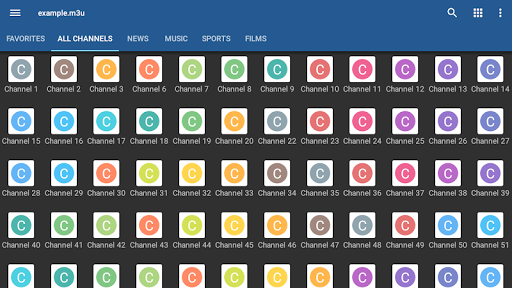
The app seems suited for everyday phone use as well as set-top box style setups, since it includes options such as launching at boot, autoplaying the last channel, and different channel layouts like grid, list, or tile views. The network-related permissions and multicast/UDP proxy notes suggest it may be used for streaming live channels over a local network or from providers that use multicast delivery. It also mentions internal and external video players plus parental control, which may make it useful for managing and viewing live TV in a more organized way.

Common uses include loading a personal channel playlist, checking program listings, switching between channels, and keeping playback ready on a device that stays connected to a TV or home network.

Common uses

  • Load and organize IPTV playlists from external sources
  • Watch live TV streams on a phone or set-top box
  • Browse channels in grid, list, or tile layouts
  • Use EPG data to view program schedules
  • Resume the last channel or start automatically on boot
  • Play multicast streams when paired with a UDP proxy
  • Apply parental control for channel access management
Best for:
IPTV viewers Live TV playlists Set-top box use Phone app Home network streaming

App Details

Package:
ru.iptvremote.android.iptv.pro
Developer:
Alexandr Sofronov
Version:
Varies with device
Updated:
Dec 30, 2025
Min Android:
Varies with device
Age Rating:
Everyone
Contains Ads:
No
In-App Purchases:
No

Official Listing

  • Official listing available on Google Play
  • Package name: ru.iptvremote.android.iptv.pro
  • Age rating: Everyone

Explore More

Browse more apps in Video Players & Editors or explore the Phone hub .

Related Video Players & Editors Apps

CapCut - Video Editor icon

CapCut - Video Editor

Video Players & Editors Bytedance Pte. Ltd.

Popular short-form video editor for Android creators.

Version 17.2.0 78.2 MB ⭐ 3.40 1,000,000,000+ installs
Kwai - Cool Video & Social Fun icon

Kwai - Cool Video & Social Fun

Video Players & Editors Joyo Technology Pte Ltd

Watch and share trending short videos, meet new friends and have fun.

Version 13.2.40.544103 239.5 MB ⭐ 4.00 500,000,000+ installs
KineMaster - Video Editor icon

KineMaster - Video Editor

Video Players & Editors KineMaster, Video Editor Experts Group

KineMaster, Your Ultimate Video Editor!

Version 8.1.4.36338.GP 148.4 MB ⭐ 4.40 500,000,000+ installs
VivaVideo - Video Cut & Editor icon

VivaVideo - Video Cut & Editor

Video Players & Editors QuVideo Inc. Video Editor & Video Maker App

Sora 2 Compatible Video Editor: Powerful AI Auto-Edits & Trendy Filters in 60s

Version 9.34.0 138.6 MB ⭐ 4.30 500,000,000+ installs
VLC for Android icon

VLC for Android

Video Players & Editors Videolabs

Popular open-source media player for Android.

Version Varies with device 27.4 MB ⭐ 4.10 100M+ installs
Screen Recorder - XRecorder icon

Screen Recorder - XRecorder

Video Players & Editors InShot Inc.

Screen recorder with audio to take live videos & Screenshot in high quality!

Version 2.5.0.1 29.4 MB ⭐ 4.70 100,000,000+ installs

How to Download IPTV Pro

If this app is not hosted directly on APKApps official link, then for the safest and most up-to-date version, install it from its official Google Play listing.