AI Keyboard: Writer, Grammar icon

Phone

AI Keyboard: Writer, Grammar

Productivity Starnest JSC ⭐ 4.30 1,000,000+
Version 167.0 Everyone

Screenshots

AI Keyboard: Writer, Grammar screenshot
Permissions Explained 9 permissions requested View details

This app requests 9 permissions. The table below explains what each permission may allow and what users should review before installing.

Status Permission What it means Why it may be used User safety note
ℹ️ Review Read The Contents Of Your Usb Storage read the contents of your USB storage This is an Android permission or app-specific permission requested by the app. The app may use this permission for features related to its category, device support, background behavior, storage, connectivity, or system integration. Review this permission before installing, especially if it does not match the app’s expected purpose.
ℹ️ Review Modify Or Delete The Contents Of Your Usb Storage modify or delete the contents of your USB storage This is an Android permission or app-specific permission requested by the app. The app may use this permission for features related to its category, device support, background behavior, storage, connectivity, or system integration. Review this permission before installing, especially if it does not match the app’s expected purpose.
ℹ️ Review Record Audio record audio This is an Android permission or app-specific permission requested by the app. The app may use this permission for features related to its category, device support, background behavior, storage, connectivity, or system integration. Review this permission before installing, especially if it does not match the app’s expected purpose.
ℹ️ Review View Network Connections view network connections This is an Android permission or app-specific permission requested by the app. The app may use this permission for features related to its category, device support, background behavior, storage, connectivity, or system integration. Review this permission before installing, especially if it does not match the app’s expected purpose.
ℹ️ Review Full Network Access full network access This is an Android permission or app-specific permission requested by the app. The app may use this permission for features related to its category, device support, background behavior, storage, connectivity, or system integration. Review this permission before installing, especially if it does not match the app’s expected purpose.
ℹ️ Review Draw Over Other Apps draw over other apps This is an Android permission or app-specific permission requested by the app. The app may use this permission for features related to its category, device support, background behavior, storage, connectivity, or system integration. Review this permission before installing, especially if it does not match the app’s expected purpose.
ℹ️ Review Control Vibration control vibration This is an Android permission or app-specific permission requested by the app. The app may use this permission for features related to its category, device support, background behavior, storage, connectivity, or system integration. Review this permission before installing, especially if it does not match the app’s expected purpose.
ℹ️ Review Prevent Device From Sleeping prevent device from sleeping This is an Android permission or app-specific permission requested by the app. The app may use this permission for features related to its category, device support, background behavior, storage, connectivity, or system integration. Review this permission before installing, especially if it does not match the app’s expected purpose.
ℹ️ Review Receive Data From Internet receive data from Internet This is an Android permission or app-specific permission requested by the app. The app may use this permission for features related to its category, device support, background behavior, storage, connectivity, or system integration. Review this permission before installing, especially if it does not match the app’s expected purpose.

About AI Keyboard: Writer, Grammar

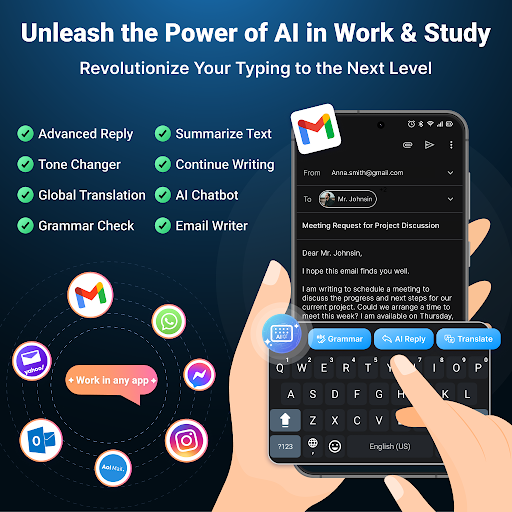
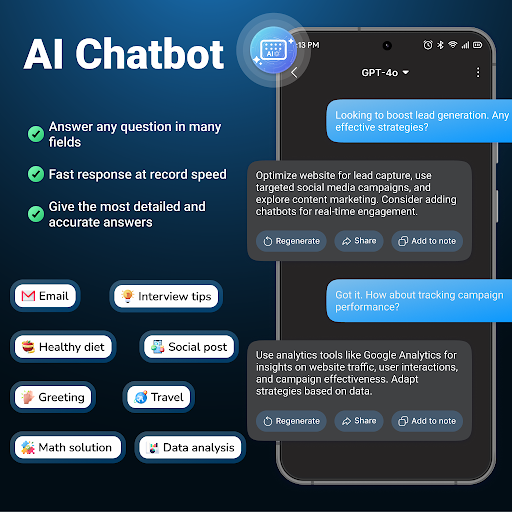
🌟 AI Keyboard: Writer, Grammar is a revolutionary application designed to transform your typing experience with AI keyboard technology & GPT API, powered by the GPT-4o mini & GPT-4o. Designed for seamless use across various writing apps, it provides robust grammar-checking, essay writer support for multiple languages. Rewrite complete sentences or adapt to different tones depending on the context of your information delivery. ❓ Do you often encounter the following problems? _ Want to improve your writing skills but have no one to provide feedback or improvement suggestions? _ Do you frequently feel stressed when unsure how to resolve a specific work issue? _ Messages sent with grammatical errors make you appear unprofessional & need grammar checks. _ Unsure how to respond when faced with a complex message? _ Spending too much time drafting & revising the same content? _ Sent messages that feel dry & lack tone or personality? 🤔 What problems does AI Keyboard: Writer, Grammar solve for you? 🤔 ✔️ The AI Keyboard: Writer, Grammar provides correct answers based on the knowledge you provide, understands your questions, & responds like a real person, creating a natural flow in your writing ✔️ With advanced grammar-checking features, AI Keyboard automatically corrects English grammar errors, make you like is essay writer ✔️ The AI Keyboard: AI Writer, Grammar assistant help you create professional emails, messages, & social media posts in any writing apps you choose ✔️ Get instant answers to complex queries, saving time & boosting productivity with the help of AI assistant tools based on GPT API ✔️AI Keyboard: Writer, Grammar helps you type faster & makes you a better AI writer with the support of the integrated AI writer assistant in writing apps ✔️ Ask the Chatbot anything you need for all field 🏷️ Key Features 🏷️ ✍️ Grammar & Spelling: Grammar checks, sentence completion, & explanations for each error to deepen your understanding of mistakes. Add professionalism to your content, & correct grammar instantly in the editor. Improve writing skills over time from work emails to personal writings. ⚡ Tone Changer: AI Keyboard: Writer, Grammar enhances your writing style, is a AI writer to suit the context of every conversation, from professional to friendly. 📝 AI Reply : AI Keyboard: Writer, Grammar understands context, providing relevant & personalized replies in writing apps. Feedback is easy, saving time with the AI keyboard. 💫 Paraphrase Your Text: The AI writer assistant will rephrase your sentences, ensuring clarity while presenting new ways to convey ideas in writing apps. 🌐 Global Translation for Business: When working with clients or friends globally, AI Keyboard eliminates language barriers. Access a rich vocabulary & get instant translation from any image, document, and PDF 🤖 AI Bot Assistant ▪ You spend too much time searching for different tools for AI Writer, now you can explore groups of more than 100 bot assistants selected by each topic (AI…

What AI Keyboard: Writer, Grammar Is Used For

AI Keyboard: Writer, Grammar appears to be a productivity app for typing help inside other Android apps. Based on the metadata, it is designed to support writing tasks such as grammar checking, sentence rewriting, tone adjustment, and drafting messages or emails. It may be useful when you want to clean up text before sending it, improve phrasing, or quickly reshape a draft for a different context.

The app’s keyboard-based setup suggests it works directly while you type, rather than as a separate editor. Permissions like overlay display, network access, and audio recording align with features such as an on-screen assistant, online AI responses, and possible voice input or dictation support. It also reads and modifies USB storage contents, which may relate to saving or loading text or app data. Because it is positioned as a writing assistant, it appears aimed at people who spend time composing messages, posts, or work-related content on a phone.

Common uses

  • Check grammar and spelling while typing
  • Rewrite sentences for clearer wording
  • Adjust tone for professional or casual messages
  • Draft emails, chat replies, or social posts
  • Use an AI assistant for quick writing help
  • Support everyday writing across other apps
  • May help reduce time spent revising text
Best for:
writers students office messaging phone app productivity

App Details

Package:
starnest.aitype.aikeyboard.chatbot.chatgpt
Category:
Productivity
Developer:
Starnest JSC
Version:
167.0
Updated:
Mar 29, 2026
Min Android:
9
Age Rating:
Everyone
Contains Ads:
Yes
In-App Purchases:
Yes

Official Listing

  • Official listing available on Google Play
  • Package name: starnest.aitype.aikeyboard.chatbot.chatgpt
  • Age rating: Everyone

Explore More

Browse more apps in Productivity or explore the Phone hub .

Related Productivity Apps

Fonts Art - Keyboard Fonts icon

Fonts Art - Keyboard Fonts

Personalization AIBY Inc.

Cool text styles and fonts! Discover beautiful design and unique styles!

Version 2.79.3 176.5 MB ⭐ 4.50 10,000,000+ installs
Aa Fonts Keyboard icon

Aa Fonts Keyboard

Personalization Simple Design Ltd.

100+ Stylish Fonts, Emojis, Symbols keyboard for Instagram & TikTok!

Version 1.0.35 21.0 MB ⭐ 4.77 10,000,000+ installs
Microsoft SwiftKey Keyboard icon

Microsoft SwiftKey Keyboard

Personalization SwiftKey

AI-powered Copilot. Personalized keyboard with gifs, stickers & themes

Version 9.10.36.21 64.1 MB ⭐ 4.44 1,000,000,000+ installs

How to Download AI Keyboard: Writer, Grammar

If this app is not hosted directly on APKApps official link, then for the safest and most up-to-date version, install it from its official Google Play listing.