Polycam: 3D Scanner & Editor icon

Phone

Polycam: 3D Scanner & Editor

Photography Polycam ⭐ 3.70 1,000,000+
Version 2.1.19 Everyone

Screenshots

Polycam: 3D Scanner & Editor screenshot
Permissions Explained 11 permissions requested View details

This app requests 11 permissions. The table below explains what each permission may allow and what users should review before installing.

Status Permission What it means Why it may be used User safety note
ℹ️ Review Approximate Location (network Based) approximate location (network-based) This is an Android permission or app-specific permission requested by the app. The app may use this permission for features related to its category, device support, background behavior, storage, connectivity, or system integration. Review this permission before installing, especially if it does not match the app’s expected purpose.
ℹ️ Review Precise Location (gps And Network Based) precise location (GPS and network-based) This is an Android permission or app-specific permission requested by the app. The app may use this permission for features related to its category, device support, background behavior, storage, connectivity, or system integration. Review this permission before installing, especially if it does not match the app’s expected purpose.
ℹ️ Review Read Phone Status And Identity read phone status and identity This is an Android permission or app-specific permission requested by the app. The app may use this permission for features related to its category, device support, background behavior, storage, connectivity, or system integration. Review this permission before installing, especially if it does not match the app’s expected purpose.
ℹ️ Review Take Pictures And Videos take pictures and videos This is an Android permission or app-specific permission requested by the app. The app may use this permission for features related to its category, device support, background behavior, storage, connectivity, or system integration. Review this permission before installing, especially if it does not match the app’s expected purpose.
ℹ️ Review View Wi Fi Connections view Wi-Fi connections This is an Android permission or app-specific permission requested by the app. The app may use this permission for features related to its category, device support, background behavior, storage, connectivity, or system integration. Review this permission before installing, especially if it does not match the app’s expected purpose.
ℹ️ Review View Network Connections view network connections This is an Android permission or app-specific permission requested by the app. The app may use this permission for features related to its category, device support, background behavior, storage, connectivity, or system integration. Review this permission before installing, especially if it does not match the app’s expected purpose.
ℹ️ Review Full Network Access full network access This is an Android permission or app-specific permission requested by the app. The app may use this permission for features related to its category, device support, background behavior, storage, connectivity, or system integration. Review this permission before installing, especially if it does not match the app’s expected purpose.
ℹ️ Review Control Vibration control vibration This is an Android permission or app-specific permission requested by the app. The app may use this permission for features related to its category, device support, background behavior, storage, connectivity, or system integration. Review this permission before installing, especially if it does not match the app’s expected purpose.
ℹ️ Review Prevent Device From Sleeping prevent device from sleeping This is an Android permission or app-specific permission requested by the app. The app may use this permission for features related to its category, device support, background behavior, storage, connectivity, or system integration. Review this permission before installing, especially if it does not match the app’s expected purpose.
ℹ️ Review Read Google Service Configuration read Google service configuration This is an Android permission or app-specific permission requested by the app. The app may use this permission for features related to its category, device support, background behavior, storage, connectivity, or system integration. Review this permission before installing, especially if it does not match the app’s expected purpose.
ℹ️ Review Receive Data From Internet receive data from Internet This is an Android permission or app-specific permission requested by the app. The app may use this permission for features related to its category, device support, background behavior, storage, connectivity, or system integration. Review this permission before installing, especially if it does not match the app’s expected purpose.

About Polycam: 3D Scanner & Editor

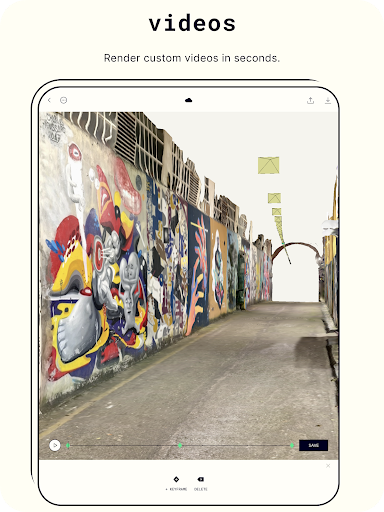
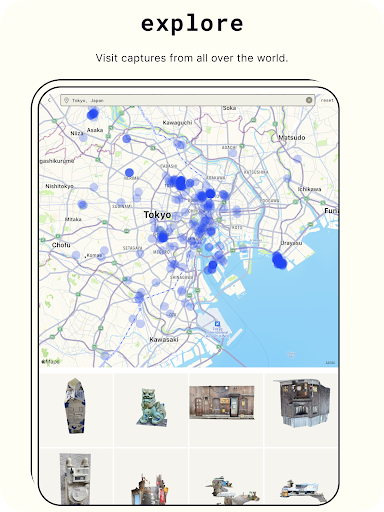
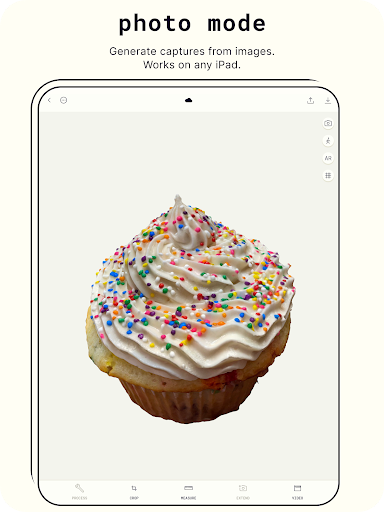
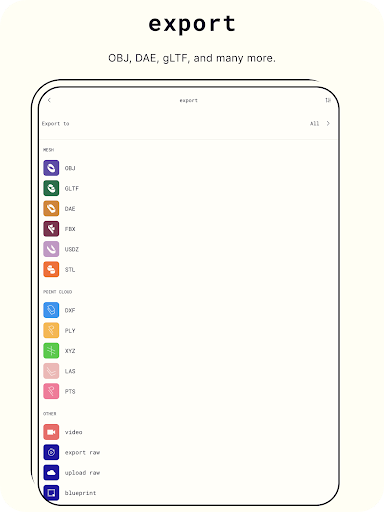
Discover a new dimension in photography with Polycam, the top-rated 3D capture app for Android. Ideal for architects, artists, designers, contractors, photographers, and anyone who wants to capture the world in a new way, Polycam offers innovative technology and advanced editing tools to bring your creativity to life. Key Features: Revolutionary 3D capture: ● Transform photos into 3D models with advanced photogrammetry ● Scan complex objects & scenes with intricate details ● Generate ready-to-use 3D assets for any computer graphics application ● Runs smoothly on any Android device with 2GB+ RAM Advanced editing tools: ● Crop your 3D captures for the perfect composition ● Rotate to view from any angle ● Rescale to adjust the size of your 3D models Export 3D models with Polycam Pro: ● Export mesh data in .obj, .dae, .fbx, .stl, & .gltf ● Export color point cloud data in .dxf, .ply, .las, .xyz, & .pts ● Export blueprints as .png images or .dae files Connect & Share: ● Share 3D models with friends & colleagues with ease ● Join the Polycam community & discover captures from around the world ● Showcase your 3D scanning skills & creativity by sharing with the community Unleash your creativity and take your photography to the next level with Polycam, the best 3D capture app on the market. Download now! Privacy Policy: https://polycam.ai/privacy_policy.pdf Terms of Use: https://polycam.ai/terms_and_conditions.pdf

What Polycam: 3D Scanner & Editor Is Used For

Polycam: 3D Scanner & Editor appears to be a phone app for creating 3D captures from photos and turning real-world objects or scenes into editable 3D models. Based on the metadata, it is aimed at people who need visual documentation or digital assets, such as architects, designers, contractors, photographers, and artists. Its category and feature list suggest it is commonly used when someone wants to scan an object, a room, or another physical space and inspect it from multiple angles on an Android device.

The app also appears to support basic editing of captured 3D content, including cropping, rotating, and resizing. That makes it useful for preparing scans before sharing or exporting them. The permission set, including camera access, location, network access, and the ability to keep the device awake, is consistent with an app that captures media, processes scans, and uploads or syncs content online. Based on the metadata, Polycam may be especially relevant for workflows involving 3D reference material, project documentation, or digital asset creation on phones.

Common uses

  • Capture objects and scenes as 3D models
  • Edit 3D captures by cropping, rotating, or resizing
  • Create visual references for design or construction work
  • Generate assets for 3D or graphics workflows
  • Share scans with colleagues or other users online
  • Use the app on a phone for on-the-go capture
  • Review captured content from multiple angles
Best for:
3D scanning Phone capture Design work Project documentation Creative reference

App Details

Package:
ai.polycam
Category:
Photography
Developer:
Polycam
Version:
2.1.19
Updated:
Mar 18, 2026
Min Android:
10
Age Rating:
Everyone
Contains Ads:
No
In-App Purchases:
Yes

Official Listing

  • Official listing available on Google Play
  • Package name: ai.polycam
  • Age rating: Everyone

Explore More

Browse more apps in Photography or explore the Phone hub .

Related Photography Apps

Picsart AI Photo Editor, Video icon

Picsart AI Photo Editor, Video

Photography PicsArt, Inc.

Remove and swap backgrounds in your photos and remove unwanted objects

Version 29.5.13 34.1 MB ⭐ 4.00 1,000,000,000+ installs
Video Editor & Maker - InShot icon

Video Editor & Maker - InShot

Photography InShot Video Editor

AI video editor with music! Edit video with effects, slideshow & slow motion

Version 2.196.1529 80.1 MB ⭐ 4.80 500,000,000+ installs
B612 AI Photo&Video Editor icon

B612 AI Photo&Video Editor

Photography SNOW Corporation

Meet trendy effects, filters, and stickers!

Version Varies with device 144.8 MB ⭐ 4.10 500,000,000+ installs
FaceApp: Perfect Face Editor icon

FaceApp: Perfect Face Editor

Photography FaceApp Technology Ltd

Natural Beauty, Selfie Retouch

Version Varies with device 84.1 MB ⭐ 4.30 500,000,000+ installs
Remini - AI Photo Enhancer icon

Remini - AI Photo Enhancer

Photography Bending Spoons

Create AI Photos, Improve and restore quality of blurry, old or damaged pics.

Version 3.7.1301.202520348 52.8 MB ⭐ 4.10 500,000,000+ installs
BeautyPlus-Selfie Photo Editor icon

BeautyPlus-Selfie Photo Editor

Photography PIXOCIAL TECHNOLOGY (SINGAPORE) PTE. LTD.

Snap perfect selfies every time. AI Auto-beautification for that flawless look.

Version 7.33.1 269.4 MB ⭐ 4.60 500,000,000+ installs

How to Download Polycam: 3D Scanner & Editor

If this app is not hosted directly on APKApps official link, then for the safest and most up-to-date version, install it from its official Google Play listing.