About ClothShift – AI Fashion Try-On
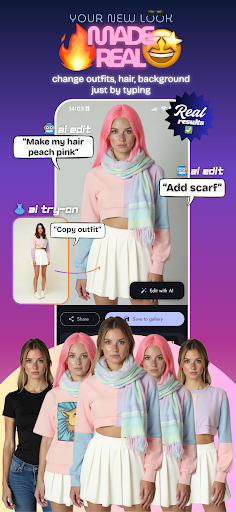
Transform Your Style with ClothShift! AI-Powered Virtual Try-On, Edits & Model Generator ClothShift brings your fashion imagination to life with advanced AI technology. Instantly try on any clothing—whether it’s a top, bottom, or full outfit—before you buy. Edit your photos with powerful AI tools, or even generate your own AI models to showcase your style or brand. The perfect tool for making confident style decisions and experimenting with iconic looks from anywhere—vintage photos, red carpets, or rare images you can’t buy! Key Features: • Instant Try-Ons: See how clothes look on you in seconds with realistic AI-powered results. • AI Image Editing: Want to add a scarf? Change your hair color? Swap your outfit? Just type it, and it happens. Endless creative control. • AI Model Generator: Generate lifelike human models to wear your clothes or showcase your brand. Customize their appearance and use them in your creative or business projects. • Try Anything: Experiment with tops, bottoms, full outfits, or even iconic styles from vintage and celebrity photos. • Easy to Use: Upload your photo and a clothing item photo—whether it's on a person or laid flat—and watch our AI work its magic! • Save & Share: Keep your favorite looks and share them with friends or followers. • Quick & Accurate: Fast, high-quality results to help you decide what works best for you. Why Choose ClothShift? • Realistic Results: Our AI creates stunning, lifelike try-ons that you can trust. • Full-Body Try-On: See complete outfits on your photo with our full-body fitting technology. • Powerful Editing: From outfit swaps to hair changes to background edits—total control at your fingertips. • Fashion Exploration: Try looks from any era, red carpets, or rare photos you can't buy. Whether you're styling for fun or for business, ClothShift has you covered. Download ClothShift now and transform your style with next-generation AI technology. Privacy policy: https://clothshift.app/legal/privacy-policy Terms of service: https://clothshift.app/legal/terms-of-service
What ClothShift – AI Fashion Try-On Is Used For
ClothShift – AI Fashion Try-On appears to be a phone app for visual fashion previewing and AI-based image editing. Based on the metadata, people may use it to see how different clothing items or full outfits could look on their own photos before making style decisions, shopping, or planning content. Its beauty category and try-on focus suggest it is aimed at personal styling and fashion experimentation rather than general photo storage or social networking.
The app description also indicates broader creative uses, including editing clothing details, changing appearance elements such as hair color, and generating AI models to display outfits. That makes it useful for users who want to test looks for personal projects, brand presentations, or style inspiration. The listed storage permissions suggest it needs access to files on the device for uploading photos and saving edited results, while network access may support AI processing and model generation features.
Common uses
- Preview tops, bottoms, or full outfits on uploaded photos
- Experiment with fashion looks before buying or sharing them
- Edit outfit details and other image elements with AI tools
- Generate AI models to showcase clothing or style concepts
- Save edited images to device storage for later use
- Share try-on results with friends or on social platforms
- Work with fashion inspiration images, including stylized or vintage looks
App Details
Package:
app.clothshift.clothshift
Developer:
ElmaDev
Version:
Varies with device
Min Android:
Varies with device
Age Rating:
Everyone
Contains Ads:
No
In-App Purchases:
Yes
Official Listing
-
Official listing available on
Google Play
-
Package name:
app.clothshift.clothshift
-
Age rating:
Everyone
Related Beauty Apps
Lifestyle
•
Dressly World
Version 2.5.9
⭐ 3.70
100,000+ installs
How to Download ClothShift – AI Fashion Try-On
If this app is not hosted directly on APKApps official link,
then for the safest and most up-to-date version, install it from its official Google Play listing.