About Work Log Pro
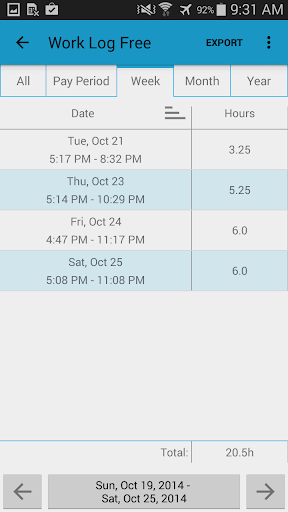
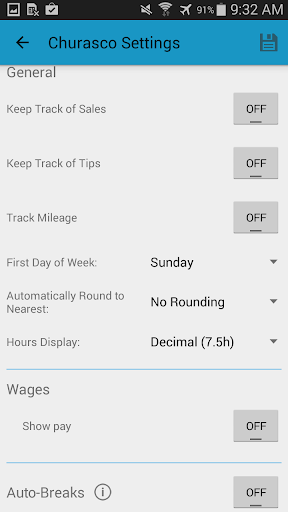
Work Log is a quick and easy way to keep track of your shifts and calculate the number of hours worked and wages paid over your pay period. Work Log Pro unlocks all of the features of Work Log, including: exporting shifts as a spreadsheet or as a PDF, importing and exporting backups of your shifts, removing ads and support for multiple jobs. NOTE: *Work Log Pro unlocks all of the features of Work Log. DO NOT uninstall Work Log Free as it has all of your data. Both Work Log and Work Log Pro must be installed in order to benefit from all of the features available. BACKUPS: You can backup and transfer your data by emailing the backup to yourself from the General Settings using the Backup Database option. You can then open the attachment directly from the email on the device you would like to import the shifts to. • Fast, simple and straightforward way to track work hours • Time saving features like automatic break deduction and pay period settings • Choose between punching in and out or manually entering your shift hours • Easy to update, delete or add past shifts • Keep track of multiple jobs, each with their own settings • Lots of customization options to suit your needs like 24h formatting, selecting when your week starts and a variety of ways to view your past shifts • See how many hours you've worked and earned over a pay period, week, month or year • Set your pay period to automatically calculate how many hours you worked and your wages for each paycheck • Automatically have deductions and/or bonuses calculated for paychecks • Optionally keep track of sales or tips (useful if you make commision or tips. useful for servers or sales people) • Set breaks to be automatically deducted from shifts over a given period of time. (ie. 30 minutes deducted after a 5 hour shift, 45 minutes deducted after an 8 hour shift), or enter breaks manually • Keep track of overtime hours and wages for up to two overtimes • Use widgets to punch in and out quickly, or as a shortcut to add a new shift. (tap on the punch in time to cancel it) • Easily backup and restore all shifts to keep all of your information safe and to easily transition to a new device • Export your recorded shifts as a spreadsheet (.CSV) by week, month, year, pay period or all recorded shifts. • Ad free Customization • Choose between a light and dark theme to suit your style • Display times with am/pm times or with a 24h clock • Display a currency symbol from over 100 countries • Set a backup reminder to remind you to backup your database every week, two weeks, month or two months • Set your pay period to be calculated by weeks, months, days or by half months (1st-15th, 16th-last) • Keep track of sales, optionally add sales to your paycheck, or a percent of sales (ideal for servers of sales staff) • Keep track of tips, optionally add tips to your paycheck • Option to automatically round shifts to 15m, 30m or 60m increments • Display hours in decimal (7.5h) or hours:minutes (7h 30m) format • Have…
What Work Log Pro Is Used For
Work Log Pro appears to be a time-tracking and pay-calculation app for people who want to record shifts and estimate earnings on an Android phone. Based on the metadata, it is commonly used to log start and end times, enter shifts manually, and review totals for hours worked across a pay period, week, month, or year. It may be especially useful for workers with repeating schedules or anyone who needs a simple way to keep a personal work history.
The app also seems aimed at users who need more than basic time logging. The metadata mentions multiple jobs, automatic break deduction, overtime tracking, pay period settings, and optional tracking for tips, commissions, deductions, or bonuses. Pro features include exporting shift records to spreadsheet or PDF formats and backing up or restoring data, which suggests it can also help with recordkeeping, transferring data to a new device, or sharing work logs when needed. Because it is described as a phone app, it appears suited to quick everyday use on a mobile device rather than a desktop workflow.
Common uses
- Track work shifts and hours on a phone
- Estimate wages based on logged time
- Manage multiple jobs with separate settings
- Record breaks, overtime, tips, or commissions
- Use automatic break deduction for long shifts
- Export shifts as spreadsheet or PDF
- Back up and restore shift data
App Details
Package:
arproductions.andrew.worklogkey
Developer:
AR Productions Inc.
Version:
12
Updated:
Oct 31, 2025
Min Android:
4.0
Age Rating:
Everyone
Contains Ads:
No
In-App Purchases:
No
Official Listing
-
Official listing available on
Google Play
-
Package name:
arproductions.andrew.worklogkey
-
Age rating:
Everyone
Related Productivity Apps
Productivity
•
Microsoft Corporation
Securely save and share your favorite memories and files across your devices.
Version Varies with device
89.8 MB
⭐ 4.60
5,000,000,000+ installs
Productivity
•
Google LLC
Cloud storage, automatic phone backup, and more.
Version 1.302.885140631
25.5 MB
⭐ 4.10
1,000,000,000+ installs
Productivity
•
Microsoft Corporation
Craft your story with formatting and grammar tools to ensure it’s right, always
Version Varies with device
120.4 MB
⭐ 4.80
1,000,000,000+ installs
Productivity
•
Microsoft Corporation
Use powerful, industry-leading AI tools to generate visual charts from any data
Version Varies with device
230.4 MB
⭐ 4.80
1,000,000,000+ installs
Productivity
•
Microsoft Corporation
Seamlessly integrate data and reports to build your presentation to impress
Version Varies with device
226.3 MB
⭐ 4.80
1,000,000,000+ installs
Productivity
•
Microsoft Corporation
Stay on top of multiple accounts with emails, calendars & contacts in one place
Version 5.2611.0
106.4 MB
⭐ 4.40
1,000,000,000+ installs
How to Download Work Log Pro
If this app is not hosted directly on APKApps official link,
then for the safest and most up-to-date version, install it from its official Google Play listing.