About Live Home 3D: House Design
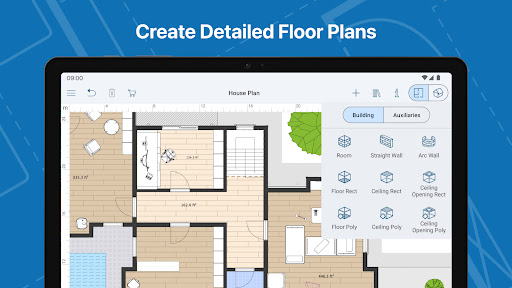
Explore the Future of 3D Home Design and Renovation with Live Home 3D Step into the world of advanced 3D home design with Live Home 3D, the ultimate app for turning your interior design ideas into reality. Whether you’re planning a stylish redecoration or a full house remodel, Live Home 3D offers powerful tools to design, visualize, and perfect your dream home. With over 5,000 3D models, predesigned houses, and interiors, you can create breathtaking home designs in an immersive digital environment. Furthermore, this home design 3D app is perfectly suitable for working on your home design offline and online. Live Home 3D is not just a home design app—it’s a comprehensive tool that caters to both professional architects and DIY house designers. Whether you’re crafting intricate 3d home plans or decorating rooms, Live Home 3D lets you express your creativity fully and realize designs of different complexity levels. Realize Your Design Potential: Key Features of Live Home 3D ✅ Floor Plan Creator Use Live Home 3D as a floor planner to create detailed layouts for your home. Customize room designs and bring your vision to life, whether you’re a professional house designer or a first-time home planner. Draw inspiration from predesigned houses or room interiors—such as kitchens, bathrooms, living rooms, and bedrooms—and modify them to suit your style. ✅ Master 3D House Design Access a library of over 5,000+ 3D models, including furniture, appliances, and decor elements. Design rooms or entire 3D house designs with ease. You can even enhance your project with free models from Trimble 3D Warehouse. ✅ Material Library Bring your designs to life with over 3,000 textures and materials. Capture the desired textures from photos and apply them directly to your 3D models, achieving a perfect, personalized look. ✅ Landscape Planning & Garden Design Live Home 3D extends beyond interiors—it’s also ideal for landscape planning. With a wide range of trees, plants, and landscaping elements, design your ideal garden or patio. Visualize your outdoor space in full 3D to get the perfect layout. ✅ Immersive 3D Walkthroughs Take a virtual walk through your home design, exploring every detail in 3D. Experience your space like never before and ensure the design is exactly as you imagined. ✅ Advanced Lighting & Geolocation Perfect your lighting with features that adjust light fixtures, time of day, and weather conditions. Live Home 3D even allows you to create realistic lighting scenarios based on your home’s location. ✅ Seamless Sharing and Collaboration Share your design projects with contractors, family, or social media followers. Export your 3D home design, floor plans, realistic renderings, and even videos of your room redecoration or garden design. Pro Features for Advanced Designers Unlock powerful tools for professional 3D house design and landscape planning with Live Home 3D’s Pro Features. These include: -Terrain Editing: Create custom elevations, depressions, and…
What Live Home 3D: House Design Is Used For
Live Home 3D: House Design appears to be a phone app for planning and visualizing home and interior layouts in 3D. Based on the metadata, people commonly use it to sketch floor plans, arrange rooms, and experiment with furniture, fixtures, and decor before making real-world changes to a home. The House & Home category and the long description suggest it is aimed at both DIY home planners and users who want more detailed design tools.
The app may also be used for remodeling ideas, room-by-room decoration, and broader property planning such as kitchens, bathrooms, living spaces, and outdoor areas. Its mention of 3D models, textures, and walkthroughs suggests users can build a visual mockup of a project and review how it might look from different angles. The network permissions indicate the app can connect online, which may support downloading content or using services tied to the app, while the sleep-prevention permission suggests longer design sessions without the screen turning off.
Common uses
- Create floor plans and room layouts
- Arrange furniture and decor in 3D
- Plan renovations before making changes
- Design kitchens, bathrooms, bedrooms, and living areas
- Explore landscape or garden layout ideas
- Review projects with 3D walkthrough-style viewing
- Use on a phone for home planning tasks
App Details
Package:
com.belightsoft.livehome3d
Developer:
Belight Software
Version:
4.11.3 (1692)
Updated:
Mar 23, 2026
Min Android:
10
Age Rating:
Everyone
Contains Ads:
No
In-App Purchases:
Yes
Official Listing
-
Official listing available on
Google Play
-
Package name:
com.belightsoft.livehome3d
-
Age rating:
Everyone
Related House & Home Apps
House & Home
•
Planner 5D
House Design & AI Room planner tool. Create 3D Floor Plans and Interior designs
Version 2.69.0
206.0 MB
⭐ 4.50
50,000,000+ installs
Art & Design
•
Marcin Lewandowski
Version 3.7
⭐ 4.00
10,000,000+ installs
House & Home
•
Room Planner Ltd
AI floor creator to design your dream house, plan rooms & style your home
Version 2612
95.9 MB
⭐ 4.00
10,000,000+ installs
Productivity
•
ArcSite
Version 5.46.1
⭐ 4.40
500,000+ installs
Art & Design
•
MYTIforge
Use 3D modeling and AR to easily design furniture, woodwork and DIY projects.
Version 24.03.1
156.2 MB
⭐ 3.87
1,000,000+ installs
How to Download Live Home 3D: House Design
If this app is not hosted directly on APKApps official link,
then for the safest and most up-to-date version, install it from its official Google Play listing.