Edge Side Bar - App Shortcuts icon

Phone

Edge Side Bar - App Shortcuts

Tools Yogesh Dama ⭐ 4.10 10,000+
Version Varies with device Everyone

Screenshots

Edge Side Bar - App Shortcuts screenshot
Permissions Explained 7 permissions requested View details

This app requests 7 permissions. The table below explains what each permission may allow and what users should review before installing.

Status Permission What it means Why it may be used User safety note
ℹ️ Review View Network Connections view network connections This is an Android permission or app-specific permission requested by the app. The app may use this permission for features related to its category, device support, background behavior, storage, connectivity, or system integration. Review this permission before installing, especially if it does not match the app’s expected purpose.
ℹ️ Review Full Network Access full network access This is an Android permission or app-specific permission requested by the app. The app may use this permission for features related to its category, device support, background behavior, storage, connectivity, or system integration. Review this permission before installing, especially if it does not match the app’s expected purpose.
ℹ️ Review Run At Startup run at startup This is an Android permission or app-specific permission requested by the app. The app may use this permission for features related to its category, device support, background behavior, storage, connectivity, or system integration. Review this permission before installing, especially if it does not match the app’s expected purpose.
ℹ️ Review Draw Over Other Apps draw over other apps This is an Android permission or app-specific permission requested by the app. The app may use this permission for features related to its category, device support, background behavior, storage, connectivity, or system integration. Review this permission before installing, especially if it does not match the app’s expected purpose.
ℹ️ Review Control Vibration control vibration This is an Android permission or app-specific permission requested by the app. The app may use this permission for features related to its category, device support, background behavior, storage, connectivity, or system integration. Review this permission before installing, especially if it does not match the app’s expected purpose.
ℹ️ Review Prevent Device From Sleeping prevent device from sleeping This is an Android permission or app-specific permission requested by the app. The app may use this permission for features related to its category, device support, background behavior, storage, connectivity, or system integration. Review this permission before installing, especially if it does not match the app’s expected purpose.
ℹ️ Review Google Play License Check Google Play license check This is an Android permission or app-specific permission requested by the app. The app may use this permission for features related to its category, device support, background behavior, storage, connectivity, or system integration. Review this permission before installing, especially if it does not match the app’s expected purpose.

About Edge Side Bar - App Shortcuts

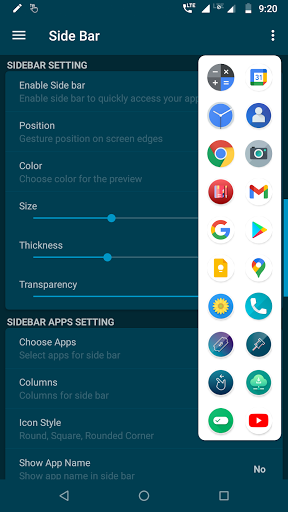
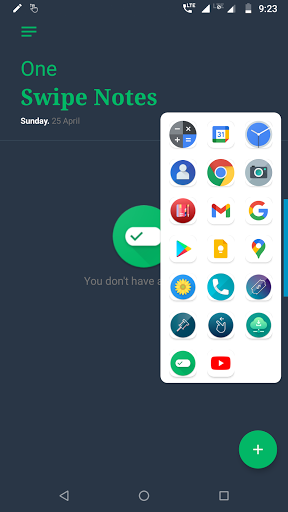
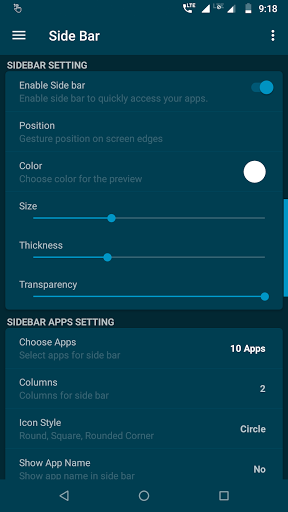
Edge screen side bar app is app shortcut app to quickly open any app anywhere, its simple easy one swipe access to your favorite apps. Quickly open your favorite apps by swiping at edge of your phone screen. Configure edge screen side bar to add as many apps as you want. You can have up to 5 columns for edge screen side bar. Change the style of side bar, color, transparency, icon style - everything you can customize as per your need. Features: ✔ Quickly access your favorite apps, its just one swipe away. ✔ No need to exit the running app, Open side bar from anywhere by swipe from edge of the screen. ✔ Add up to 5 columns to side bar. ✔ Change icon style, background color, transparency and many more customization options. ✔ Material UI with easy and simple settings. ✔ Complete gesture customization options. Note: App need overlay permission to create gesture control on edge of the screen. facing issues? or do you have any idea or suggestions, don't hesitate to drop me a mail at [email protected] Please visit http:/ /www.yogeshdama.com for more details If you like Side bar app, don't forget rate 5 stars ★★★★★ or review.

What Edge Side Bar - App Shortcuts Is Used For

Edge Side Bar - App Shortcuts appears to be a utility app for creating a swipe-in shortcut panel along the edge of an Android phone screen. Based on the metadata, people commonly use this kind of app to launch favorite apps faster without returning to the home screen or opening a separate app drawer. It may be especially useful for users who want quick one-swipe access to frequently used tools, messaging apps, or navigation apps while staying inside the app they are already using.

The app’s permissions and description suggest it relies on overlay access to draw the side bar on top of other apps and support gesture-based opening from the screen edge. The customization options mentioned in the metadata indicate it may let users adjust the bar’s look and layout, such as icon style, transparency, color, and the number of columns. Because it is listed as a phone app, it seems aimed at everyday smartphone use rather than TV or desktop-style navigation.

Common uses

  • Open favorite apps from the edge of the screen with a swipe gesture.
  • Keep shortcuts available while using other apps.
  • Customize the side bar’s appearance, including icon style and transparency.
  • Organize shortcuts into multiple columns for quicker access.
  • Use gesture controls to trigger the side bar from anywhere on the phone.
  • Run it as a phone utility for faster app switching and navigation.
Best for:
Quick app access One-handed use Gesture shortcuts Phone customization Frequent app switching

App Details

Package:
com.bhanu.simplesidebar
Category:
Tools
Developer:
Yogesh Dama
Version:
Varies with device
Min Android:
Varies with device
Age Rating:
Everyone
Contains Ads:
Yes
In-App Purchases:
No

Official Listing

  • Official listing available on Google Play
  • Package name: com.bhanu.simplesidebar
  • Age rating: Everyone

Explore More

Browse more apps in Tools or explore the Phone hub .

Related Tools Apps

ADW Launcher icon

ADW Launcher

Personalization AnderWeb

ADW Launcher 2, beyond tweaking your android desktop

Version 2.0.1.75 12.9 MB ⭐ 3.92 10,000,000+ installs

How to Download Edge Side Bar - App Shortcuts

If this app is not hosted directly on APKApps official link, then for the safest and most up-to-date version, install it from its official Google Play listing.