Photo Measures icon

Phone

Photo Measures

Productivity Cubent ⭐ 3.70 50,000+
Version 1.68 Everyone

Screenshots

Photo Measures screenshot
Permissions Explained 6 permissions requested View details

This app requests 6 permissions. The table below explains what each permission may allow and what users should review before installing.

Status Permission What it means Why it may be used User safety note
ℹ️ Review Read The Contents Of Your Usb Storage read the contents of your USB storage This is an Android permission or app-specific permission requested by the app. The app may use this permission for features related to its category, device support, background behavior, storage, connectivity, or system integration. Review this permission before installing, especially if it does not match the app’s expected purpose.
ℹ️ Review Modify Or Delete The Contents Of Your Usb Storage modify or delete the contents of your USB storage This is an Android permission or app-specific permission requested by the app. The app may use this permission for features related to its category, device support, background behavior, storage, connectivity, or system integration. Review this permission before installing, especially if it does not match the app’s expected purpose.
ℹ️ Review Take Pictures And Videos take pictures and videos This is an Android permission or app-specific permission requested by the app. The app may use this permission for features related to its category, device support, background behavior, storage, connectivity, or system integration. Review this permission before installing, especially if it does not match the app’s expected purpose.
ℹ️ Review View Network Connections view network connections This is an Android permission or app-specific permission requested by the app. The app may use this permission for features related to its category, device support, background behavior, storage, connectivity, or system integration. Review this permission before installing, especially if it does not match the app’s expected purpose.
ℹ️ Review Full Network Access full network access This is an Android permission or app-specific permission requested by the app. The app may use this permission for features related to its category, device support, background behavior, storage, connectivity, or system integration. Review this permission before installing, especially if it does not match the app’s expected purpose.
ℹ️ Review Google Play License Check Google Play license check This is an Android permission or app-specific permission requested by the app. The app may use this permission for features related to its category, device support, background behavior, storage, connectivity, or system integration. Review this permission before installing, especially if it does not match the app’s expected purpose.

About Photo Measures

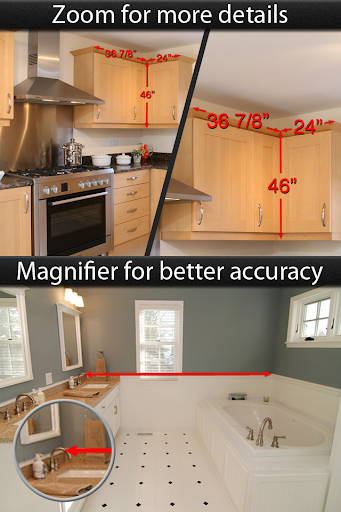
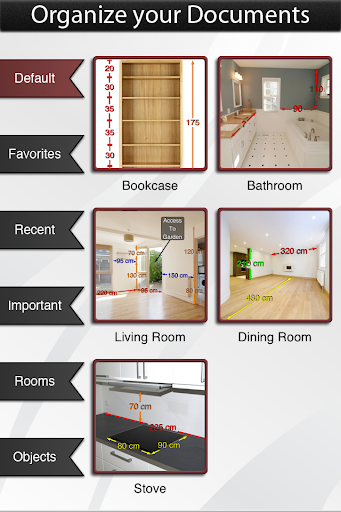
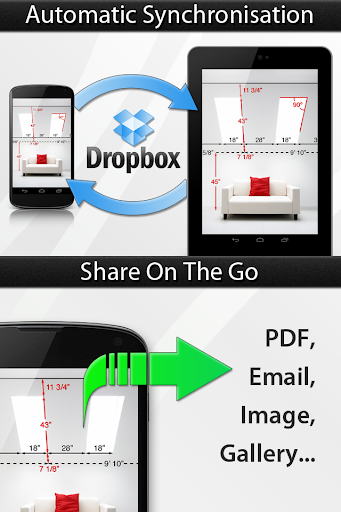
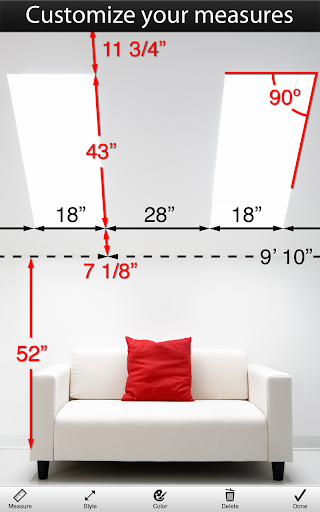
Photo Measures is the best and easiest way to save measures on your own photos on Android. Architectural Digest - "Very useful when shopping or meeting with contractors" Tuaw.com - "It's perfect for your own work around the house, and is handy for creating plans to bring to a contractor." AppSafari Rating: ★★★★★ - "So incredibly convenient" Recommended by many reference magazines, websites and blogs all around the world: Architectural Digest, Tuaw.com, This Old House, AppOfTheDay.com, AppSafari.com, AppGefahren.de, etc... ◆◆◆◆◆ Constructing a house? Engineering a new project? Moving to a new place? Take some photos and note down the dimensions on the photos to remember the exact layout, and to make sure that everything will fit easily. Need to keep in mind the exact dimensions of an object? Just take a photo and quickly write them on it. Are you decorating? Want to buy a new frame or a new furniture but not sure it will fit? No problem since you can have all your house dimensions always with you! ◆◆◆◆◆ You are a real estate agent? A contractor? An engineer? A designer? Working in the construction industry? Someone who wants to keep his house's measure easily accessible? Whenever you need to save dimensions, sizes, angles or write down a detail you need to remember, Photo Measures will help you to be more efficient and more accurate. ◆◆◆◆◆ Photo Measures helps you to: ✓ Take a photo and directly draw measures on it ✓ Zoom into and out of your photo when you need more precision ✓ Edit your measures with a very intuitive interface ✓ Quickly add text as comments when measures are not enough ✓ Native support for angles ✓ Save your measures in imperial or metric units ✓ Easily organize your photos by category ✓ Export your dimensions in high resolution ✓ Export as PDF or JPG ✓ Import photos of any size and aspect ratio Keep posted, a lot of new features are planned for the next versions!

What Photo Measures Is Used For

Photo Measures is a productivity app for adding dimensions and notes directly onto photos on an Android phone. Based on the metadata, it appears to be used when you need to document physical spaces or objects visually, such as rooms, furniture, fixtures, layouts, or project details, then keep those measurements attached to the image for later reference.

Common use cases may include home planning, construction, real estate work, interior decorating, and other tasks where exact sizes matter. The app’s support for metric and imperial units, angles, text comments, photo zooming, and export to PDF or JPG suggests it is meant for organizing reference images and sharing them with contractors, clients, or coworkers. The permission to access storage fits functions like importing photos and saving edited results, while camera access may be used to capture new reference images. It is designed for phone use, so it may be most practical on a handheld device in the field or on-site.

Common uses

  • Add measurements directly onto photos for quick visual reference.
  • Record room, furniture, or object dimensions while planning a space.
  • Use angle markers and text notes to capture extra project details.
  • Switch between metric and imperial units as needed.
  • Organize photos by category for different projects or locations.
  • Export annotated images as PDF or JPG for sharing or archiving.
  • Import existing photos and edit them without starting from scratch.
Best for:
Home planning Contractors Real estate work Interior design Phone app

App Details

Package:
com.bigbluepixel.photomeasures
Category:
Productivity
Developer:
Cubent
Version:
1.68
Updated:
Mar 4, 2024
Min Android:
6.0
Age Rating:
Everyone
Contains Ads:
No
In-App Purchases:
No

Official Listing

  • Official listing available on Google Play
  • Package name: com.bigbluepixel.photomeasures
  • Age rating: Everyone

Explore More

Browse more apps in Productivity or explore the Phone hub .

Related Productivity Apps

Microsoft OneDrive icon

Microsoft OneDrive

Productivity Microsoft Corporation

Securely save and share your favorite memories and files across your devices.

Version Varies with device 89.8 MB ⭐ 4.60 5,000,000,000+ installs
Google One icon

Google One

Productivity Google LLC

Cloud storage, automatic phone backup, and more.

Version 1.302.885140631 25.5 MB ⭐ 4.10 1,000,000,000+ installs
Microsoft Word: Edit Documents icon

Microsoft Word: Edit Documents

Productivity Microsoft Corporation

Craft your story with formatting and grammar tools to ensure it’s right, always

Version Varies with device 120.4 MB ⭐ 4.80 1,000,000,000+ installs
Microsoft Excel: Spreadsheets icon

Microsoft Excel: Spreadsheets

Productivity Microsoft Corporation

Use powerful, industry-leading AI tools to generate visual charts from any data

Version Varies with device 230.4 MB ⭐ 4.80 1,000,000,000+ installs
Microsoft PowerPoint icon

Microsoft PowerPoint

Productivity Microsoft Corporation

Seamlessly integrate data and reports to build your presentation to impress

Version Varies with device 226.3 MB ⭐ 4.80 1,000,000,000+ installs
Microsoft Outlook icon

Microsoft Outlook

Productivity Microsoft Corporation

Stay on top of multiple accounts with emails, calendars & contacts in one place

Version 5.2611.0 106.4 MB ⭐ 4.40 1,000,000,000+ installs

How to Download Photo Measures

If this app is not hosted directly on APKApps official link, then for the safest and most up-to-date version, install it from its official Google Play listing.