Food List Tracking & Shopping icon

Phone

Food List Tracking & Shopping

Food & Drink Brain Vault ⭐ 3.10 100,000+
Version 1.0.35 Everyone

Screenshots

Food List Tracking & Shopping screenshot
Permissions Explained 10 permissions requested View details

This app requests 10 permissions. The table below explains what each permission may allow and what users should review before installing.

Status Permission What it means Why it may be used User safety note
ℹ️ Review Read The Contents Of Your Usb Storage read the contents of your USB storage This is an Android permission or app-specific permission requested by the app. The app may use this permission for features related to its category, device support, background behavior, storage, connectivity, or system integration. Review this permission before installing, especially if it does not match the app’s expected purpose.
ℹ️ Review Modify Or Delete The Contents Of Your Usb Storage modify or delete the contents of your USB storage This is an Android permission or app-specific permission requested by the app. The app may use this permission for features related to its category, device support, background behavior, storage, connectivity, or system integration. Review this permission before installing, especially if it does not match the app’s expected purpose.
ℹ️ Review Take Pictures And Videos take pictures and videos This is an Android permission or app-specific permission requested by the app. The app may use this permission for features related to its category, device support, background behavior, storage, connectivity, or system integration. Review this permission before installing, especially if it does not match the app’s expected purpose.
ℹ️ Review View Wi Fi Connections view Wi-Fi connections This is an Android permission or app-specific permission requested by the app. The app may use this permission for features related to its category, device support, background behavior, storage, connectivity, or system integration. Review this permission before installing, especially if it does not match the app’s expected purpose.
ℹ️ Review View Network Connections view network connections This is an Android permission or app-specific permission requested by the app. The app may use this permission for features related to its category, device support, background behavior, storage, connectivity, or system integration. Review this permission before installing, especially if it does not match the app’s expected purpose.
ℹ️ Review Full Network Access full network access This is an Android permission or app-specific permission requested by the app. The app may use this permission for features related to its category, device support, background behavior, storage, connectivity, or system integration. Review this permission before installing, especially if it does not match the app’s expected purpose.
ℹ️ Review Control Vibration control vibration This is an Android permission or app-specific permission requested by the app. The app may use this permission for features related to its category, device support, background behavior, storage, connectivity, or system integration. Review this permission before installing, especially if it does not match the app’s expected purpose.
ℹ️ Review Prevent Device From Sleeping prevent device from sleeping This is an Android permission or app-specific permission requested by the app. The app may use this permission for features related to its category, device support, background behavior, storage, connectivity, or system integration. Review this permission before installing, especially if it does not match the app’s expected purpose.
ℹ️ Review Read Google Service Configuration read Google service configuration This is an Android permission or app-specific permission requested by the app. The app may use this permission for features related to its category, device support, background behavior, storage, connectivity, or system integration. Review this permission before installing, especially if it does not match the app’s expected purpose.
ℹ️ Review Receive Data From Internet receive data from Internet This is an Android permission or app-specific permission requested by the app. The app may use this permission for features related to its category, device support, background behavior, storage, connectivity, or system integration. Review this permission before installing, especially if it does not match the app’s expected purpose.

About Food List Tracking & Shopping

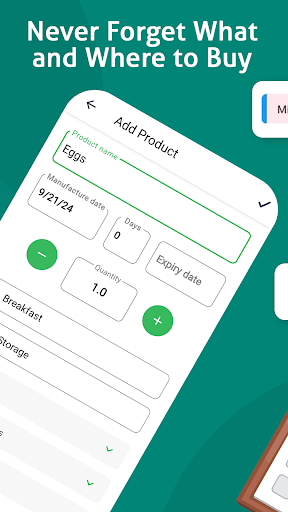
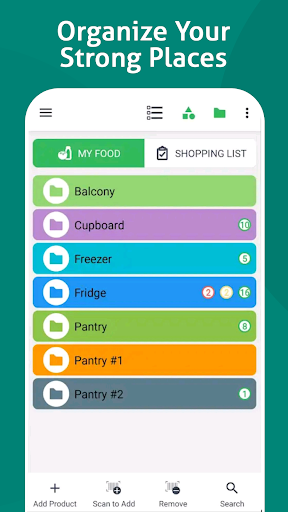
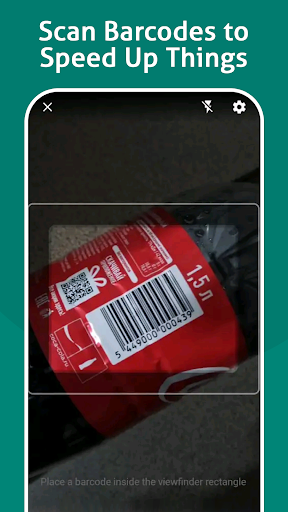
Over 1 Million downloads to date. Try it now FREE. This application allows you to track your food supplies at home, keep an eye on expiration dates of products, use the shopping list to replenish your stock of food. - Scan barcodes to speed up your work - Get notifications before the expiration date and never waste your food - Sort products by categories and assign storage places to keep all in order - Access on any of your Android devices and share the list with your family Details: There are 2 lists on 2 tabs: "My Food" and "Shopping List" "My Food" - You can add there food stored in your fridge, freezer, on shelves and anywhere at home - For each product you can set an expiration date if needed - You can see expiration date of each product in the list as well as a visual indication of products expired soon or already expired - You can copy any item from "My Food" list to "Shopping List" and set the quantity needed to purchase "Shopping List" - You can add there items directly or copy them from "Food List" - After you have purchased an item you can move it from "Shopping List" to "My Food" list - When you move an item from "Shopping List" to "My Food" the quantity is deducted from "Shopping List" and added to "My Food" Barcodes - You can use your phone's camera to scan barcodes of products - Once barcode was added to a product you can just scan this barcode to perform an action (add or mark as purchased) instead of manual input - You can associate more than one barcode to a single product. Use "Catalog" menu item to edit items and add extra barcodes Categories and Storage Places - Group products into categories; - Create storage places (can be hierarchical) and know where your food is stored; - Customize the view: plain list or with categories and/or storage places; - Assign colors to storage places for easy and intuitive view; Sharing and Syncing - Share your lists with your family - Go to "Users" menu item and add your family member's e-mail - When this person installs the application and performs login with his e-mail he will be able to access your lists - If you log in with your account on another device all data syncs automatically almost in real-time Don't hesitate to contact us if you have any questions or suggestions. We use Open Food Facts database https://world.openfoodfacts.org/ to fetch products' names and photos by barcode. This option's availability depends on the country.

What Food List Tracking & Shopping Is Used For

Food List Tracking & Shopping appears to be a phone app for organizing household food inventory and planning grocery replenishment. Based on the metadata, it is commonly used to keep track of items stored at home, such as food in the fridge, freezer, or pantry, while also maintaining a separate shopping list for items that need to be bought.

The app may be especially useful for people who want to monitor expiration dates and reduce missed or forgotten products. It also appears to support barcode scanning, which can make adding items or marking them as purchased faster than manual entry. The category and feature set suggest a practical home-management tool rather than a recipe or delivery app.

Relevant permissions, such as network access, storage access, and camera use, fit features like syncing lists across devices, sharing with family members, saving data, and scanning product barcodes. Based on the metadata, it may work well for households that want a simple way to sort groceries by category or storage place and keep a shared list updated across Android devices.

Common uses

  • Track food stored at home by item, category, and storage location
  • Monitor expiration dates and see which products are nearing expiry
  • Build and update a shopping list from items already in your food list
  • Scan barcodes to add products or mark purchases more quickly
  • Share lists with family members and sync data across Android devices
  • Organize pantry, fridge, and freezer items in a single phone app
Best for:
household inventory grocery planning family sharing phone app food tracking

App Details

Package:
com.chestersw.foodlist
Category:
Food & Drink
Developer:
Brain Vault
Version:
1.0.35
Updated:
Dec 8, 2025
Min Android:
7.0
Age Rating:
Everyone
Contains Ads:
Yes
In-App Purchases:
Yes

Official Listing

  • Official listing available on Google Play
  • Package name: com.chestersw.foodlist
  • Age rating: Everyone

Explore More

Browse more apps in Food & Drink or explore the Phone hub .

Related Food & Drink Apps

BLW Meals: Starting Solids icon

BLW Meals: Starting Solids

Parenting BLW SOCIAL

Baby Led Weaning app made by Feeding Experts. Affordable and easy to use.

Version 1.0.160 6.5 MB ⭐ 3.30 100,000+ installs

How to Download Food List Tracking & Shopping

If this app is not hosted directly on APKApps official link, then for the safest and most up-to-date version, install it from its official Google Play listing.