About CalliPro
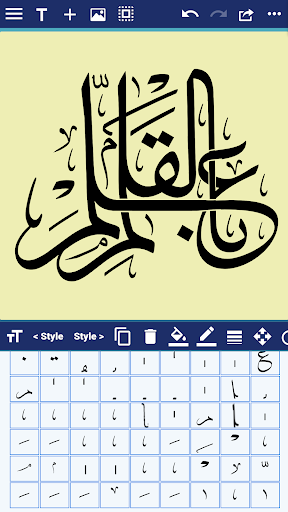
Customize styles, colors, and curves to design stunning calligraphic art—no experience needed. Whether you're a pro or just playing around, express yourself in elegant, flowing script. Save and share your creations in seconds! The main features include Powerful Calligraphy Tools, Quran Integration, Fonts & Typography, Layout & Design Control, Precise Editing Features, Multilingual Interface, Save, Export & Share, and Flexible Canvas Options. See the full list: - Add Text, Shapes, or both to a Favorites list. - Edit the Text, Tashkeel, Shapes, and Glyphs as a path (full Edit Path features available as In-App Purchase). - Show or hide touch gesture. - Insert Quranic text using Mishafi Gold or Silver with search capability (full Quran available as In-App Purchase). - Inspect the glyphs and ligatures for any font and add them to the design. - Choose a specific color using the Eyedropper tool. - Align text or shapes using the Alignment tools. - Bring design elements Forward or send them Backward. - Choose from a variety of vector shapes. - Change the color and the width of the text outline. - Choose either Arabic, English or Indonesian UI [user interface] and menus. - Choose from a collection of 21 fonts including Diwan's most advanced Arabic fonts like Diwan Naskh Mishafi, Diwan Thuluth, Diwan Farsi, Waseem (Ruqa’a like font), Kufi, and more. - Select from a number of shaping options for each word segment including alternative shapes, wide forms, and removed dots. - Freely position word segments to create complex compositions. - Add a range of decorative shapes that can be positioned freely to decorate the overall design. - Change the font size. - Use multi-level undo and redo. - Select from a wide range of colors for text and background. - Make the background transparent. - Save the design as an image that can be used with other applications. - Save the design as a high-resolution PDF. - Export the design to SVG (Scalable Vector Graphics). - Create designs with different sizes. - Save designs and open them at any time. - Export or Import designs. - Merge two designs to create one design. - Zoom in or out. - Add a background image. - Use a grid for easier positioning of text. - Rotate the text. - Flip the text horizontally and vertically. - Insert multi-line text. - Select font size, alignment, and line spacing before inserting the text. - Lock or Unlock the design. - Group words or letters. - Share the design on Facebook no longer available.
What CalliPro Is Used For
CalliPro appears to be a calligraphy and layout design app for creating decorative text-based artwork on Android phones. Based on the metadata, it is mainly used for styling Arabic and other multilingual text with fonts, curves, colors, shapes, and alignment tools, so users can build polished script compositions without needing advanced design software.
The app may also be useful for people who want to place Quranic text into designs, since the description mentions Quran integration and searchable text options. It supports saving, exporting, and sharing work in several formats, including image, PDF, and SVG, which suggests it is intended for both casual design use and more structured print or digital output. Because it can access storage and network connections, it likely handles importing, saving, and exporting design files, while the camera permission may relate to adding images or using photos as part of a composition.
On a phone, CalliPro seems suited to detailed text editing, font experimentation, and small-to-medium design tasks where precise placement matters. The metadata also points to multilingual menus, undo/redo, transparent backgrounds, and layered composition features, which may make it practical for users working on invitations, decorative graphics, social posts, or custom lettering projects.
Common uses
- Create calligraphic artwork with styled text, shapes, and decorative elements.
- Design Arabic, English, or Indonesian text layouts with font and typography controls.
- Insert and arrange Quranic text for religious-themed compositions.
- Export finished work as an image, PDF, or SVG for sharing or reuse.
- Save, reopen, import, or merge designs for later editing.
- Adjust colors, outlines, alignment, layers, and canvas size for precise layout work.
- Use on a phone for detailed text-based design and lettering tasks.
App Details
Package:
com.diwan.muhtarifalkhat2
Developer:
Diwan Software Ltd
Version:
3.3.0
Updated:
Jun 4, 2025
Min Android:
10
Age Rating:
Teen
Contains Ads:
No
In-App Purchases:
Yes
Official Listing
-
Official listing available on
Google Play
-
Package name:
com.diwan.muhtarifalkhat2
-
Age rating:
Teen
Related Productivity Apps
Productivity
•
Microsoft Corporation
Securely save and share your favorite memories and files across your devices.
Version Varies with device
89.8 MB
⭐ 4.60
5,000,000,000+ installs
Productivity
•
Google LLC
Cloud storage, automatic phone backup, and more.
Version 1.302.885140631
25.5 MB
⭐ 4.10
1,000,000,000+ installs
Productivity
•
Microsoft Corporation
Craft your story with formatting and grammar tools to ensure it’s right, always
Version Varies with device
120.4 MB
⭐ 4.80
1,000,000,000+ installs
Productivity
•
Microsoft Corporation
Use powerful, industry-leading AI tools to generate visual charts from any data
Version Varies with device
230.4 MB
⭐ 4.80
1,000,000,000+ installs
Productivity
•
Microsoft Corporation
Seamlessly integrate data and reports to build your presentation to impress
Version Varies with device
226.3 MB
⭐ 4.80
1,000,000,000+ installs
Productivity
•
Microsoft Corporation
Stay on top of multiple accounts with emails, calendars & contacts in one place
Version 5.2611.0
106.4 MB
⭐ 4.40
1,000,000,000+ installs
How to Download CalliPro
If this app is not hosted directly on APKApps official link,
then for the safest and most up-to-date version, install it from its official Google Play listing.