About Add Reverb to Video: VideoVerb
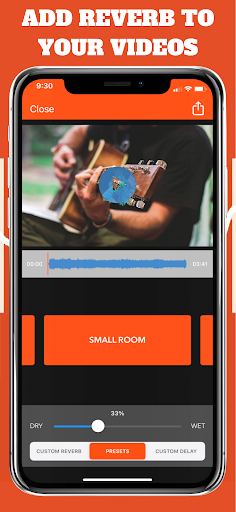
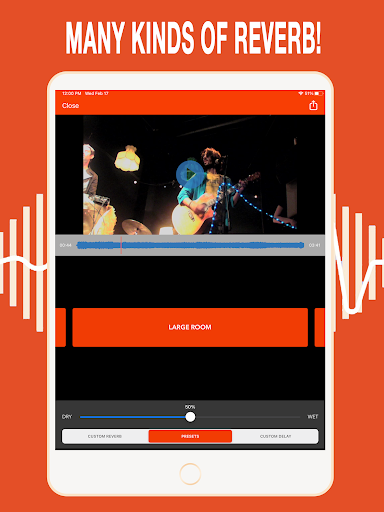
Add Reverb, Echo & Delay to Your Videos Instantly! Give your videos immersive, professional-sounding audio in seconds. VideoVerb is an easy-to-use video audio editor that lets you add reverb, echo, and delay effects to any video. Perfect for musicians, vloggers, filmmakers, ASMR creators, drummers, violinists, cellists, string players, podcasters, voiceover artists, editors, and video creators. Whether you want subtle ambience, a large room feel, a massive arena sound, or a creative effect, VideoVerb helps your videos sound polished, cinematic, and engaging. 🎵 Easy Reverb & Audio Effects Import any video and instantly apply high-quality reverb, echo, or delay. Adjust the Dry/Wet mix to blend effects perfectly with your original audio. No experience required. Included Reverb Presets: • Small Room • Large Room • Arena • Outer Space 🎚️ Custom Reverb Controls Unlock advanced reverb controls to design your own unique sound. Shape depth, space, and character with customizable parameters for truly creative video audio effects. ✨ Perfect For • Musicians & songwriters • Vloggers & YouTubers • Podcasters & voiceover artists • Filmmakers & video creators • Editors & social media creators • ASMR artists • Anyone who wants better-sounding video audio Need Help? Contact us directly through the app’s side menu. We’re happy to help! Developer Page https://play.google.com/store/apps/developer?id=Future+Moments Website www.future-moments.com Brought to you by Future Moments We create powerful, easy-to-use audio and video apps for creators. Whether you’re making music, podcasts, videos, reels, or social content, our tools help you sound better and work faster. More Apps by Future Moments: Audio Cleaner AI Audio Cleanup Magic Voice Memo Cleaner Remove Noise from Audio MAIVE Ai Video Generator VideoVerb Add reverb to your videos Hear Boost Get super hearing & recording powers AudioFix: For Videos Denoise & clean the sound of your video VideoMaster Instant audio post-production for videos AudioVerb Add reverb & delay to your audio AudioMaster Audio mastering for podcasts & music ---- VideoVerb is a video audio editor for adding reverb, echo, and delay to any video. Enhance video sound quality, apply audio effects for video, and create immersive cinematic audio for music videos, vlogs, ASMR, podcasts, reels, and social media videos in seconds.
What Add Reverb to Video: VideoVerb Is Used For
Add Reverb to Video: VideoVerb appears to be a video audio editor for changing the sound of videos on a phone. Based on the metadata, it is commonly used to add reverb, echo, and delay effects after importing a video, which may help create a room-like, arena-like, or more stylized audio feel. The app also includes preset effects such as Small Room, Large Room, Arena, and Outer Space, suggesting it is aimed at quick audio enhancement as well as more creative editing.
This kind of app may be useful for musicians, vloggers, podcasters, voiceover users, and other video creators who want to adjust how spoken words or performances sound in recorded clips. The listed permissions, including storage access, network access, and changing audio settings, fit an app that needs to load media files, process audio, and save edited output. Because it is a phone app in the Video Players & Editors category, it appears intended for on-the-go editing rather than advanced desktop-style production.
Common uses
- Import a video and apply reverb, echo, or delay effects
- Adjust the dry/wet mix to balance original and processed audio
- Use preset spaces like Small Room, Large Room, or Arena
- Create a more ambient or stylized sound for short videos
- Edit clips for music performances, voice recordings, or social media posts
- Save time on basic audio treatment without needing complex tools
App Details
Package:
com.futuremoments.videoverb
Developer:
Future Moments
Version:
1.37
Updated:
Mar 16, 2026
Min Android:
7.0
Age Rating:
Everyone
Contains Ads:
No
In-App Purchases:
Yes
Official Listing
-
Official listing available on
Google Play
-
Package name:
com.futuremoments.videoverb
-
Age rating:
Everyone
Related Video Players & Editors Apps
Music & Audio
•
Offtop Inc.
Version 24.8.34
⭐ 4.40
1,000,000+ installs
Music & Audio
•
Recisio
Version 3.5.2
⭐ 4.50
100,000+ installs
Music & Audio
•
n-Track
Version 10.5.46
⭐ 4.60
10,000+ installs
Music & Audio
•
Suture Sound Inc.
Version 1.5.1
⭐ 4.00
10,000+ installs
Video Players & Editors
•
KineMaster, Video Editor Experts Group
A must-have for Reels, Shorts, and TikTok! Easy & free to make great videos now!
Version 4.0.174
139.9 MB
⭐ 4.33
5,000,000+ installs
How to Download Add Reverb to Video: VideoVerb
If this app is not hosted directly on APKApps official link,
then for the safest and most up-to-date version, install it from its official Google Play listing.