Aqua Map Boating icon

Phone

Aqua Map Boating

Maps & Navigation GEC S.R.L. ⭐ 3.50 100,000+
Version 43.2 Everyone

Screenshots

Aqua Map Boating screenshot
Permissions Explained 14 permissions requested View details

This app requests 14 permissions. The table below explains what each permission may allow and what users should review before installing.

Status Permission What it means Why it may be used User safety note
ℹ️ Review Approximate Location (network Based) approximate location (network-based) This is an Android permission or app-specific permission requested by the app. The app may use this permission for features related to its category, device support, background behavior, storage, connectivity, or system integration. Review this permission before installing, especially if it does not match the app’s expected purpose.
ℹ️ Review Precise Location (gps And Network Based) precise location (GPS and network-based) This is an Android permission or app-specific permission requested by the app. The app may use this permission for features related to its category, device support, background behavior, storage, connectivity, or system integration. Review this permission before installing, especially if it does not match the app’s expected purpose.
ℹ️ Review Read The Contents Of Your Usb Storage read the contents of your USB storage This is an Android permission or app-specific permission requested by the app. The app may use this permission for features related to its category, device support, background behavior, storage, connectivity, or system integration. Review this permission before installing, especially if it does not match the app’s expected purpose.
ℹ️ Review Modify Or Delete The Contents Of Your Usb Storage modify or delete the contents of your USB storage This is an Android permission or app-specific permission requested by the app. The app may use this permission for features related to its category, device support, background behavior, storage, connectivity, or system integration. Review this permission before installing, especially if it does not match the app’s expected purpose.
ℹ️ Review Take Pictures And Videos take pictures and videos This is an Android permission or app-specific permission requested by the app. The app may use this permission for features related to its category, device support, background behavior, storage, connectivity, or system integration. Review this permission before installing, especially if it does not match the app’s expected purpose.
ℹ️ Review View Wi Fi Connections view Wi-Fi connections This is an Android permission or app-specific permission requested by the app. The app may use this permission for features related to its category, device support, background behavior, storage, connectivity, or system integration. Review this permission before installing, especially if it does not match the app’s expected purpose.
ℹ️ Review View Network Connections view network connections This is an Android permission or app-specific permission requested by the app. The app may use this permission for features related to its category, device support, background behavior, storage, connectivity, or system integration. Review this permission before installing, especially if it does not match the app’s expected purpose.
ℹ️ Review Full Network Access full network access This is an Android permission or app-specific permission requested by the app. The app may use this permission for features related to its category, device support, background behavior, storage, connectivity, or system integration. Review this permission before installing, especially if it does not match the app’s expected purpose.
ℹ️ Review Run At Startup run at startup This is an Android permission or app-specific permission requested by the app. The app may use this permission for features related to its category, device support, background behavior, storage, connectivity, or system integration. Review this permission before installing, especially if it does not match the app’s expected purpose.
ℹ️ Review Reorder Running Apps reorder running apps This is an Android permission or app-specific permission requested by the app. The app may use this permission for features related to its category, device support, background behavior, storage, connectivity, or system integration. Review this permission before installing, especially if it does not match the app’s expected purpose.
ℹ️ Review Control Vibration control vibration This is an Android permission or app-specific permission requested by the app. The app may use this permission for features related to its category, device support, background behavior, storage, connectivity, or system integration. Review this permission before installing, especially if it does not match the app’s expected purpose.
ℹ️ Review Prevent Device From Sleeping prevent device from sleeping This is an Android permission or app-specific permission requested by the app. The app may use this permission for features related to its category, device support, background behavior, storage, connectivity, or system integration. Review this permission before installing, especially if it does not match the app’s expected purpose.
ℹ️ Review Google Play License Check Google Play license check This is an Android permission or app-specific permission requested by the app. The app may use this permission for features related to its category, device support, background behavior, storage, connectivity, or system integration. Review this permission before installing, especially if it does not match the app’s expected purpose.
ℹ️ Review Receive Data From Internet receive data from Internet This is an Android permission or app-specific permission requested by the app. The app may use this permission for features related to its category, device support, background behavior, storage, connectivity, or system integration. Review this permission before installing, especially if it does not match the app’s expected purpose.

About Aqua Map Boating

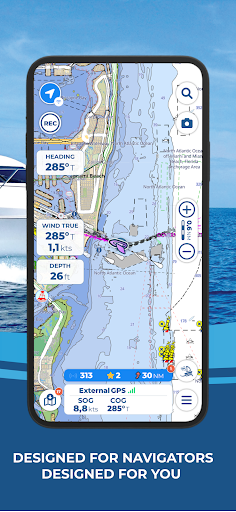
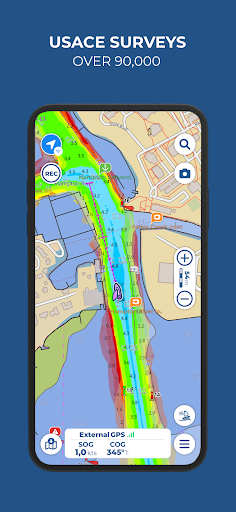
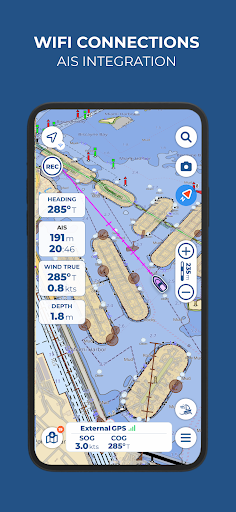
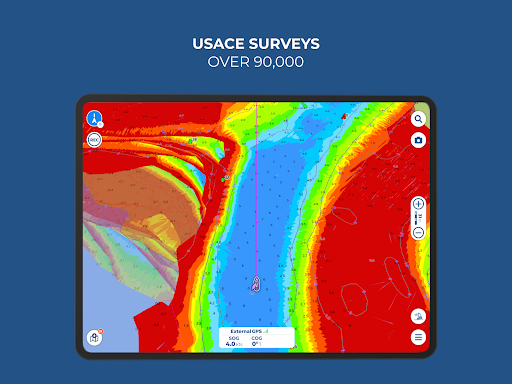
Free 14-day trial for all subscriptions Aqua Map offers weekly updated OFFICIAL NAUTICAL CHARTS (NOAA) for marine navigation. Purchase a chart subscription for the area of your interest, download the map areas for offline use, and connect your onboard instruments for a complete experience. ● BASIC FEATURES - Switch between manual and auto route planning modes - Record your GPS tracks - Store and share your navigation data (markers, routes, and recorded tracks) - Display tides and currents predictions and simulations - Increase your safety with Anchor Alarm - Enable Live Sharing to interact with the Aqua Map community - Display points of interest from the "ActiveCaptain" and "Waterway Guide" communities ● EXPERT SUBSCRIPTION Note: this subscription does not include charts; it must be paired with a chart subscription. - Marine forecasts (wind, waves, currents, gusts, salinity, sea surface temperature + weather information for any point on the map) - Overlay satellite images on the charts - Advanced AnchorLink with anchorage mirroring and email/telegram notifications for greater peace of mind while anchored, even if you are away from the boat - Connect your NMEA instruments via WiFi (autopilot, depth sounder, wind sensor, compass, GPS) and use their data on the app - AIS with automatic collision detection - Route Explorer for real-time information on all elements along your route ● MASTER SUBSCRIPTION FOR THE BEST NAVIGATION EXPERIENCE Note: this subscription does not include charts; it must be paired with a chart subscription. - All features of the EXPERT subscription are included in the MASTER subscription. - U.S. LOCAL DATA: > U.S. Army Corps of Engineers surveys for safe navigation in shallow waters > U.S. Coast Guard lights list and local notice to mariners ● PURCHASE OPTIONS To access the charts, you need to purchase a chart subscription for the area of interest. Optionally, you can add the Expert subscription or the Master subscription to unlock extra navigation features and additional data. Subscription payments will be made through your Google account. The annual subscription will automatically renew unless canceled at least 24 hours before expiration. You can manage your subscription and disable automatic renewal in the account settings section after purchase. End User License Agreement: https://www.aquamap.app/eula Terms of use: https://www.aquamap.app/terms-and-conditions Privacy policy: https://www.aquamap.app/privacy-policy

What Aqua Map Boating Is Used For

Aqua Map Boating appears to be a marine navigation app for boaters who need charts, route planning, and on-water reference tools on a phone. Based on the metadata, it is centered on official nautical charts, GPS-based navigation, and offline map use, which makes it useful for planning and following routes when traveling by boat or working around coastal and inland waterways.

The app also appears to support navigation-related data sharing and instrument integration. Its listed permissions and features suggest it may use precise location, network access, and storage to download chart areas, record tracks, save routes and markers, and connect with onboard instruments such as GPS, depth sounders, wind sensors, compass, autopilot, and AIS equipment. It also includes tide and current information, anchor alarm tools, and weather-related overlays in higher subscription tiers, so it may be used for trip planning, anchoring, and monitoring conditions while underway.

Because it is in the Maps & Navigation category and is built for phones, it seems most relevant to users who want a handheld boating reference app rather than a general map app. The subscription model also indicates that charts and some advanced marine data are separate from the base app, so the common use is likely to combine the app with a paid chart area and optional feature upgrades.

Common uses

  • Download and view nautical charts for a selected boating area
  • Plan and adjust boat routes with manual or automatic route tools
  • Record GPS tracks, routes, and markers for later reference
  • Use offline map areas when cellular coverage is limited
  • Check tides, currents, and other marine conditions while planning
  • Set anchor alarms and monitor anchorage-related information
  • Connect supported onboard instruments and marine data sources
Best for:
Boaters Marine navigation Offline charts Route planning Phone use

App Details

Package:
com.gec.MarineApp.WorldViewerLite
Developer:
GEC S.R.L.
Version:
43.2
Updated:
Mar 20, 2026
Min Android:
8.0
Age Rating:
Everyone
Contains Ads:
No
In-App Purchases:
Yes

Official Listing

  • Official listing available on Google Play
  • Package name: com.gec.MarineApp.WorldViewerLite
  • Age rating: Everyone

Explore More

Browse more apps in Maps & Navigation or explore the Phone hub .

Related Maps & Navigation Apps

Navionics® Boating icon

Navionics® Boating

Maps & Navigation Garmin

Detailed nautical charts and a boatload of useful features.

Version Varies with device 242.5 MB ⭐ 2.80 5,000,000+ installs
VesselFinder icon

VesselFinder

Maps & Navigation VT Explorer Ltd

Real time AIS ship tracking of marine traffic, vessel database, ship photos.

Version 5.6.5 28.2 MB ⭐ 3.99 1,000,000+ installs

How to Download Aqua Map Boating

If this app is not hosted directly on APKApps official link, then for the safest and most up-to-date version, install it from its official Google Play listing.