SoundType AI - Voice To Text icon

Phone

SoundType AI - Voice To Text

Productivity Innosquares limited ⭐ 4.50 1,000,000+
Version 2.0.12 Everyone

Screenshots

SoundType AI - Voice To Text screenshot
Permissions Explained 13 permissions requested View details

This app requests 13 permissions. The table below explains what each permission may allow and what users should review before installing.

Status Permission What it means Why it may be used User safety note
ℹ️ Review Read The Contents Of Your Usb Storage read the contents of your USB storage This is an Android permission or app-specific permission requested by the app. The app may use this permission for features related to its category, device support, background behavior, storage, connectivity, or system integration. Review this permission before installing, especially if it does not match the app’s expected purpose.
ℹ️ Review Modify Or Delete The Contents Of Your Usb Storage modify or delete the contents of your USB storage This is an Android permission or app-specific permission requested by the app. The app may use this permission for features related to its category, device support, background behavior, storage, connectivity, or system integration. Review this permission before installing, especially if it does not match the app’s expected purpose.
ℹ️ Review Record Audio record audio This is an Android permission or app-specific permission requested by the app. The app may use this permission for features related to its category, device support, background behavior, storage, connectivity, or system integration. Review this permission before installing, especially if it does not match the app’s expected purpose.
ℹ️ Review View Network Connections view network connections This is an Android permission or app-specific permission requested by the app. The app may use this permission for features related to its category, device support, background behavior, storage, connectivity, or system integration. Review this permission before installing, especially if it does not match the app’s expected purpose.
ℹ️ Review Pair With Bluetooth Devices pair with Bluetooth devices This is an Android permission or app-specific permission requested by the app. The app may use this permission for features related to its category, device support, background behavior, storage, connectivity, or system integration. Review this permission before installing, especially if it does not match the app’s expected purpose.
ℹ️ Review Access Bluetooth Settings access Bluetooth settings This is an Android permission or app-specific permission requested by the app. The app may use this permission for features related to its category, device support, background behavior, storage, connectivity, or system integration. Review this permission before installing, especially if it does not match the app’s expected purpose.
ℹ️ Review Full Network Access full network access This is an Android permission or app-specific permission requested by the app. The app may use this permission for features related to its category, device support, background behavior, storage, connectivity, or system integration. Review this permission before installing, especially if it does not match the app’s expected purpose.
ℹ️ Review Change Your Audio Settings change your audio settings This is an Android permission or app-specific permission requested by the app. The app may use this permission for features related to its category, device support, background behavior, storage, connectivity, or system integration. Review this permission before installing, especially if it does not match the app’s expected purpose.
ℹ️ Review Control Vibration control vibration This is an Android permission or app-specific permission requested by the app. The app may use this permission for features related to its category, device support, background behavior, storage, connectivity, or system integration. Review this permission before installing, especially if it does not match the app’s expected purpose.
ℹ️ Review Prevent Device From Sleeping prevent device from sleeping This is an Android permission or app-specific permission requested by the app. The app may use this permission for features related to its category, device support, background behavior, storage, connectivity, or system integration. Review this permission before installing, especially if it does not match the app’s expected purpose.
ℹ️ Review Google Play License Check Google Play license check This is an Android permission or app-specific permission requested by the app. The app may use this permission for features related to its category, device support, background behavior, storage, connectivity, or system integration. Review this permission before installing, especially if it does not match the app’s expected purpose.
ℹ️ Review Read Google Service Configuration read Google service configuration This is an Android permission or app-specific permission requested by the app. The app may use this permission for features related to its category, device support, background behavior, storage, connectivity, or system integration. Review this permission before installing, especially if it does not match the app’s expected purpose.
ℹ️ Review Receive Data From Internet receive data from Internet This is an Android permission or app-specific permission requested by the app. The app may use this permission for features related to its category, device support, background behavior, storage, connectivity, or system integration. Review this permission before installing, especially if it does not match the app’s expected purpose.

About SoundType AI - Voice To Text

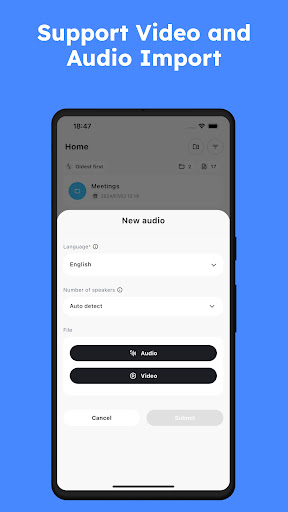
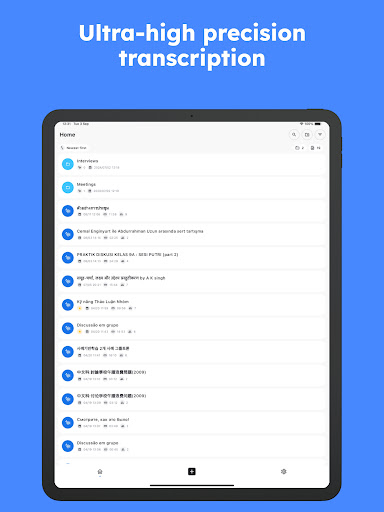
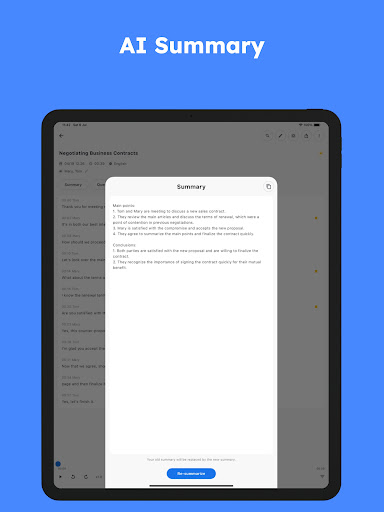
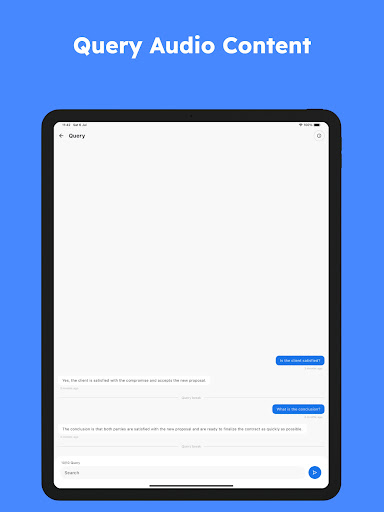
Turn spoken words into written text effortlessly with SoundType AI! Our advanced app for transcribing voice to text and transcribing audio transforms your voice or video files into accurately transcribed text. Its also equipped with innovative audio features and AI-powered summaries. With our standout feature of individual speaker identification, its an ideal choice for transcribing from meetings, interviews, podcasts, and more. Supporting over 90 languages, SoundType AI simplifies transcription of conversations from around the globe. Features: ● Super High Accuracy in Converting Voice to Text Transcription Our AI boasts an unrivaled precision for transcribing voice to text, trained on an impressive 680K hours of multilingual and multitask data. Experience flawless transcriptions each time you use SoundType AI. ● Individual Speaker Recognition for Transcribing Ideal for group meetings and interviews, SoundType AI identifies and tags different speakers in your audio, providing well-structured, easy-to-follow transcriptions. ● Uncomplicated Long Audio Transcription Have lengthy recordings to transcribe? No problem! SoundType AI handles long audio files with ease, ensuring all-inclusive and accurate transcriptions. ● Engaging Transcribe Audio to Text Experience Engage with your transcriptions in unique ways. Ask questions about your audio or video, and our AI will generate responses from the content, enhancing your transcribe experience. ● Summarized Transcriptions Receive the key points and highlights of your audio in a concise, understandable format with SoundType AIs summary feature. ● Comprehensive Voice/Video to Text Transcription Whether its uploading an audio or video file, recording within the app, or importing from YouTube, SoundType AI transcribes it into text for straightforward analysis. ● Broad Language Support for Transcription With our sophisticated AI technology, transcribe in over 90 languages and dialects effortlessly, perfect for international meetings, research work, and global podcasts. Use SoundType AI for transcribing spoken content from: ○ Meeting Notes ○ Negotiations ○ Interviews ○ Language Studies ○ Podcasts ○ Lectures And more, all converted into simple-to-read text! Supported Formats: Our app accepts a broad range of file formats, including MP3, WAV, WMA, M4A, and more. If you have queries about specific file types, our support team is ready to help. Export Formats: Easily export your transcriptions in various formats, such as TXT and SRT. Requirements: Internet connection Upgrade your productivity with SoundType AI - the future of transcribe voice to text and transcribe audio to text at your fingertips. Privacy Policy: https://soundtype.ai/privacy-policy Terms of Use: https://soundtype.ai/terms-of-use

What SoundType AI - Voice To Text Is Used For

SoundType AI - Voice To Text appears to be a productivity app focused on turning spoken content into written text on a phone. Based on the metadata, it may be used to transcribe live speech or imported audio and video files into text, which can be helpful for taking notes from meetings, interviews, lectures, or podcasts. The app also appears to include AI-powered summaries, so users may use it to quickly review the main points from longer recordings.

The metadata suggests it is designed for conversations in multiple languages and for recordings with more than one speaker. Its speaker identification feature may help organize transcripts by labeling different voices, which can be useful in group discussions or interview settings. Permission details such as microphone access, storage access, and network access align with recording audio, reading files, and sending data for transcription features.

Common uses

  • Transcribing live speech into text on a phone
  • Converting recorded audio or video files into transcripts
  • Capturing notes from meetings, interviews, or lectures
  • Creating summaries from longer recordings
  • Separating different speakers in group conversations
  • Working with multilingual speech and dialects
  • Reviewing content from podcasts or other spoken media
Best for:
meeting notes interviews lecture notes speech transcription multilingual use phone app

App Details

Package:
com.innosq.soundtypeai
Category:
Productivity
Developer:
Innosquares limited
Version:
2.0.12
Updated:
Mar 24, 2026
Min Android:
8.0
Age Rating:
Everyone
Contains Ads:
No
In-App Purchases:
Yes

Official Listing

  • Official listing available on Google Play
  • Package name: com.innosq.soundtypeai
  • Age rating: Everyone

Explore More

Browse more apps in Productivity or explore the Phone hub .

Related Productivity Apps

Microsoft OneDrive icon

Microsoft OneDrive

Productivity Microsoft Corporation

Securely save and share your favorite memories and files across your devices.

Version Varies with device 89.8 MB ⭐ 4.60 5,000,000,000+ installs
Google One icon

Google One

Productivity Google LLC

Cloud storage, automatic phone backup, and more.

Version 1.302.885140631 25.5 MB ⭐ 4.10 1,000,000,000+ installs
Microsoft Word: Edit Documents icon

Microsoft Word: Edit Documents

Productivity Microsoft Corporation

Craft your story with formatting and grammar tools to ensure it’s right, always

Version Varies with device 120.4 MB ⭐ 4.80 1,000,000,000+ installs
Microsoft Excel: Spreadsheets icon

Microsoft Excel: Spreadsheets

Productivity Microsoft Corporation

Use powerful, industry-leading AI tools to generate visual charts from any data

Version Varies with device 230.4 MB ⭐ 4.80 1,000,000,000+ installs
Microsoft PowerPoint icon

Microsoft PowerPoint

Productivity Microsoft Corporation

Seamlessly integrate data and reports to build your presentation to impress

Version Varies with device 226.3 MB ⭐ 4.80 1,000,000,000+ installs
Microsoft Outlook icon

Microsoft Outlook

Productivity Microsoft Corporation

Stay on top of multiple accounts with emails, calendars & contacts in one place

Version 5.2611.0 106.4 MB ⭐ 4.40 1,000,000,000+ installs

How to Download SoundType AI - Voice To Text

If this app is not hosted directly on APKApps official link, then for the safest and most up-to-date version, install it from its official Google Play listing.