About PolarFinder Pro
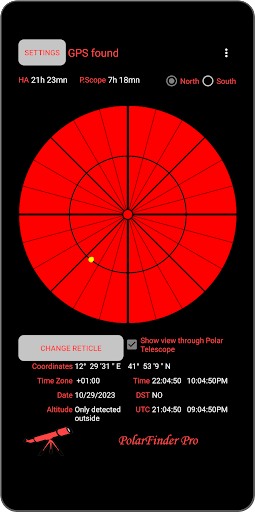
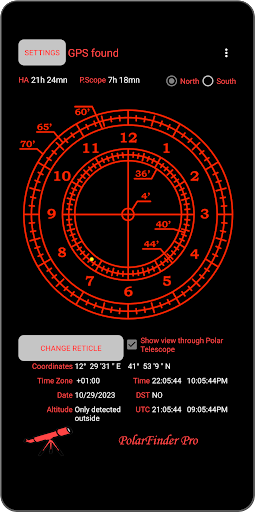
This application allows you to make a precise stationing of the mount, excellent especially for astrophotographers and it works in both celestial poles. In the settings you can choose to exclude the GPS and enter the customized coordinates and / or even a particular date and time in order to know the exact position of the Polaris (northern hemisphere) or Sigma Octantis (southern hemisphere) for a certain place. This feature is also useful to know the peak of the polar for a specific place directly in the field without having to resort to third applications. Once the position has been calculated, the polar image will be shown exactly as it should be set in the polar telescope, remembering that it inverts the images (the app also allows real vision). ATTENTION: To use this app you need to see the Polar star and have a polar scope. Main features of the app: 1. Possibility to manually enter coordinates, date and time excluding the gps; 2. Various reticles available: - PolarFinder; - Skywatcher (old and new); - Ioptron; - Bresser; - Astro-Physics; - Takahashi; 3. Works in both hemispheres; 4. Possibility of activating/deactivating the view through the polar telescope (inverts the images); 5. Possibility of activating/deactivating the "Full Screen" view; 6. Possibility of activating/deactivating the "Super Dark" view; 7. Position of the Polaris or of the Octant very accurate thanks to the calculation of the phenomenon of the Precession; 8. Altimeter; 9. Very accurate help PLEASE NOTE: This app unlike most apps of its kind, takes into account the phenomenon of the Earth's Precession. The Earth has a rather complex movement, one of them is called the Precession where the rotational axis of Earths slowly changes its orientation and the celestial poles are slowly changing with it. This movement is rather small, around 26,000 years per revolution, but in time it changes the apparent position of celestial objects. As the right-ascension coordinate is used when calculating the hour angle, it is important to consider the effects of precession on the RA coordinate. For any problems, clarifications, suggestions or suggestions for improvement, write to me. I am at your complete disposal thanks and ... Clear Skies!
What PolarFinder Pro Is Used For
PolarFinder Pro is a tools app that appears to help with polar alignment of telescope mounts. Based on the metadata, it is mainly intended for astrophotographers and other users who need to position a mount accurately using the sky’s polar reference points, with support for both the northern and southern hemispheres.
The app may be useful in the field when setting up a mount and checking the position of Polaris or Sigma Octantis for a specific place and time. It includes options to enter coordinates manually, which suggests it can be used without GPS if a user prefers to type in location data. The permission list includes approximate and precise location, which fits an app that calculates position based on where you are. It also references polar scope reticles, inverted telescope-style viewing, and full-screen or dark display options, so it appears designed for practical setup rather than general astronomy browsing.
Common uses likely include quick mount stationing before an observing session, selecting the right reticle style for a specific polar scope, and checking alignment on a phone in outdoor conditions. Because the app is described as working with celestial pole calculations and precession, it may appeal to users who want a more technical alignment aid for field use.
Common uses
- Aligning a telescope mount with the celestial pole
- Checking Polaris or Sigma Octantis position for a given place and time
- Using manual coordinates when GPS is unavailable or not wanted
- Matching alignment markers with supported polar scope reticles
- Viewing a dark or full-screen setup interface outdoors
- Helping astrophotographers with mount stationing in the field
App Details
Package:
com.lunari.polarfinderpro
Developer:
Raffaele Lunari
Version:
2.5.5
Updated:
Feb 1, 2026
Min Android:
5.0
Age Rating:
Everyone
Contains Ads:
No
In-App Purchases:
No
Official Listing
-
Official listing available on
Google Play
-
Package name:
com.lunari.polarfinderpro
-
Age rating:
Everyone
Related Tools Apps
Travel & Local
•
Outdooractive AG
Find, plan & track your outdoor adventures with reliable maps trusted by experts
Version Varies with device
27.3 MB
⭐ 4.40
5,000,000+ installs
Maps & Navigation
•
Waymarked Trails LTD
Version Varies with device
⭐ 4.30
100,000+ installs
Education
•
Simulation Curriculum Corp.
Version 7.6.5.4
⭐ 4.10
10,000+ installs
How to Download PolarFinder Pro
If this app is not hosted directly on APKApps official link,
then for the safest and most up-to-date version, install it from its official Google Play listing.