EAS Simulator Pro icon

Phone

EAS Simulator Pro

Entertainment PJP Develop ⭐ 4.30 10,000+
Version 2.2.4 Mature 17+

Screenshots

EAS Simulator Pro screenshot
Permissions Explained 7 permissions requested View details

This app requests 7 permissions. The table below explains what each permission may allow and what users should review before installing.

Status Permission What it means Why it may be used User safety note
ℹ️ Review Read The Contents Of Your Usb Storage read the contents of your USB storage This is an Android permission or app-specific permission requested by the app. The app may use this permission for features related to its category, device support, background behavior, storage, connectivity, or system integration. Review this permission before installing, especially if it does not match the app’s expected purpose.
ℹ️ Review Modify Or Delete The Contents Of Your Usb Storage modify or delete the contents of your USB storage This is an Android permission or app-specific permission requested by the app. The app may use this permission for features related to its category, device support, background behavior, storage, connectivity, or system integration. Review this permission before installing, especially if it does not match the app’s expected purpose.
ℹ️ Review Record Audio record audio This is an Android permission or app-specific permission requested by the app. The app may use this permission for features related to its category, device support, background behavior, storage, connectivity, or system integration. Review this permission before installing, especially if it does not match the app’s expected purpose.
ℹ️ Review View Network Connections view network connections This is an Android permission or app-specific permission requested by the app. The app may use this permission for features related to its category, device support, background behavior, storage, connectivity, or system integration. Review this permission before installing, especially if it does not match the app’s expected purpose.
ℹ️ Review Disable Your Screen Lock disable your screen lock This is an Android permission or app-specific permission requested by the app. The app may use this permission for features related to its category, device support, background behavior, storage, connectivity, or system integration. Review this permission before installing, especially if it does not match the app’s expected purpose.
ℹ️ Review Full Network Access full network access This is an Android permission or app-specific permission requested by the app. The app may use this permission for features related to its category, device support, background behavior, storage, connectivity, or system integration. Review this permission before installing, especially if it does not match the app’s expected purpose.
ℹ️ Review Prevent Device From Sleeping prevent device from sleeping This is an Android permission or app-specific permission requested by the app. The app may use this permission for features related to its category, device support, background behavior, storage, connectivity, or system integration. Review this permission before installing, especially if it does not match the app’s expected purpose.

About EAS Simulator Pro

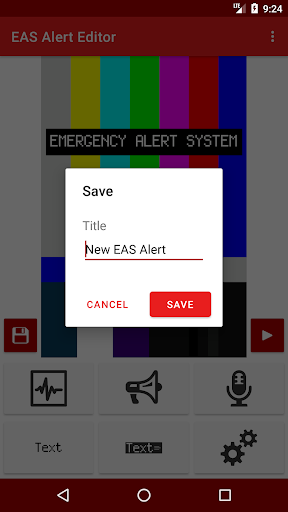
Ever wanted to simulate a natural disaster, a nuclear war or a zombie apocalypse? Now you can use your Android device to create and play realistic-looking mock Emergency Alert System (formerly known as Emergency Broadcast System) messages. ⭐⭐⭐⭐ 9000+ PURCHASES & REACHED THE TOP NEW PAID AND TOP PAID ANDROID APPS CHART - THANK YOU FOR YOUR PREFERENCE!⭐⭐⭐⭐ Thank you all for the useful feedback and acclaim! ✅ EAS SIMULATOR PRO FEATURES: • No ads. • Full access to the Emergency Alert System alert editor to create and save your own custom alerts without limitations. • Convert the EAS alerts to video (uses screen recording and microphone audio). • Export/import your EAS alerts as files for backup or sharing with friends with EAS Simulator Demo or Pro. • Plays realistic EAS alerts. • Schedule an alert to play at a given time (even if the device is locked). Ideal for drills, pranks or role-playing. • Comes loaded with all the pre-defined alerts, featuring real-life natural disasters (e.g. flash flood in New Jersey, tornado in Oklahoma...) and also some thrilling fictional emergency scenarios including a North Korean nuclear attack, an unidentified nuclear strike in New York, zombie virus pandemics and others inspired by famous video-games and movies. 🚨 THE ALERTS: • Backgrounds similar to the ones used on TV alerts (black, color bars, intermission screens, etc.). • Static or blinking texts. • Scrolling texts (news-ticker like). • SAME headers (the beeping and buzzing sounds heard in the beginning of the alerts). • Attention signal (single/combined frequency and tornado siren). • Voice message generated by your device's Text to Speech engine (TTS). • End of Message (EOM) sound. 📝 NOTES: • It's important that you're satisfied with your purchase, so before buying EAS Simulator Pro consider trying the Demo version first and see if the EAS creator features work well in your device. • Voice messages are not generated by EAS Simulator. Instead, the app uses your phone/tablet's built-in Text to Speech engine, if it has any. If your device doesn't have a TTS engine installed, the voice messages will not play, but everything else in the alerts will. The Google Play store has plenty of TTS engines and voices (both free and paid) you can use. If you want to use different voices in your alerts, you need to download and install a different TTS engine on your device and set it as the default. • Exporting to video is a new functionality which might not work properly on some devices. Please be patient. Inform the developer if you have any issues. ⚠️ KNOWN ISSUES: • Users with Android 10 were experiencing crashes when trying to schedule an alert. This has been fixed in version 2.0. • The latest versions of the OS tightened up restrictions on interruptions caused by apps: This means that a scheduled alert will show up as a notification (instead of playing automatically) if you're interacting with your phone at the scheduled time. Clicking on the notification will play the…

What EAS Simulator Pro Is Used For

EAS Simulator Pro appears to be an entertainment app for creating and playing mock Emergency Alert System messages on an Android phone. Based on the metadata, it is commonly used to build realistic-looking alert screens and audio sequences that resemble broadcast emergency notices, including preset scenarios and custom alerts made by the user.

The app may appeal to people who want to experiment with emergency-style presentations, stage drills, or create fictional alert clips for role-play or video projects. The permission set suggests it can work with audio recording, file storage, network access, and screen/sleep control, which fits its features for saving alerts, converting them to video, and scheduling alerts to play later. Since voice playback depends on the device’s Text to Speech support, results may vary by phone. It is mainly a phone app rather than a tablet- or TV-focused tool.

Common uses

  • Create mock emergency alert messages with visual and audio effects
  • Use preset alert scenarios or make custom alerts from the editor
  • Save and export alert files for backup or sharing
  • Schedule an alert to play at a chosen time
  • Record audio and convert alerts into video clips
  • Use it for drills, role-play, or fictional emergency-style content
  • Relies on the device’s Text to Speech engine for spoken messages
Best for:
Phone users Custom alert creation Role-play scenarios Drill practice Video clip makers

App Details

Package:
com.pjpdevelop.eassimulator.pro
Category:
Entertainment
Developer:
PJP Develop
Version:
2.2.4
Updated:
Dec 29, 2024
Min Android:
10
Age Rating:
Mature 17+
Contains Ads:
No
In-App Purchases:
No

Official Listing

  • Official listing available on Google Play
  • Package name: com.pjpdevelop.eassimulator.pro
  • Age rating: Mature 17+

Explore More

Browse more apps in Entertainment or explore the Phone hub .

Related Entertainment Apps

Prime Video icon

Prime Video

Entertainment Amazon Mobile LLC

Watch movies, TV shows, live programming and sports on Prime Video

Version Varies with device 46.9 MB ⭐ 4.10 500,000,000+ installs
Disney+ icon

Disney+

Entertainment Disney
Version 26.4.0+rc4-2026.03.25 59.6 MB ⭐ 4.30 500,000,000+ installs
Prime Video icon

Prime Video

Entertainment Amazon Mobile LLC

Watch movies, TV shows, live programming and sports on Prime Video

Version 6.23.21+v15.4.0.880-armv7a 34.1 MB ⭐ 2.90 100,000,000+ installs
Twitch: Live Streaming icon

Twitch: Live Streaming

Entertainment Twitch Interactive, Inc.
Version Varies with device 140.0 MB ⭐ 4.00 100,000,000+ installs

How to Download EAS Simulator Pro

If this app is not hosted directly on APKApps official link, then for the safest and most up-to-date version, install it from its official Google Play listing.