Pocket Radar® Sports icon

Phone

Pocket Radar® Sports

Sports Pocket Radar, Inc. ⭐ 3.40 100,000+
Version 2.3.2 Everyone

Screenshots

Pocket Radar® Sports screenshot
Permissions Explained 13 permissions requested View details

This app requests 13 permissions. The table below explains what each permission may allow and what users should review before installing.

Status Permission What it means Why it may be used User safety note
ℹ️ Review Approximate Location (network Based) approximate location (network-based) This is an Android permission or app-specific permission requested by the app. The app may use this permission for features related to its category, device support, background behavior, storage, connectivity, or system integration. Review this permission before installing, especially if it does not match the app’s expected purpose.
ℹ️ Review Precise Location (gps And Network Based) precise location (GPS and network-based) This is an Android permission or app-specific permission requested by the app. The app may use this permission for features related to its category, device support, background behavior, storage, connectivity, or system integration. Review this permission before installing, especially if it does not match the app’s expected purpose.
ℹ️ Review Read The Contents Of Your Usb Storage read the contents of your USB storage This is an Android permission or app-specific permission requested by the app. The app may use this permission for features related to its category, device support, background behavior, storage, connectivity, or system integration. Review this permission before installing, especially if it does not match the app’s expected purpose.
ℹ️ Review Take Pictures And Videos take pictures and videos This is an Android permission or app-specific permission requested by the app. The app may use this permission for features related to its category, device support, background behavior, storage, connectivity, or system integration. Review this permission before installing, especially if it does not match the app’s expected purpose.
ℹ️ Review Record Audio record audio This is an Android permission or app-specific permission requested by the app. The app may use this permission for features related to its category, device support, background behavior, storage, connectivity, or system integration. Review this permission before installing, especially if it does not match the app’s expected purpose.
ℹ️ Review View Network Connections view network connections This is an Android permission or app-specific permission requested by the app. The app may use this permission for features related to its category, device support, background behavior, storage, connectivity, or system integration. Review this permission before installing, especially if it does not match the app’s expected purpose.
ℹ️ Review Pair With Bluetooth Devices pair with Bluetooth devices This is an Android permission or app-specific permission requested by the app. The app may use this permission for features related to its category, device support, background behavior, storage, connectivity, or system integration. Review this permission before installing, especially if it does not match the app’s expected purpose.
ℹ️ Review Access Bluetooth Settings access Bluetooth settings This is an Android permission or app-specific permission requested by the app. The app may use this permission for features related to its category, device support, background behavior, storage, connectivity, or system integration. Review this permission before installing, especially if it does not match the app’s expected purpose.
ℹ️ Review Change Network Connectivity change network connectivity This is an Android permission or app-specific permission requested by the app. The app may use this permission for features related to its category, device support, background behavior, storage, connectivity, or system integration. Review this permission before installing, especially if it does not match the app’s expected purpose.
ℹ️ Review Full Network Access full network access This is an Android permission or app-specific permission requested by the app. The app may use this permission for features related to its category, device support, background behavior, storage, connectivity, or system integration. Review this permission before installing, especially if it does not match the app’s expected purpose.
ℹ️ Review Run At Startup run at startup This is an Android permission or app-specific permission requested by the app. The app may use this permission for features related to its category, device support, background behavior, storage, connectivity, or system integration. Review this permission before installing, especially if it does not match the app’s expected purpose.
ℹ️ Review Prevent Device From Sleeping prevent device from sleeping This is an Android permission or app-specific permission requested by the app. The app may use this permission for features related to its category, device support, background behavior, storage, connectivity, or system integration. Review this permission before installing, especially if it does not match the app’s expected purpose.
ℹ️ Review Modify System Settings modify system settings This is an Android permission or app-specific permission requested by the app. The app may use this permission for features related to its category, device support, background behavior, storage, connectivity, or system integration. Review this permission before installing, especially if it does not match the app’s expected purpose.

About Pocket Radar® Sports

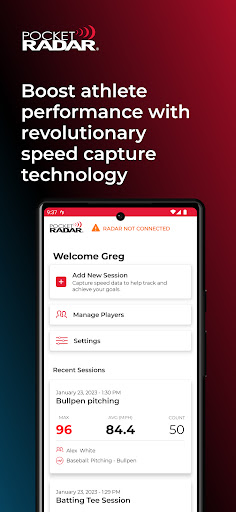
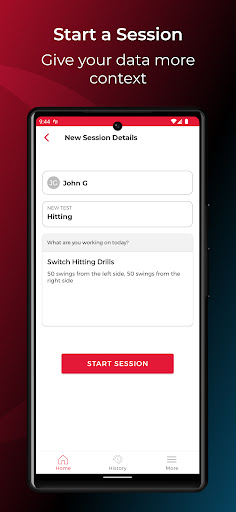
The Pocket Radar® Sports App is a performance management platform that makes capturing, analyzing, and sharing speeds more powerful than ever. *IMPORTANT: This App requires the Smart Coach Radar as a separate piece of hardware to pair with via Bluetooth® and does not work with any other Pocket Radar models. Get yours today at PocketRadar.com/SmartCoach **New Pocket Radar PLUS Subscription features available at additional cost - CONNECT: Add velocities into your favorite streaming & scoring providers to enhance your game experiences. Current partners include GameChanger, AthletesGoLive, SkillShark, SidelineHD and Sporfie. More coming soon! - PITCH TAGGING / CHARTING: Dive deeper into your games and bullpens with location and pitch type selections associated with each velocity. POWERFUL NEW APP FEATURES: • Speed Display and Audio Announcements: Improve your training and development sessions by seeing your results immediately on an external display or by hearing your numbers through pairing with a Bluetooth® speaker or headphones. • Speeds Embedded Directly in Your Videos: Record video with speeds embedded directly in the video. Export and share your videos with friends, coaches, and recruiters. • Detailed History for Each Session: Track your progress over time with our comprehensive history of your sessions including max speed and average speed. Sort and filter your results. • All of your players in one place: Want to manage not just one but a group of player’s and their velocities? Player Management allows you to simply create a list of players and assign one or multiple players to each session. • Share your speed for the world to see: Do you have a great video that shows off your talents and speed number? Share it for the world to see. When you play back a recorded video, you can tap the share icon and share to your favorite social media platforms like Facebook or Instagram – or send a text message of the video to your friends. AND MORE FEATURES INCLUDING… Portrait Mode (Record and Display Speeds in Either Landscape or Portrait Mode) History Sorting/Filtering Voice Annotated Notes Live View (Real Time List of Speeds) Selective Download (You Choose What to Export) Video Organization (Save Videos in Folder, Not Entire Gallery) With +/- 1 MPH accuracy, this is not your typical "phone radar" that functions like a stopwatch or relies on perfect optical conditions/set-up. This is the same technology that is currently being utilized for player development and recruiting at the highest levels, including World Series champions and National Championship winning schools and organizations. Compatible with devices running Android 10 and above. Terms of Use and EULA: https://www.pocketradar.com/pages/terms-of-use FAQ: https://www.pocketradar.com/community/help-center Contact Us: https://www.pocketradar.com/pages/contact-us

What Pocket Radar® Sports Is Used For

Pocket Radar® Sports appears to be a companion app for the Smart Coach Radar hardware, used to capture and manage speed measurements during sports training and game situations. Based on the metadata, it is centered on recording velocities, displaying them in real time, and organizing session results for athletes, coaches, or teams.

The app may be used on a phone near the field, bullpen, or practice area, where Bluetooth pairing with the radar device is required. Its permissions suggest it can connect to Bluetooth accessories, access audio and camera features for video capture, and use network access for sharing or syncing data. The description also indicates it can overlay speeds onto videos, keep session history, and support player management, which makes it useful for reviewing performance over time and sharing clips with coaches, recruiters, or teammates. Some features appear to relate to external display or audio announcements, and the app may also connect speeds into third-party sports streaming or scoring services.

Common uses

  • Pair with Smart Coach Radar hardware to capture speed readings
  • Show live speed results during training or games
  • Record videos with speed data embedded in the footage
  • Review session history, including max and average speeds
  • Organize results by player, session, or filter settings
  • Share clips or speed results with coaches and teammates
  • Connect to supported sports streaming or scoring platforms
Best for:
athletes coaches team training player tracking phone app

App Details

Package:
com.pocketradar.android
Category:
Sports
Developer:
Pocket Radar, Inc.
Version:
2.3.2
Updated:
Mar 25, 2026
Min Android:
10
Age Rating:
Everyone
Contains Ads:
No
In-App Purchases:
Yes

Official Listing

  • Official listing available on Google Play
  • Package name: com.pocketradar.android
  • Age rating: Everyone

Explore More

Browse more apps in Sports or explore the Phone hub .

Related Sports Apps

8 Ball Pool icon

8 Ball Pool

Sports Miniclip.com

Play online multiplayer or PvP Pool games and compete with your friends!

Version 56.21.1 116.8 MB ⭐ 4.80 1,000,000,000+ installs
EA SPORTS FC™ Mobile Soccer 26 icon

EA SPORTS FC™ Mobile Soccer 26

Sports ELECTRONIC ARTS

Play the World's Soccer Game Anywhere with Premier League, UCL & LALIGA stars.

Version 26.1.04 177.7 MB ⭐ 4.50 500,000,000+ installs
Carrom Pool: Disc Game icon

Carrom Pool: Disc Game

Sports Miniclip.com

Play the hit multiplayer Carrom Disc Pool board game and become the best!

Version 18.11.4 79.1 MB ⭐ 4.50 500,000,000+ installs
Soccer Superstar icon

Soccer Superstar

Sports Real Freestyle Soccer
Version 0.3.48 141.3 MB ⭐ 4.70 100,000,000+ installs
Dream League Soccer 2026 icon

Dream League Soccer 2026

Sports First Touch Games Ltd.

FIFPRO licensed soccer game

Version 13.130 535.3 MB ⭐ 4.40 100,000,000+ installs
eFootball™ icon

eFootball™

Sports KONAMI

Play eFootball™ with users around the world!

Version 10.3.1 61.4 MB ⭐ 4.20 100,000,000+ installs

How to Download Pocket Radar® Sports

If this app is not hosted directly on APKApps official link, then for the safest and most up-to-date version, install it from its official Google Play listing.