USB Camera Pro icon

Phone

USB Camera Pro

Video Players & Editors 沈垚 / ShenYao China ⭐ 3.60 100,000+
Version Varies with device Everyone

Screenshots

USB Camera Pro screenshot
Permissions Explained 14 permissions requested View details

This app requests 14 permissions. The table below explains what each permission may allow and what users should review before installing.

Status Permission What it means Why it may be used User safety note
ℹ️ Review Precise Location (gps And Network Based) precise location (GPS and network-based) This is an Android permission or app-specific permission requested by the app. The app may use this permission for features related to its category, device support, background behavior, storage, connectivity, or system integration. Review this permission before installing, especially if it does not match the app’s expected purpose.
ℹ️ Review Read The Contents Of Your Usb Storage read the contents of your USB storage This is an Android permission or app-specific permission requested by the app. The app may use this permission for features related to its category, device support, background behavior, storage, connectivity, or system integration. Review this permission before installing, especially if it does not match the app’s expected purpose.
ℹ️ Review Modify Or Delete The Contents Of Your Usb Storage modify or delete the contents of your USB storage This is an Android permission or app-specific permission requested by the app. The app may use this permission for features related to its category, device support, background behavior, storage, connectivity, or system integration. Review this permission before installing, especially if it does not match the app’s expected purpose.
ℹ️ Review Take Pictures And Videos take pictures and videos This is an Android permission or app-specific permission requested by the app. The app may use this permission for features related to its category, device support, background behavior, storage, connectivity, or system integration. Review this permission before installing, especially if it does not match the app’s expected purpose.
ℹ️ Review Record Audio record audio This is an Android permission or app-specific permission requested by the app. The app may use this permission for features related to its category, device support, background behavior, storage, connectivity, or system integration. Review this permission before installing, especially if it does not match the app’s expected purpose.
ℹ️ Review View Wi Fi Connections view Wi-Fi connections This is an Android permission or app-specific permission requested by the app. The app may use this permission for features related to its category, device support, background behavior, storage, connectivity, or system integration. Review this permission before installing, especially if it does not match the app’s expected purpose.
ℹ️ Review View Network Connections view network connections This is an Android permission or app-specific permission requested by the app. The app may use this permission for features related to its category, device support, background behavior, storage, connectivity, or system integration. Review this permission before installing, especially if it does not match the app’s expected purpose.
ℹ️ Review Allow Wi Fi Multicast Reception allow Wi-Fi Multicast reception This is an Android permission or app-specific permission requested by the app. The app may use this permission for features related to its category, device support, background behavior, storage, connectivity, or system integration. Review this permission before installing, especially if it does not match the app’s expected purpose.
ℹ️ Review Full Network Access full network access This is an Android permission or app-specific permission requested by the app. The app may use this permission for features related to its category, device support, background behavior, storage, connectivity, or system integration. Review this permission before installing, especially if it does not match the app’s expected purpose.
ℹ️ Review Run At Startup run at startup This is an Android permission or app-specific permission requested by the app. The app may use this permission for features related to its category, device support, background behavior, storage, connectivity, or system integration. Review this permission before installing, especially if it does not match the app’s expected purpose.
ℹ️ Review Draw Over Other Apps draw over other apps This is an Android permission or app-specific permission requested by the app. The app may use this permission for features related to its category, device support, background behavior, storage, connectivity, or system integration. Review this permission before installing, especially if it does not match the app’s expected purpose.
ℹ️ Review Control Vibration control vibration This is an Android permission or app-specific permission requested by the app. The app may use this permission for features related to its category, device support, background behavior, storage, connectivity, or system integration. Review this permission before installing, especially if it does not match the app’s expected purpose.
ℹ️ Review Prevent Device From Sleeping prevent device from sleeping This is an Android permission or app-specific permission requested by the app. The app may use this permission for features related to its category, device support, background behavior, storage, connectivity, or system integration. Review this permission before installing, especially if it does not match the app’s expected purpose.
ℹ️ Review Google Play License Check Google Play license check This is an Android permission or app-specific permission requested by the app. The app may use this permission for features related to its category, device support, background behavior, storage, connectivity, or system integration. Review this permission before installing, especially if it does not match the app’s expected purpose.

About USB Camera Pro

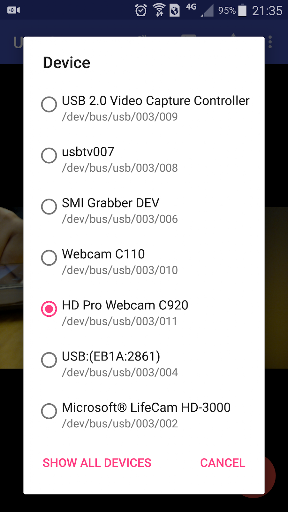
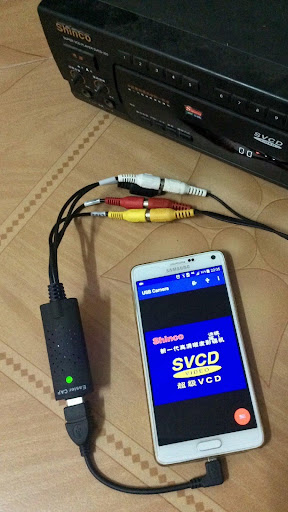
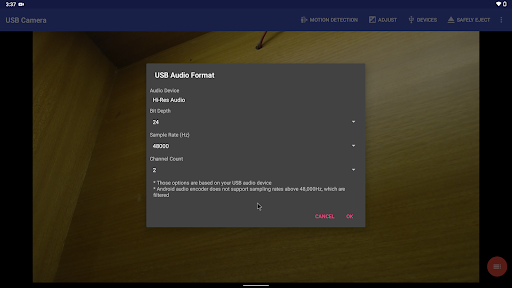
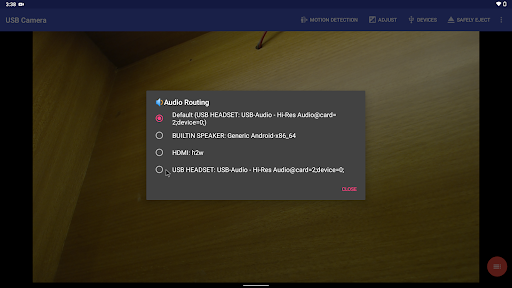
Using USB 3.0 HDMI capture card : https://youtu.be/WkmuyfwKVrs Using UVC H.264 device : https://youtu.be/j-71QMNuDr0 Connect multiple devices : https://youtu.be/2znw4eVazDs RTSP real time stream : https://youtu.be/-Qzc0RSDerg RTMP live streaming : https://youtu.be/S5Bc1r57CUU Picture In Picture : https://youtu.be/Mbturdxyi5c VR/FPV View : https://youtu.be/zEqBXLNFnE0 Display Video On Lock Screen : https://youtu.be/Hdf2H_YusO Tip: Supports following devices: * UVC WebCam with microphone or external USB Audio input (Supports H.264, H.265, HEVC, MJPG, YUY2, P010, NV12 and so on) * UVC video grabber with audio input or external USB Audio input (Up to 4K via HDMI, Supports H.264, H.265, HEVC, MJPG, YUY2, P010, NV12 and so on, Supports progressive and interlaced video) * Windows Hello Camera and IR Camera * Geek szitman supercamera(2ce3:3828)non-UVC devices, e.g. USB Endoscope * EasyCap including audio with UTV007 / HTV600 / HTV800 chipsets (VID_1B71&PID_3002) * EasyCap including audio with STK1160 + SAA7113/GM7113 + AC97 chipsets (Audio 48kHz stereo version VID_05E1&PID_0408) * EasyCap including audio with STK1160 + SAA7113/GM7113 (Audio 8kHz mono version VID_05E1&PID_0408) * EasyCap including audio with EM2860 + SAA7113/GM7113 + AC97 chipsets (VID_EB1A&PID_2861) * EasyCap including audio with SMI2021 + SAA7113/GM7113 + ES7240/CS5340 chipsets (VID_1C88&PID_0007, PID_003C, PID_003D, PID_003E, PID_003F, PID_1001) Please use a good quality OTG cable and ensure power supply. Some devices may need to bridge HUB to enhanced USB signals to work properly, e.g. Elgato Cam link, ezcap Video Grabber. Using HEVC for video recording/streaming requires Android 5.0 or above, and the device must supports HEVC codec. Using AV1 for video streaming requires Android 10 or above, and the device must supports AV1 codec. "USB Camera" can let your android device connect to USB WebCam or video capture card via USB-OTG. You can record video or capture snapshot, OR turn your phone into a wireless IP Camera via build-in RTSP and HTTP Server for security monitoring WITH Bi-directional audio support, you can use your browser to view, of course, include "IP Camera" App. "USB Camera" can mix USB Audio with a built-in microphone or system audio and output, or overlay the built-in camera/screen video onto the external camera video. "USB Camera" can push the video and audio to RTMP/SRT live media server and use for network live broadcast. It supports the rtmps security protocol and SRT protocol and it can also push the media to multiple media server at the same time. It also supports HEVC/AV1 over RTMP and can be used for YouTube Live currently. "USB Camera" supports Side by Side(SBS) view and it can work with FPV goggle "USB Camera" can add timestamp, GPS, speed and other info on the video frames while recording and can use your headset or Bluetooth headset to capture snapshot and record video. It also supports WebCam's snapshot button. "USB Camera" supports loop-recording. Can set…

What USB Camera Pro Is Used For

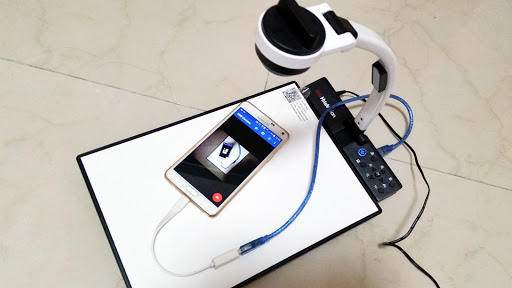
USB Camera Pro appears to be a camera and video-capture app for Android phones that can connect to USB webcams, capture cards, and other UVC-compatible video devices through USB-OTG. Based on the metadata, people commonly use it to view live camera input, record video, take snapshots, and work with external cameras that are not built into the phone. Its support for multiple video formats and capture devices suggests it is aimed at users who need a phone-based monitoring or capture setup rather than a simple selfie camera app.

The app also seems suited for streaming and surveillance-style use cases. The description mentions RTSP and HTTP server features, so it may be used to turn a phone into an IP camera for viewing in a browser or on another device. Permissions like microphone access, camera access, network access, startup behavior, and drawing over other apps fit these common tasks, especially when audio capture, live streaming, or always-on monitoring is needed. It may also be useful for users working with endoscopes, HDMI capture adapters, or other external video sources on the go.

Common uses

  • Connect a USB webcam or capture card to an Android phone via USB-OTG
  • Record video or capture still images from an external camera source
  • Use the phone as an IP camera for local streaming over RTSP or HTTP
  • Monitor a live feed with picture-in-picture or overlay-style viewing
  • Capture audio along with video when the connected device supports it
  • Work with compatible USB video devices such as UVC cameras and some capture adapters
  • Use for mobile viewing setups where an external camera is easier than the built-in camera
Best for:
external webcam use phone camera monitoring live video capture IP camera setup USB capture devices

App Details

Package:
com.shenyaocn.android.usbcamerapro
Developer:
沈垚 / ShenYao China
Version:
Varies with device
Updated:
Mar 30, 2026
Min Android:
Varies with device
Age Rating:
Everyone
Contains Ads:
No
In-App Purchases:
No

Official Listing

  • Official listing available on Google Play
  • Package name: com.shenyaocn.android.usbcamerapro
  • Age rating: Everyone

Explore More

Browse more apps in Video Players & Editors or explore the Phone hub .

Related Video Players & Editors Apps

IPC360 Home icon

IPC360 Home

Video Players & Editors Puwell Technology Inc
Version 8.10.1.0 ⭐ 2.80 1,000,000+ installs
YI Life icon

YI Life

House & Home ANTS TECHNOLOGY (HK) LIMITED

Connects you with family through real-time video and audio anytime and anywhere

Version 1.2.8_20240618 89.0 MB ⭐ 4.20 100,000+ installs

How to Download USB Camera Pro

If this app is not hosted directly on APKApps official link, then for the safest and most up-to-date version, install it from its official Google Play listing.