USB Dual Camera Pro icon

Phone

USB Dual Camera Pro

Video Players & Editors 沈垚 / ShenYao China ⭐ 4.00 1,000+
Version Varies with device Everyone

Screenshots

USB Dual Camera Pro screenshot
Permissions Explained 13 permissions requested View details

This app requests 13 permissions. The table below explains what each permission may allow and what users should review before installing.

Status Permission What it means Why it may be used User safety note
ℹ️ Review Precise Location (gps And Network Based) precise location (GPS and network-based) This is an Android permission or app-specific permission requested by the app. The app may use this permission for features related to its category, device support, background behavior, storage, connectivity, or system integration. Review this permission before installing, especially if it does not match the app’s expected purpose.
ℹ️ Review Read The Contents Of Your Usb Storage read the contents of your USB storage This is an Android permission or app-specific permission requested by the app. The app may use this permission for features related to its category, device support, background behavior, storage, connectivity, or system integration. Review this permission before installing, especially if it does not match the app’s expected purpose.
ℹ️ Review Modify Or Delete The Contents Of Your Usb Storage modify or delete the contents of your USB storage This is an Android permission or app-specific permission requested by the app. The app may use this permission for features related to its category, device support, background behavior, storage, connectivity, or system integration. Review this permission before installing, especially if it does not match the app’s expected purpose.
ℹ️ Review Take Pictures And Videos take pictures and videos This is an Android permission or app-specific permission requested by the app. The app may use this permission for features related to its category, device support, background behavior, storage, connectivity, or system integration. Review this permission before installing, especially if it does not match the app’s expected purpose.
ℹ️ Review Record Audio record audio This is an Android permission or app-specific permission requested by the app. The app may use this permission for features related to its category, device support, background behavior, storage, connectivity, or system integration. Review this permission before installing, especially if it does not match the app’s expected purpose.
ℹ️ Review View Wi Fi Connections view Wi-Fi connections This is an Android permission or app-specific permission requested by the app. The app may use this permission for features related to its category, device support, background behavior, storage, connectivity, or system integration. Review this permission before installing, especially if it does not match the app’s expected purpose.
ℹ️ Review View Network Connections view network connections This is an Android permission or app-specific permission requested by the app. The app may use this permission for features related to its category, device support, background behavior, storage, connectivity, or system integration. Review this permission before installing, especially if it does not match the app’s expected purpose.
ℹ️ Review Allow Wi Fi Multicast Reception allow Wi-Fi Multicast reception This is an Android permission or app-specific permission requested by the app. The app may use this permission for features related to its category, device support, background behavior, storage, connectivity, or system integration. Review this permission before installing, especially if it does not match the app’s expected purpose.
ℹ️ Review Full Network Access full network access This is an Android permission or app-specific permission requested by the app. The app may use this permission for features related to its category, device support, background behavior, storage, connectivity, or system integration. Review this permission before installing, especially if it does not match the app’s expected purpose.
ℹ️ Review Run At Startup run at startup This is an Android permission or app-specific permission requested by the app. The app may use this permission for features related to its category, device support, background behavior, storage, connectivity, or system integration. Review this permission before installing, especially if it does not match the app’s expected purpose.
ℹ️ Review Control Vibration control vibration This is an Android permission or app-specific permission requested by the app. The app may use this permission for features related to its category, device support, background behavior, storage, connectivity, or system integration. Review this permission before installing, especially if it does not match the app’s expected purpose.
ℹ️ Review Prevent Device From Sleeping prevent device from sleeping This is an Android permission or app-specific permission requested by the app. The app may use this permission for features related to its category, device support, background behavior, storage, connectivity, or system integration. Review this permission before installing, especially if it does not match the app’s expected purpose.
ℹ️ Review Google Play License Check Google Play license check This is an Android permission or app-specific permission requested by the app. The app may use this permission for features related to its category, device support, background behavior, storage, connectivity, or system integration. Review this permission before installing, especially if it does not match the app’s expected purpose.

About USB Dual Camera Pro

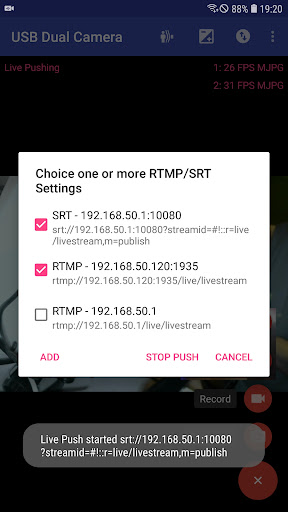
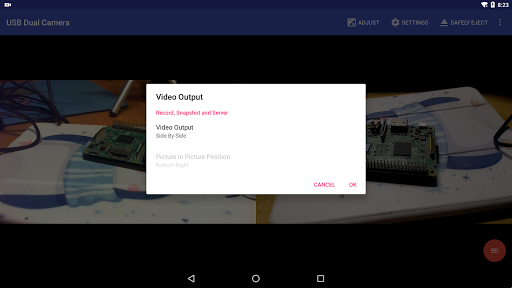
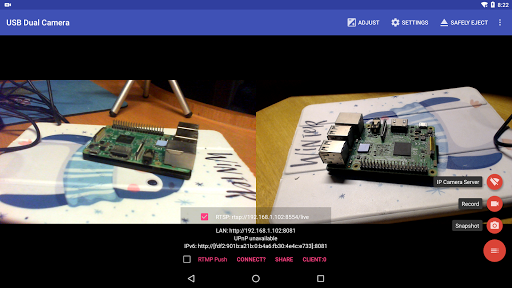
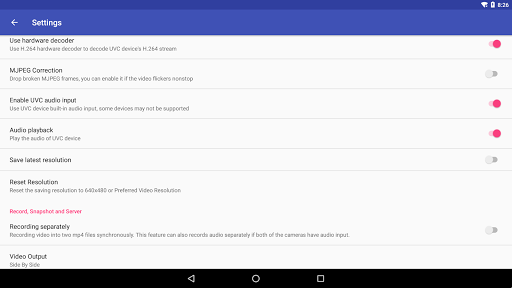
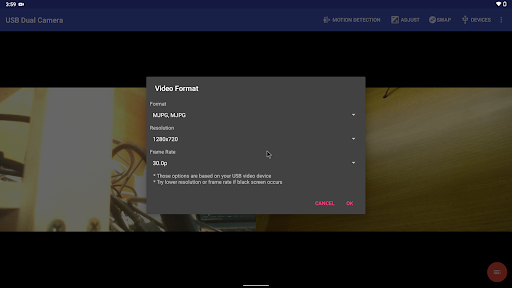
Tip: * Supports UVC WebCam WITH microphone and UVC video grabber WITH audio input(Up to 4K via HDMI, Supports progressive and interlaced video). MJPEG(or H.264, H.265, HEVC) format is required when using 2 cameras at the same time. * Windows Hello Camera and IR Camera * Geek szitman supercamera(2ce3:3828)non-UVC devices, e.g. USB Endoscope Please use a good quality OTG cable and ensure power supply Please ensure that the 2 cameras have sufficient power supply. It is recommended to use HUB with external power supply! Some devices may need to bridge HUB to work properly, e.g. Elgato Cam link. Using HEVC for video recording/streaming requires Android 5.0 or above, and the device must supports HEVC codec. Using AV1 for video streaming requires Android 10 or above, and the device must supports AV1 codec. See the video for more info: https://youtu.be/B569qfWx83U "USB Dual Camera" can let your android device connect to 2 USB WebCams or video capture cards via USB-OTG at the same time. You can record video or capture snapshot., OR turn your phone into a wireless IP Camera via build-in RTSP and HTTP Server for security monitoring WITH Bi-directional audio support, you can use your browser to view, of course, include "IP Camera" App. "USB Dual Camera" can push the video and audio to RTMP/SRT live media server and use for network live broadcast. It supports the rtmps security protocol and SRT protocol and it can also push the media to multiple media server at the same time. It also supports HEVC/AV1 over RTMP and can be used for YouTube Live currently. "USB Dual Camera" can mix USB Audio with a built-in microphone or system audio and output, or overlay the built-in camera/screen video onto the external camera video. "USB Dual Camera" can record video into two mp4 files synchronously if you connect to 2 USB WebCams at the same time and record. This feature can also records audio separately if both of the cameras have audio input. It can also set to create full Side-by-Side (SBS) 3D video. You can use your 3D video player to view 3D video. It can mix audio automatically if both cameras have audio input. "USB Dual Camera" can add timestamp, GPS, speed and other info on the video frames while recording. Or overlay the built-in camera video onto the external camera video. "USB Dual Camera" supports loop-recording. Can set auto-segment when recording and auto-delete old video archives when no enough storage. "USB Dual Camera" can be used as "Dash Cam" USB Dual Camera can seamless switching between foreground and background. Just press 'Enter background' from menu. The recording will not interrupted during switching! It support auto video recording which based on Motion Detection and the video record can be uploaded to FTP server automatically and notify you via Email! Bi-directional audio requires IP Camera App, you can get it from https://play.google.com/store/apps/details?id=com.shenyaocn.android.WebCamPro IMPORTANT! On Android 9 and above, Camera permission…

What USB Dual Camera Pro Is Used For

USB Dual Camera Pro appears to be a camera and video capture app for Android phones that can work with USB-connected devices through OTG. Based on the metadata, people commonly use it to connect one or two UVC webcams, video grabbers, or compatible USB cameras for recording, taking snapshots, or handling live video input from external sources. The app category also suggests it fits into video capture and editing workflows rather than general photography.

It may be especially useful when the phone is being used as a monitoring, streaming, or capture device. The description indicates support for features such as RTSP/HTTP IP camera output, RTMP/SRT live streaming, and audio capture, so it can be used for remote viewing, live broadcasts, or basic security-style monitoring setups. Permissions like camera access, microphone access, network access, storage access, and precise location suggest it may save media files, send video over a network, and optionally add location-related information to recordings.

Because it targets USB video hardware, common use cases likely depend on a good OTG cable, power supply, and compatible cameras or capture devices. It appears to be aimed at users who need a phone-based tool for external camera input, dual-camera recording, or streaming from USB sources rather than a simple built-in camera app.

Common uses

  • Connects USB webcams or capture cards to an Android phone via OTG
  • Records video or captures snapshots from external camera sources
  • May turn a phone into an IP camera for network viewing
  • Supports live streaming to RTMP or SRT servers based on the metadata
  • Can be used with audio input from compatible USB devices or the phone microphone
  • May help with dual-camera recording when two supported USB cameras are attached
  • Useful for monitoring, streaming, and external video capture workflows
Best for:
external camera users live streaming setups phone-based monitoring usb capture workflows dual-camera recording

App Details

Package:
com.shenyaocn.android.usbdualcamerapro
Developer:
沈垚 / ShenYao China
Version:
Varies with device
Updated:
Mar 13, 2026
Min Android:
Varies with device
Age Rating:
Everyone
Contains Ads:
No
In-App Purchases:
No

Official Listing

  • Official listing available on Google Play
  • Package name: com.shenyaocn.android.usbdualcamerapro
  • Age rating: Everyone

Explore More

Browse more apps in Video Players & Editors or explore the Phone hub .

Related Video Players & Editors Apps

ieGeek Cam icon

ieGeek Cam

Tools SHENZHEN GLOBALEBUY CO., LTD.
Version 6.0.0 ⭐ 4.50 1,000,000+ installs
ZUMIMALL icon

ZUMIMALL

Business Shenzhen Junan Technology Co., Ltd

Version 6.0.1 ⭐ 4.60 100,000+ installs

How to Download USB Dual Camera Pro

If this app is not hosted directly on APKApps official link, then for the safest and most up-to-date version, install it from its official Google Play listing.