Luminar: AI Photo Editor icon

Phone

Luminar: AI Photo Editor

Photography Skylum Software ⭐ 4.40 1,000,000+
Version 3.4 Everyone

Screenshots

Luminar: AI Photo Editor screenshot
Permissions Explained 8 permissions requested View details

This app requests 8 permissions. The table below explains what each permission may allow and what users should review before installing.

Status Permission What it means Why it may be used User safety note
ℹ️ Review View Network Connections view network connections This is an Android permission or app-specific permission requested by the app. The app may use this permission for features related to its category, device support, background behavior, storage, connectivity, or system integration. Review this permission before installing, especially if it does not match the app’s expected purpose.
ℹ️ Review Full Network Access full network access This is an Android permission or app-specific permission requested by the app. The app may use this permission for features related to its category, device support, background behavior, storage, connectivity, or system integration. Review this permission before installing, especially if it does not match the app’s expected purpose.
ℹ️ Review Run At Startup run at startup This is an Android permission or app-specific permission requested by the app. The app may use this permission for features related to its category, device support, background behavior, storage, connectivity, or system integration. Review this permission before installing, especially if it does not match the app’s expected purpose.
ℹ️ Review Control Vibration control vibration This is an Android permission or app-specific permission requested by the app. The app may use this permission for features related to its category, device support, background behavior, storage, connectivity, or system integration. Review this permission before installing, especially if it does not match the app’s expected purpose.
ℹ️ Review Prevent Device From Sleeping prevent device from sleeping This is an Android permission or app-specific permission requested by the app. The app may use this permission for features related to its category, device support, background behavior, storage, connectivity, or system integration. Review this permission before installing, especially if it does not match the app’s expected purpose.
ℹ️ Review Google Play License Check Google Play license check This is an Android permission or app-specific permission requested by the app. The app may use this permission for features related to its category, device support, background behavior, storage, connectivity, or system integration. Review this permission before installing, especially if it does not match the app’s expected purpose.
ℹ️ Review Read Google Service Configuration read Google service configuration This is an Android permission or app-specific permission requested by the app. The app may use this permission for features related to its category, device support, background behavior, storage, connectivity, or system integration. Review this permission before installing, especially if it does not match the app’s expected purpose.
ℹ️ Review Receive Data From Internet receive data from Internet This is an Android permission or app-specific permission requested by the app. The app may use this permission for features related to its category, device support, background behavior, storage, connectivity, or system integration. Review this permission before installing, especially if it does not match the app’s expected purpose.

About Luminar: AI Photo Editor

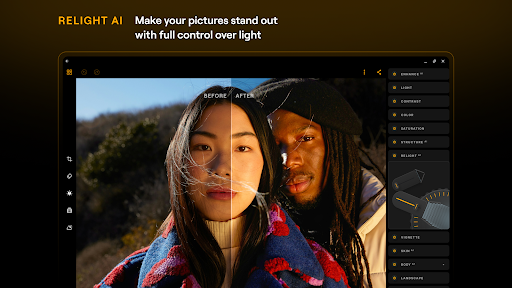
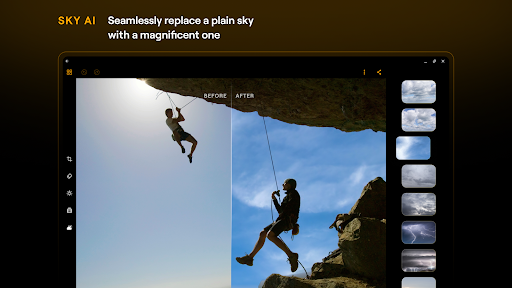
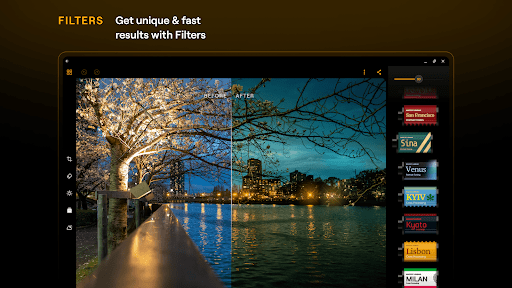
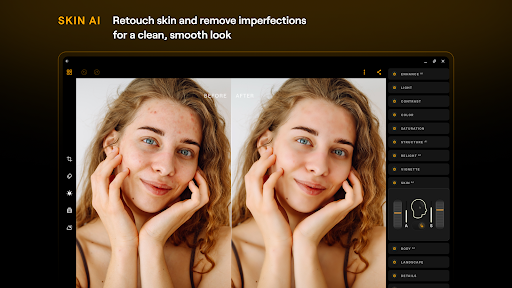
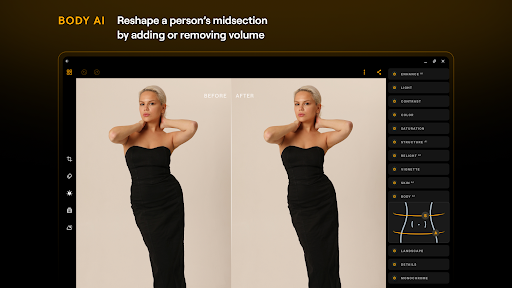
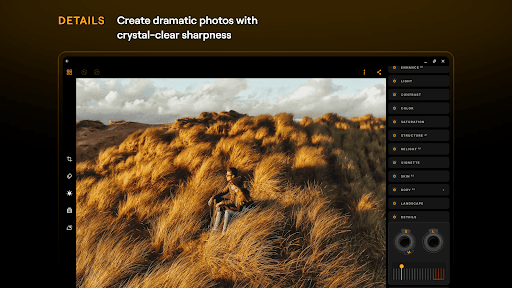
Luminar is a powerful AI photo editor for Android and ChromeOS, built for modern photography and everyday photo editing. Edit photos and pictures with professional tools, enhance images with smart AI, retouch photos, reshape details, work with RAW photo editing — all-in-one intuitive picture editing app designed for creativity on the go. WHY YOU SHOULD TRY LUMINAR: Luminar is an AI photo editor that helps you enhance photos and achieve natural, polished results. Designed for mobile photography, it makes photo editing fast, intuitive, and enjoyable. FAST, INTUITIVE PHOTO EDITING Luminar combines a clean interface with tactile controls that feel natural and responsive. Smooth sliders and precision dials make it easy to edit photos, adjust light & colour, crop images, and fine-tune details — without complicated workflows. This simple photo editor reduces friction so you can focus on creativity, whether you’re a beginner or looking for a more professional photo editor on mobile. SMART AI PHOTO ENHANCEMENT Luminar uses advanced AI to help you enhance photos faster while keeping results realistic and balanced. It works as a powerful AI photo enhancer for everyday editing and photography workflows. - EnhanceAI — improve color, tone, and clarity with one slider - SkyAI — realistic sky replacement for dramatic photography edits - RelightAI — rebalance lighting and exposure after the photo is taken - StructureAI — enhance texture, details without harsh sharpening - SkinAI — smooth skin, remove blemishes, acne, and wrinkles naturally - BodyAI — subtly reshape body proportions for realistic photo retouching Perfect for selfie retouch, beauty editing, smooth skin, and portrait photos enhancement. PROFESSIONAL EDITING TOOLS, ALL-IN-ONE APP Luminar is more than a filter app — it’s a full-featured professional photo editor: - RAW editing — a flexible RAW photo editor for maximum image quality - Curves & colour edit tools — control tones, contrast, and mood - Detail enhancement — sharpen and refine images with precision - Crop & geometry — crop picture, resize pictures, straighten, rotate, and align - Landscape tools — enhance foliage, remove haze, boost golden-hour light - Monochrome & vintage photo filters — expressive black-and-white and aesthetic looks - Erase & object removal — remove objects, glare, distractions, and unwanted details - Photo filters and effects — aesthetic filters, glow effects, vignette photo tools, and photo presets A complete solution for photo retouching, picture fixing, and creative photography editing. DESIGNED FOR ANDROID & CHROMEOS Built specifically for Android devices and Chromebooks, Luminar delivers a smooth, responsive photo editing app experience on phones and larger screens. Edit pictures anywhere — at home or on the go — with consistent performance and intuitive controls. GET STARTED Download Luminar: Photo Editor and turn everyday photos into polished, expressive images — faster, cleaner, and with full creative control…

What Luminar: AI Photo Editor Is Used For

Luminar: AI Photo Editor appears to be a mobile photo-editing app for Android and ChromeOS users who want to improve pictures on the go. Based on the metadata, it is commonly used for everyday image adjustments such as cropping, straightening, resizing, and tuning light, color, contrast, and detail. The app is positioned for both casual editing and more advanced photography workflows, especially when a phone is the main device for taking and refining photos.

The metadata also suggests that Luminar includes AI-assisted tools for common retouching tasks. These may include improving overall image quality, adjusting lighting after the photo is taken, replacing skies, enhancing texture, smoothing skin, and making subtle portrait corrections. Because it supports RAW editing and broader color controls, it may appeal to people who want more precise edits than a basic filter app. The listed network permissions and startup-related permission indicate the app may connect online for certain features or licensing, but they do not reveal how every tool works.

Common uses

  • Edit photos directly on a phone or Chromebook-style device
  • Adjust brightness, color, contrast, curves, and clarity
  • Use AI tools to enhance portraits and everyday photos
  • Retouch skin and refine facial details in selfies or portraits
  • Work with RAW images for more detailed photo adjustments
  • Crop, rotate, resize, and straighten images before sharing
  • Apply landscape-focused edits such as haze reduction and light enhancement
Best for:
mobile photo editing portrait retouching RAW photo editing AI image enhancement phone app

App Details

Package:
com.skylum.luminar
Category:
Photography
Developer:
Skylum Software
Version:
3.4
Updated:
Mar 26, 2026
Min Android:
11
Age Rating:
Everyone
Contains Ads:
No
In-App Purchases:
Yes

Official Listing

  • Official listing available on Google Play
  • Package name: com.skylum.luminar
  • Age rating: Everyone

Explore More

Browse more apps in Photography or explore the Phone hub .

Related Photography Apps

Picsart AI Photo Editor, Video icon

Picsart AI Photo Editor, Video

Photography PicsArt, Inc.

Remove and swap backgrounds in your photos and remove unwanted objects

Version 29.5.13 34.1 MB ⭐ 4.00 1,000,000,000+ installs
Video Editor & Maker - InShot icon

Video Editor & Maker - InShot

Photography InShot Video Editor

AI video editor with music! Edit video with effects, slideshow & slow motion

Version 2.196.1529 80.1 MB ⭐ 4.80 500,000,000+ installs
B612 AI Photo&Video Editor icon

B612 AI Photo&Video Editor

Photography SNOW Corporation

Meet trendy effects, filters, and stickers!

Version Varies with device 144.8 MB ⭐ 4.10 500,000,000+ installs
FaceApp: Perfect Face Editor icon

FaceApp: Perfect Face Editor

Photography FaceApp Technology Ltd

Natural Beauty, Selfie Retouch

Version Varies with device 84.1 MB ⭐ 4.30 500,000,000+ installs
Remini - AI Photo Enhancer icon

Remini - AI Photo Enhancer

Photography Bending Spoons

Create AI Photos, Improve and restore quality of blurry, old or damaged pics.

Version 3.7.1301.202520348 52.8 MB ⭐ 4.10 500,000,000+ installs
BeautyPlus-Selfie Photo Editor icon

BeautyPlus-Selfie Photo Editor

Photography PIXOCIAL TECHNOLOGY (SINGAPORE) PTE. LTD.

Snap perfect selfies every time. AI Auto-beautification for that flawless look.

Version 7.33.1 269.4 MB ⭐ 4.60 500,000,000+ installs

How to Download Luminar: AI Photo Editor

If this app is not hosted directly on APKApps official link, then for the safest and most up-to-date version, install it from its official Google Play listing.