About Superimpose
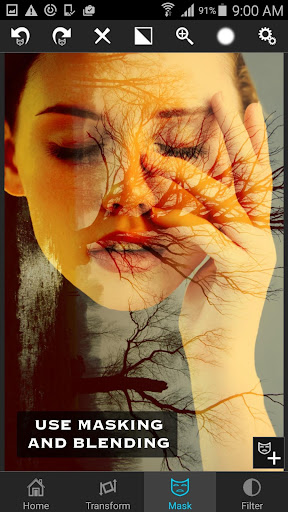
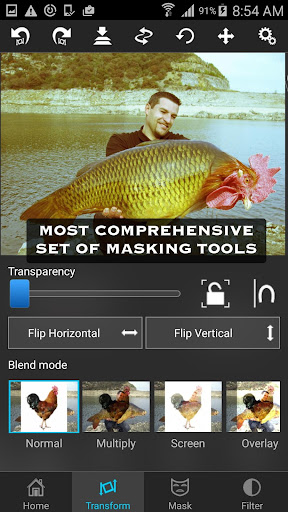
Just with a few taps, create professional grade superimposed or juxtaposed photos on your iPhone! You don't need a computers and expensive software to superimpose or cut/copy/paste one photo on top of another any more. Here is how it works... 1. Load a background image. 2. Load a foreground image. 3. Mask out unwanted portion of the foreground image using wide range of masking tools. 4. Smoothen the edges with smoothen tool inside the app, if required. 5. Move, Scale, Resize, Rotate, Flip the foreground to place it on the right location on the background image. 6. Adjust the colors/exposure/contrast/hue/saturation etc. of the foreground and the background images if required to match both the images in terms of colors. 7. You are done! Share with your friends and amaze them! You can also use this tool to do serious photo editing tasks like blending textures or overlaying borders or to do double exposure with adjustable transparency and 18 blending modes. Masking in the app is the most powerful one available on the app store, just tap on an area of the photo, and the app will mask out all the connected area with similar colors. Or you can use brush, lasso, global color similarity, rectangle, ellipse, linear, bi-linear or radial gradient masking tools. Mask a portion with this tool and that portion of the foreground image will become transparent and reveal the background.
What Superimpose Is Used For
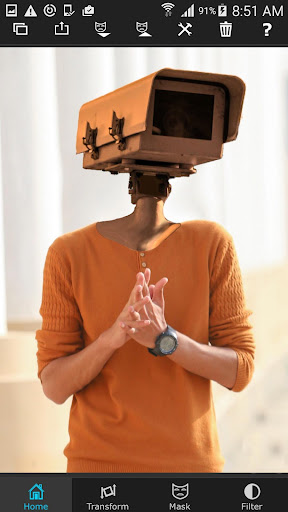
Superimpose appears to be a photo-editing app for creating layered images on a phone. Based on the metadata, it is commonly used to place one photo over another, remove parts of the foreground, and adjust the result so the two images blend more naturally. This makes it useful for people who want to build composite photos without using desktop editing software.
The app also appears suited to more detailed editing tasks, such as blending textures, creating double-exposure effects, or adding overlays and borders. Its listed tools suggest support for masking, moving, resizing, rotating, flipping, and color matching, which are typical steps when combining images. The permission to take pictures and videos may relate to capturing new source images, while storage access is likely needed to open and save edited files on the device.
Common uses
- Combine two photos into a single composite image
- Mask out parts of a foreground photo
- Adjust size, rotation, and placement of layered images
- Match color, exposure, contrast, hue, and saturation
- Create double-exposure or blending effects
- Edit and save images from phone storage
- Use camera-captured images as editing sources
App Details
Package:
com.superimposeapp.superimposeapp
Developer:
Pankaj Goswami
Version:
Varies with device
Min Android:
Varies with device
Age Rating:
Everyone
Contains Ads:
No
In-App Purchases:
No
Official Listing
-
Official listing available on
Google Play
-
Package name:
com.superimposeapp.superimposeapp
-
Age rating:
Everyone
Related Photography Apps
Photography
•
PicsArt, Inc.
Remove and swap backgrounds in your photos and remove unwanted objects
Version 29.5.13
34.1 MB
⭐ 4.00
1,000,000,000+ installs
Photography
•
InShot Video Editor
AI video editor with music! Edit video with effects, slideshow & slow motion
Version 2.196.1529
80.1 MB
⭐ 4.80
500,000,000+ installs
Photography
•
SNOW Corporation
Meet trendy effects, filters, and stickers!
Version Varies with device
144.8 MB
⭐ 4.10
500,000,000+ installs
Photography
•
FaceApp Technology Ltd
Natural Beauty, Selfie Retouch
Version Varies with device
84.1 MB
⭐ 4.30
500,000,000+ installs
Photography
•
Bending Spoons
Create AI Photos, Improve and restore quality of blurry, old or damaged pics.
Version 3.7.1301.202520348
52.8 MB
⭐ 4.10
500,000,000+ installs
Photography
•
PIXOCIAL TECHNOLOGY (SINGAPORE) PTE. LTD.
Snap perfect selfies every time. AI Auto-beautification for that flawless look.
Version 7.33.1
269.4 MB
⭐ 4.60
500,000,000+ installs
How to Download Superimpose
If this app is not hosted directly on APKApps official link,
then for the safest and most up-to-date version, install it from its official Google Play listing.