ecobee Wrap icon

Phone

ecobee Wrap

House & Home SupremeVue ⭐ 3.60 10,000+
Version 5.80 Everyone

Screenshots

ecobee Wrap screenshot
Permissions Explained 14 permissions requested View details

This app requests 14 permissions. The table below explains what each permission may allow and what users should review before installing.

Status Permission What it means Why it may be used User safety note
ℹ️ Review Approximate Location (network Based) approximate location (network-based) This is an Android permission or app-specific permission requested by the app. The app may use this permission for features related to its category, device support, background behavior, storage, connectivity, or system integration. Review this permission before installing, especially if it does not match the app’s expected purpose.
ℹ️ Review Precise Location (gps And Network Based) precise location (GPS and network-based) This is an Android permission or app-specific permission requested by the app. The app may use this permission for features related to its category, device support, background behavior, storage, connectivity, or system integration. Review this permission before installing, especially if it does not match the app’s expected purpose.
ℹ️ Review Read Phone Status And Identity read phone status and identity This is an Android permission or app-specific permission requested by the app. The app may use this permission for features related to its category, device support, background behavior, storage, connectivity, or system integration. Review this permission before installing, especially if it does not match the app’s expected purpose.
ℹ️ Review Read The Contents Of Your Usb Storage read the contents of your USB storage This is an Android permission or app-specific permission requested by the app. The app may use this permission for features related to its category, device support, background behavior, storage, connectivity, or system integration. Review this permission before installing, especially if it does not match the app’s expected purpose.
ℹ️ Review Record Audio record audio This is an Android permission or app-specific permission requested by the app. The app may use this permission for features related to its category, device support, background behavior, storage, connectivity, or system integration. Review this permission before installing, especially if it does not match the app’s expected purpose.
ℹ️ Review View Wi Fi Connections view Wi-Fi connections This is an Android permission or app-specific permission requested by the app. The app may use this permission for features related to its category, device support, background behavior, storage, connectivity, or system integration. Review this permission before installing, especially if it does not match the app’s expected purpose.
ℹ️ Review View Network Connections view network connections This is an Android permission or app-specific permission requested by the app. The app may use this permission for features related to its category, device support, background behavior, storage, connectivity, or system integration. Review this permission before installing, especially if it does not match the app’s expected purpose.
ℹ️ Review Full Network Access full network access This is an Android permission or app-specific permission requested by the app. The app may use this permission for features related to its category, device support, background behavior, storage, connectivity, or system integration. Review this permission before installing, especially if it does not match the app’s expected purpose.
ℹ️ Review Run At Startup run at startup This is an Android permission or app-specific permission requested by the app. The app may use this permission for features related to its category, device support, background behavior, storage, connectivity, or system integration. Review this permission before installing, especially if it does not match the app’s expected purpose.
ℹ️ Review Control Vibration control vibration This is an Android permission or app-specific permission requested by the app. The app may use this permission for features related to its category, device support, background behavior, storage, connectivity, or system integration. Review this permission before installing, especially if it does not match the app’s expected purpose.
ℹ️ Review Prevent Device From Sleeping prevent device from sleeping This is an Android permission or app-specific permission requested by the app. The app may use this permission for features related to its category, device support, background behavior, storage, connectivity, or system integration. Review this permission before installing, especially if it does not match the app’s expected purpose.
ℹ️ Review Google Play License Check Google Play license check This is an Android permission or app-specific permission requested by the app. The app may use this permission for features related to its category, device support, background behavior, storage, connectivity, or system integration. Review this permission before installing, especially if it does not match the app’s expected purpose.
ℹ️ Review Read Google Service Configuration read Google service configuration This is an Android permission or app-specific permission requested by the app. The app may use this permission for features related to its category, device support, background behavior, storage, connectivity, or system integration. Review this permission before installing, especially if it does not match the app’s expected purpose.
ℹ️ Review Receive Data From Internet receive data from Internet This is an Android permission or app-specific permission requested by the app. The app may use this permission for features related to its category, device support, background behavior, storage, connectivity, or system integration. Review this permission before installing, especially if it does not match the app’s expected purpose.

About ecobee Wrap

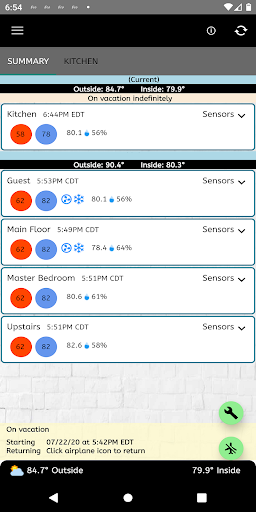
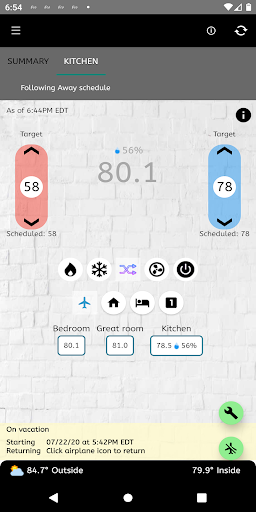
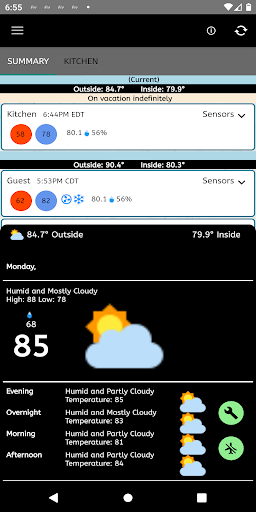
An application for ecobee thermostats that allows for quick and easy management of the ecobee thermostat and adds features not available in the official app. Most app features are enabled in the free version. Purchasing the app will remove advertising and enable some reports. Geofence option to automatically set Away/Home mode Notification and home screen widgets to quickly change comfort settings Multiple report options - daily, 7 day, and monthly Support for multiple locations/groups Quick summary display of thermostats and sensors Supports Celsius and Fahrenheit temperature settings Widget available for quick view of thermostats Auto-refresh of main application and widget information Usage reports showing HVAC system use and indoor/outdoor temperature Temperature alert settings for outdoor and indoor temperatures One button away mode where you can set the away start and end times Adjust away settings while still in away mode Support for remote sensors This application allows you to view and change your ecobee thermostat settings, set away/back modes, change HVAC/Fan modes, change thermostat names, view last read time, and edit away times for ecobee thermostats. You can view all of your ecobee controlled thermostats by location, current temperature information, outside temperature, and average indoor temperature. Moving between thermostats is as easy as swiping left or right or clicking the tabs. You can change individual thermostat settings, set specific away settings, and disable away mode. Turning off your HVAC or Fan for individual thermostats is also supported. Send any issues or questions to [email protected]. Due to ecobee requirements you must authorize this application via a PIN code on the ecobee web portal. The application will provide instructions on how to do this. Features: ★ View and change temperatures for all thermostats. ★ Temperatures displayed to one decimal places. ★ Quickly change HVAC and Fan modes ★ Set Away/Back mode including start and end times and target temperature settings ★ Edit away times when in Away mode ★ Change thermostat name ★ View average indoor and outdoor temperatures ★ View HVAC usage reports and outdoor/indoor temperatures ★ Set temperature alerts for indoor/outdoor temperatures ★ Configurable Widget for quick view of thermostats ★ Android wear notifications and widget-like view of thermostats ★ Daily usage reports for all thermostats ★ Remote sensor information displayed Please note the following: 1) Current temperature is displayed to one decimal places so that you can understand why your heating/cooling is running even when it appears to be at temperature. This comes directly from the thermostat and is not an estimate. IMPORTANT: This is NOT an official ecobee application (nor are we affiliated in any way with ecobee) and the app only reads information available from the ecobee web site and does not connect to your thermostats directly. If your thermostats show as disconnected or you suspect…

What ecobee Wrap Is Used For

ecobee Wrap appears to be a house-and-home companion app for people who manage ecobee thermostats from an Android phone. Based on the metadata, it is used to view thermostat status, adjust temperatures, switch HVAC or fan modes, and move between multiple thermostats or locations. It also seems designed for quicker access than a full web portal or standard thermostat screen, with support for swiping between devices and checking current readings at a glance.

The app may be especially useful for users who want more control over away/home settings, including setting away times, changing target temperatures, and adjusting those settings while already in Away mode. The metadata also mentions geofence-based Away/Home automation, widgets for home-screen control, and reports such as daily, 7-day, and monthly usage summaries. Permission requests like precise and approximate location likely relate to geofence features, while network access is needed for syncing thermostat data. Some features, such as reports, appear to be tied to the paid version, and the app also includes ads.

Common uses

  • View and adjust ecobee thermostat temperatures from a phone
  • Switch HVAC and fan modes without opening a browser
  • Set Away and Home modes, including custom away times
  • Use location-based geofencing to automate away/home behavior
  • Check thermostat, sensor, and indoor/outdoor temperature summaries
  • Browse multiple locations or thermostat groups from one app
  • Use widgets for quick thermostat control and status viewing
Best for:
ecobee owners home temperature control away/home automation phone users widget control

App Details

Package:
com.supremevue.ecobeewrap
Category:
House & Home
Developer:
SupremeVue
Version:
5.80
Updated:
Jun 24, 2025
Min Android:
6.0
Age Rating:
Everyone
Contains Ads:
Yes
In-App Purchases:
Yes

Official Listing

  • Official listing available on Google Play
  • Package name: com.supremevue.ecobeewrap
  • Age rating: Everyone

Explore More

Browse more apps in House & Home or explore the Phone hub .

Related House & Home Apps

Kasa icon

Kasa

Lifestyle TP-LINK SYSTEMS INC.

Kasa Smart is your portal to your TP-LINK Smart Home.

Version 3.3.660 191.8 MB ⭐ 4.73 5,000,000+ installs
Vivint icon

Vivint

House & Home Vivint Home

Control your Vivint Smart Home with the next generation Vivint App.

Version 24.5.200 220.8 MB ⭐ 4.38 1,000,000+ installs
ecobee icon

ecobee

House & Home ecobee inc.

Control your thermostat, comfort, and home monitoring from your phone

Version 11.8+250465 148.0 MB ⭐ 4.16 1,000,000+ installs

How to Download ecobee Wrap

If this app is not hosted directly on APKApps official link, then for the safest and most up-to-date version, install it from its official Google Play listing.