Genius Fax icon

Phone

Genius Fax

Business The Grizzly Labs ⭐ 4.80 100,000+
Version 1.10.0 Everyone

Screenshots

Genius Fax screenshot
Permissions Explained 11 permissions requested View details

This app requests 11 permissions. The table below explains what each permission may allow and what users should review before installing.

Status Permission What it means Why it may be used User safety note
ℹ️ Review Find Accounts On The Device find accounts on the device This is an Android permission or app-specific permission requested by the app. The app may use this permission for features related to its category, device support, background behavior, storage, connectivity, or system integration. Review this permission before installing, especially if it does not match the app’s expected purpose.
ℹ️ Review Read Your Contacts read your contacts This is an Android permission or app-specific permission requested by the app. The app may use this permission for features related to its category, device support, background behavior, storage, connectivity, or system integration. Review this permission before installing, especially if it does not match the app’s expected purpose.
ℹ️ Review Read The Contents Of Your Usb Storage read the contents of your USB storage This is an Android permission or app-specific permission requested by the app. The app may use this permission for features related to its category, device support, background behavior, storage, connectivity, or system integration. Review this permission before installing, especially if it does not match the app’s expected purpose.
ℹ️ Review Modify Or Delete The Contents Of Your Usb Storage modify or delete the contents of your USB storage This is an Android permission or app-specific permission requested by the app. The app may use this permission for features related to its category, device support, background behavior, storage, connectivity, or system integration. Review this permission before installing, especially if it does not match the app’s expected purpose.
ℹ️ Review View Wi Fi Connections view Wi-Fi connections This is an Android permission or app-specific permission requested by the app. The app may use this permission for features related to its category, device support, background behavior, storage, connectivity, or system integration. Review this permission before installing, especially if it does not match the app’s expected purpose.
ℹ️ Review View Network Connections view network connections This is an Android permission or app-specific permission requested by the app. The app may use this permission for features related to its category, device support, background behavior, storage, connectivity, or system integration. Review this permission before installing, especially if it does not match the app’s expected purpose.
ℹ️ Review Full Network Access full network access This is an Android permission or app-specific permission requested by the app. The app may use this permission for features related to its category, device support, background behavior, storage, connectivity, or system integration. Review this permission before installing, especially if it does not match the app’s expected purpose.
ℹ️ Review Reorder Running Apps reorder running apps This is an Android permission or app-specific permission requested by the app. The app may use this permission for features related to its category, device support, background behavior, storage, connectivity, or system integration. Review this permission before installing, especially if it does not match the app’s expected purpose.
ℹ️ Review Control Vibration control vibration This is an Android permission or app-specific permission requested by the app. The app may use this permission for features related to its category, device support, background behavior, storage, connectivity, or system integration. Review this permission before installing, especially if it does not match the app’s expected purpose.
ℹ️ Review Prevent Device From Sleeping prevent device from sleeping This is an Android permission or app-specific permission requested by the app. The app may use this permission for features related to its category, device support, background behavior, storage, connectivity, or system integration. Review this permission before installing, especially if it does not match the app’s expected purpose.
ℹ️ Review Receive Data From Internet receive data from Internet This is an Android permission or app-specific permission requested by the app. The app may use this permission for features related to its category, device support, background behavior, storage, connectivity, or system integration. Review this permission before installing, especially if it does not match the app’s expected purpose.

About Genius Fax

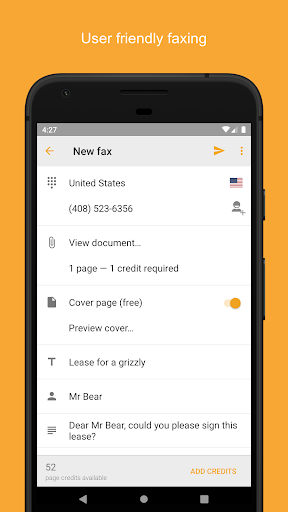
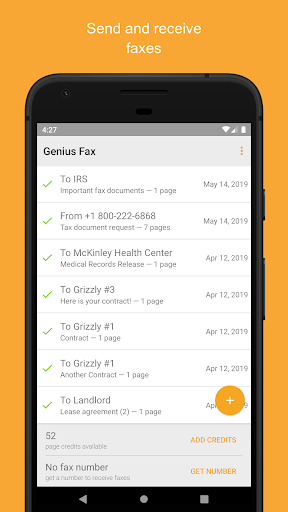
*** Faxing is not free, cost details are available below. *** Genius Fax is the easiest way to send and receive faxes from your Android device that stays affordable. It's fast, simple to use and beautiful. No need to go to the dreaded fax store anymore. To send a fax: choose a file from any location (Dropbox, Google Drive, any other app) To receive a fax: subscribe for a number and you’re all set. You receive documents as PDF and can preview them or export them to any other app. **** Sending: - Tap the “+” button to create a new fax - Pick a document from any location on your phone - Enter the recipient fax number - Optionally add a title, sender, recipient details and enable the cover page - Tap the send button! - Each page costs one fax credit but the cover page is always free. Receiving: - Subscribe to a number for 1, 3 or 6 months; add additional monthes any time you want; - Give away your number to whoever needs to fax to you - Add credits to receive faxes. One page costs one credit. - Faxes appear in your fax list as soon as they are received and paid for Features: - Simple and beautiful UI. We don't understand why business apps should be ugly! - Pick a PDF or image file to send from another app or from the cloud - Send a fax to select international fax numbers (see list of countries below) - Send and forget: push notifications for success and failure - Receive faxes - Free cover page - Conveniently buy credits and fax number subscriptions - History of the faxes you sent available from any of your devices with Genius Fax (using your Genius Fax account) - Easily delete from history Cost: - Each page of your PDF file costs a fax credit to send or to receive - When sending, the cover page appended by Genius Fax is always free - You can buy credits in Genius Fax. One fax credit costs as little as $0.39. - You can buy a number in Genius Fax for as little as $3.49/month - Send your fax to any supported country. It's always one credit per page. International destinations supported: US, Canada, UK, Japan, France, Germany, Spain, Austria, Portugal, Italy, Belgium, Luxembourg, Switzerland, Netherlands, Cyprus, Norway, Sweden, Estonia, Latvia, Greece, Hungary, Romania, Iceland, Ireland, Malta, Morocco, Turkey, Saudi Arabia, South Africa, Israel, Kazakhstan, India, China, Hong Kong, Singapore, Malaysia, Taiwan, Thailand, Mexico, Argentina, Brazil, Puerto Rico, Costa Rica, Panama, New Zealand and Australia Genius Fax is fully compatible with Genius Scan. You can scan documents with Genius Scan and fax them with Genius Fax. Genius Fax supports documents up to 50 MB. Please let us know your feedback at [email protected] so that we can improve the app with the next iteration!

What Genius Fax Is Used For

Genius Fax appears to be a business app for sending and receiving faxes from an Android phone. Based on the metadata, it is meant for situations where someone still needs fax transmission without using a physical fax machine or a fax shop. It can be used to send PDF or image files from the device or from cloud-connected apps, and it also supports receiving faxes through a subscribed fax number.

This app may be useful for people who handle documents that still need to be faxed in work settings such as offices, healthcare, legal, or administrative tasks. The permissions suggest it can access contacts, storage, and network connections, which fits a fax workflow that involves selecting files, entering recipient numbers, and syncing documents over the internet. Received faxes are delivered as PDF files, and the history feature suggests users can review past sent and received faxes across devices tied to the same account.

Common uses

  • Send PDF or image documents as faxes from a phone
  • Receive faxes through a purchased fax number subscription
  • Preview received fax documents as PDFs
  • Export received files to other apps on the device
  • Add cover pages and sender or recipient details when sending
  • Track fax history from an account across devices
  • Use stored files or cloud files as fax sources
Best for:
business documents phone users fax sending fax receiving office workflows

App Details

Package:
com.thegrizzlylabs.geniusfax
Category:
Business
Developer:
The Grizzly Labs
Version:
1.10.0
Updated:
Nov 13, 2025
Min Android:
8.0
Age Rating:
Everyone
Contains Ads:
No
In-App Purchases:
Yes

Official Listing

  • Official listing available on Google Play
  • Package name: com.thegrizzlylabs.geniusfax
  • Age rating: Everyone

Explore More

Browse more apps in Business or explore the Phone hub .

Related Business Apps

How to Download Genius Fax

If this app is not hosted directly on APKApps official link, then for the safest and most up-to-date version, install it from its official Google Play listing.