About Dragon Drum Machine
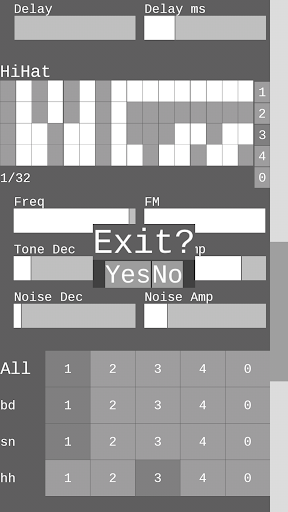
Dragon is a drum machine built to quickly and easily make glitch, distorted, lofi drum beats and manipulate them live. The drums are simple and flexible, capable of some classic drum machine sounds and also new weirdness. Each is synthesized in real time and sent to a multi effect rig with variable speed stutter, bit reduction, pitched feedback delay, down-sample, reverb, and a resonant bandpass filter. The drums are triggered by a four pattern step sequencer. Patterns can be changed individually for each drum or triggered together for quick pattern switches for all drums. Features: Four pattern sequencer with local and global pattern control BPM control with nudging Save/load presets Record audio as wav Three drum synths: -Bass-similar to tr-808 with more consistent pitch -Snare-similar to tr-909 with added fm and delay -Hi-hat-two tones and noise with fm Effects rig: -Asymmetry and tanh(x) for tape like distortion -Pitched feedback delay -Retrigger (aka stutter/buffer) with variable speed and reversing -Bit reduction -Down-sample -Reverb -Resonant bandpass filter Preset management and wav export requires permission for file storage read/write Unpaid version disables preset saving and audio recording Possible future ports to desktop and ios. Made with Pure Data and libGDX. Any questions, concerns, or creations, please contact Full parameter and effect reference: SYNTH PARAMETERS Bass drum- Freq: Frequency. Locks into semitones so you can harmonize easily Decay: Amplitude decay Freq Env Dec: Frequency envelope decay. Changes how fast the pitch drops Freq Env Amt: Frequency envelope amount. Changes how much the pitch drops Noise: Noise burst for click Amp: Bass drum amp Snare drum- Tone Low Dec: Tone low decay Tone High Dec: Tone high decay Noise Dec: Noise decay FM: Frequency modulate the low tone by the high tone Freq: Frequency. Locks into semitones so you an harmonize easily, though fm and the high tone potentially bring inharmonic tones Freq Env: Frequency envelope. Changes how much the pitch drops Delay: Feedback delay Delay ms: Milliseconds of delay Tone Distance: Distance between low and high tones Amp: Volume of snare Hi-Hat- Freq: Frequency FM: Frequency modulate the tone Tone Dec: Tone decay Tone Amp: Tone amplitude Noise Dec: Noise decay Noise Amp: Tone amplitude EFFECTS Retrig: Loop audio by the specified time interval (bottom box) within the range of another time interval (top box) Rev: reverse retrigger’s playback Speed: control the speed of the retrigger’s playback Bit Red: Bit reducer. Mixes in a low bit signal BP Filt: Band-pass filter. All the way left is off Tanh: Amplifies and the waveshapes the signal through a hyperbolic tangent curve. Creates a tape-like distortion Asym: Adds to the signal, creating a DC offset. Needs Tanh turned a bit for a significant effect Down Samp: Down-sample the signal Reverb: Mixes in reverb signal Delay: Pitched feedback delay dry/wet Delay ms: Milliseconds of delay Freq: Adjust the pitch that…
What Dragon Drum Machine Is Used For
Dragon Drum Machine appears to be a phone app for creating electronic drum patterns and shaping them with live effects. Based on the metadata, it is aimed at users who want to build glitchy, distorted, or lo-fi beats using a step sequencer rather than a full music workstation. It may be useful for quick beat sketching, experimental rhythm design, or making rough drum loops on an Android device.
The app includes three synthesized drum voices and a four-pattern sequencer, so it seems designed for hands-on pattern switching and rhythm variation. The listed effects such as stutter, bit reduction, delay, down-sampling, reverb, and filtering suggest it is especially suited to sound design and live manipulation of drum sounds. Because it can record audio and save/export WAV files, it may also be used to capture ideas, export loops, or build samples for later editing. The file storage permission is relevant for preset management and audio export, while the sleep-prevention permission likely helps keep playback or recording active during a session.
Common uses
- Create drum loops with a simple step sequencer.
- Switch between patterns for different drum parts or for the full kit.
- Shape sounds with distortion, stutter, delay, reverb, and filtering.
- Use the built-in synth drums for bass, snare, and hi-hat style sounds.
- Record audio as WAV when the recording feature is enabled.
- Save and load presets in the paid version, according to the metadata.
- Use it as a phone-based tool for beat sketching and live rhythm experiments.
App Details
Package:
com.thiiird.drgn
Developer:
Akunull Systems
Version:
36
Updated:
Mar 27, 2026
Min Android:
9
Age Rating:
Everyone
Contains Ads:
No
In-App Purchases:
No
Official Listing
-
Official listing available on
Google Play
-
Package name:
com.thiiird.drgn
-
Age rating:
Everyone
Related Music & Audio Apps
Music & Audio
•
Suture Sound Inc.
Version 1.5.1
⭐ 4.00
10,000+ installs
How to Download Dragon Drum Machine
If this app is not hosted directly on APKApps official link,
then for the safest and most up-to-date version, install it from its official Google Play listing.