Compress Video Size Compressor icon

Phone

Compress Video Size Compressor

Video Players & Editors Inverse AI ⭐ 4.50 5,000,000+
Version 19.0.0 29.5 MB Everyone

Screenshots

Compress Video Size Compressor screenshot
Permissions Explained 16 permissions requested View details

This app requests 16 permissions. The table below explains what each permission may allow and what users should review before installing.

Status Permission What it means Why it may be used User safety note
⚠️ Sensitive Read external storage android.permission.READ_EXTERNAL_STORAGE Allows the app to read files from shared device storage. Used by media players, file managers, backup apps, editors, upload tools, and document apps. Sensitive permission. Review carefully if the app does not need access to files or media.
ℹ️ Review Read Media Video android.permission.READ_MEDIA_VIDEO This is an Android permission or app-specific permission requested by the app. The app may use this permission for features related to its category, device support, background behavior, storage, connectivity, or system integration. Review this permission before installing, especially if it does not match the app’s expected purpose.
ℹ️ Review Send notifications android.permission.POST_NOTIFICATIONS Allows the app to send notifications to the device. Used for alerts, reminders, messages, account activity, updates, or media controls. Review notification settings if the app sends too many alerts.
ℹ️ Review Request Ignore Battery Optimizations android.permission.REQUEST_IGNORE_BATTERY_OPTIMIZATIONS This is an Android permission or app-specific permission requested by the app. The app may use this permission for features related to its category, device support, background behavior, storage, connectivity, or system integration. Review this permission before installing, especially if it does not match the app’s expected purpose.
ℹ️ Review Foreground Service android.permission.FOREGROUND_SERVICE This is an Android permission or app-specific permission requested by the app. The app may use this permission for features related to its category, device support, background behavior, storage, connectivity, or system integration. Review this permission before installing, especially if it does not match the app’s expected purpose.
⚠️ Sensitive Modify external storage android.permission.WRITE_EXTERNAL_STORAGE Allows the app to write or modify files in shared device storage. Used for saving downloads, media files, exports, edited documents, backups, or cached content. Sensitive permission. Make sure file access matches the app’s purpose.
Common Internet access android.permission.INTERNET Allows the app to open network connections and communicate with online services. Commonly used for streaming, syncing, login, ads, analytics, downloads, cloud features, and app updates. Common permission. Review the app’s behavior if it does not appear to need online access.
Common View network status android.permission.ACCESS_NETWORK_STATE Allows the app to check whether the device is connected to Wi-Fi, mobile data, or another network. Often used to avoid loading content when offline or to adjust loading based on connection quality. Generally low risk by itself.
ℹ️ Review Access Wifi State android.permission.ACCESS_WIFI_STATE This is an Android permission or app-specific permission requested by the app. The app may use this permission for features related to its category, device support, background behavior, storage, connectivity, or system integration. Review this permission before installing, especially if it does not match the app’s expected purpose.
ℹ️ Review Keep device awake android.permission.WAKE_LOCK Allows the app to prevent the device from sleeping while a task is running. Used for media playback, downloads, navigation, alarms, calls, or long-running background tasks. Review battery usage if the app keeps the device awake too often.
ℹ️ Review Gms Permission Ad Id com.google.android.gms.permission.AD_ID This is an Android permission or app-specific permission requested by the app. The app may use this permission for features related to its category, device support, background behavior, storage, connectivity, or system integration. Review this permission before installing, especially if it does not match the app’s expected purpose.
ℹ️ Review Receive Boot Completed android.permission.RECEIVE_BOOT_COMPLETED This is an Android permission or app-specific permission requested by the app. The app may use this permission for features related to its category, device support, background behavior, storage, connectivity, or system integration. Review this permission before installing, especially if it does not match the app’s expected purpose.
ℹ️ Review C2dm Permission Receive com.google.android.c2dm.permission.RECEIVE This is an Android permission or app-specific permission requested by the app. The app may use this permission for features related to its category, device support, background behavior, storage, connectivity, or system integration. Review this permission before installing, especially if it does not match the app’s expected purpose.
ℹ️ Review Finsky Permission Bind Get Install Referrer Service com.google.android.finsky.permission.BIND_GET_INSTALL_REFERRER_SERVICE This is an Android permission or app-specific permission requested by the app. The app may use this permission for features related to its category, device support, background behavior, storage, connectivity, or system integration. Review this permission before installing, especially if it does not match the app’s expected purpose.
ℹ️ Review Vending Billing com.android.vending.BILLING This is an Android permission or app-specific permission requested by the app. The app may use this permission for features related to its category, device support, background behavior, storage, connectivity, or system integration. Review this permission before installing, especially if it does not match the app’s expected purpose.
ℹ️ Review Com Video Converter Video Compressor Dynamic Receiver Not Exported Permission com.video_converter.video_compressor.DYNAMIC_RECEIVER_NOT_EXPORTED_PERMISSION This is an Android permission or app-specific permission requested by the app. The app may use this permission for features related to its category, device support, background behavior, storage, connectivity, or system integration. Review this permission before installing, especially if it does not match the app’s expected purpose.

About Compress Video Size Compressor

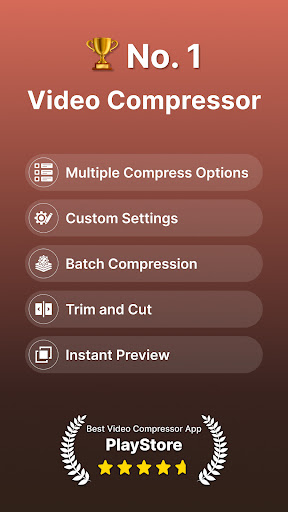
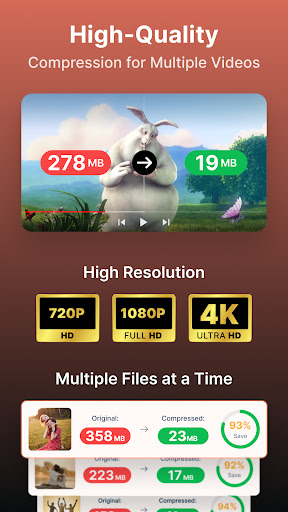
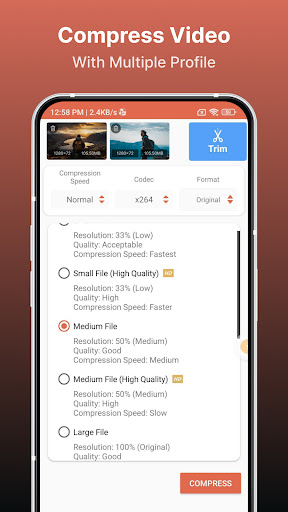
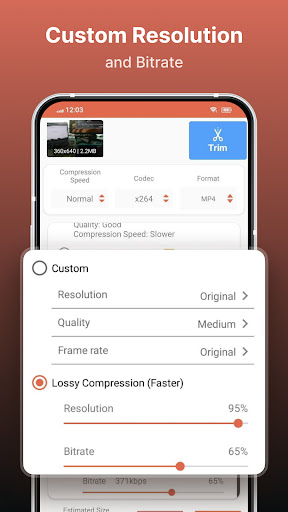
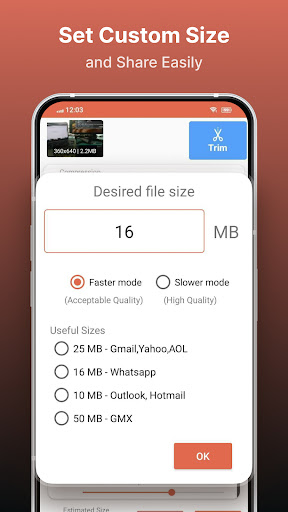
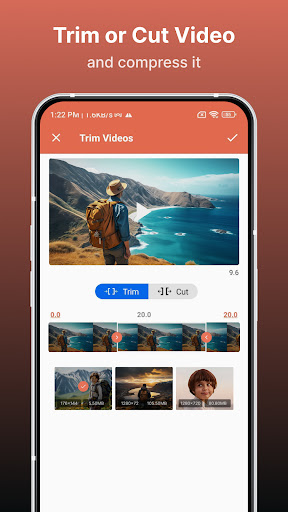
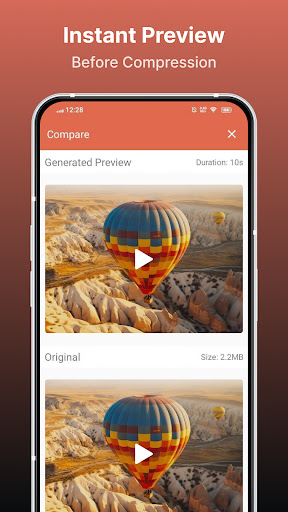
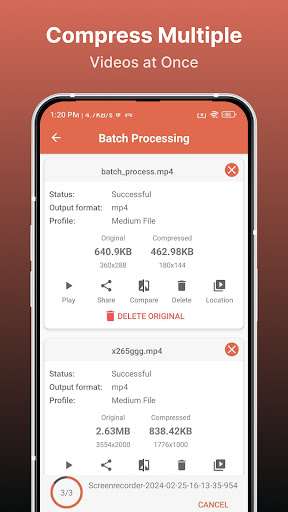
Supported Video Formats MP4, MKV, AVI, 3GP, FLV, MTS, MPEG, MPG, WMV, M4V, MOV, VOB KEY FEATURES 🎬 Compress an uncompressed video by keeping original quality. 🎬 Choose from predefined multiple compression profiles with different quality and size settings. 🎬 Compress video to a manually inputted size. 🎬 Shows a preview of small duration for the chosen compression settings before the compression process starts. Helps users to understand the quality of the compression beforehand. 🎬 Queue multiple videos to compress them in batch mode. 🎬 Choose between X264 and X265(HEVC) codec for compression. HEVC codec provides much more compression than X264 codec. But X264 is much faster than X265 in terms of compression speed. 🎬 Choose Compression process speed. Higher the speed larger the compressed video size. 🎬 Choose custom resolution. 🎬 Compresses a video by decreasing resolution, video bitrate. In this option the user can see the estimated compressed video size before compressing. This doesn’t preserve original quality. 🎬 Compare compressed and original video by playing them simultaneously in the same screen. 🎬 Delete compressed or original file after compression from the app. 🎬 Reduces video size, shrink video, save and clear device's storage space. 🎬 High quality video compression and Low quality video compression. 🎬 Convert video to MP4, MKV, AVI, 3GP, FLV, MTS, M4V, MOV formats.(PRO Feature) 🎬 Convert video from MP4, MKV, AVI, 3GP, FLV, MTS, MPEG, MPG, WMV, M4V, MOV, VOB formats. 🎬 Play Compressed and Converted Video. 🎬 Share compressed, converted and size reduced videos. Video Compressor - Compact Video application can compress and convert almost any format of videos. It provides users with default compress/preset profiles. Users can choose desired compression quality, compression speed, video resolution, bitrate etc. Also this compressor and converter lets the user input the desired compressed video size and it compresses the video to that size. Also you can compress videos in batch mode by queuing multiple videos. This Video Compressor can compress an uncompressed video without losing quality using X264 and X265(HEVC) codec. It can also compress a compressed video by decreasing the quality which is Resolution, Bitrate. This video compressor gives the user a transparent and flexible way to choose the compression level by customizing resolution and bitrate of the video. It shows the estimated size of the compressed video before the compression begins. This helps you decide how much space you want to save with what quality of the compression. It supports many video formats. This is the best Video compressor and converter app in the market which provides every possible settings for compressing your video.

What Compress Video Size Compressor Is Used For

Compress Video Size Compressor appears to be a phone app for reducing video file size and managing video conversions. Based on the metadata, it is commonly used when someone wants to save storage space, make large videos easier to share, or adjust a clip for a specific size or quality target. It supports several video formats, which suggests it can handle files from different cameras or editing workflows.

The app’s compression tools may be useful for users who want more control than a simple one-tap shrink option. The metadata mentions preset compression profiles, manual size entry, codec choices such as X264 and X265, resolution changes, and batch processing for multiple videos. It also appears to include preview and comparison features, which can help users check how a compressed result may look before finishing the process. Permissions like storage and media access suggest it needs access to videos stored on the device, while background and notification permissions may support longer compression tasks and progress updates.

Common uses

  • Reduce video size to free up device storage
  • Compress videos for easier sharing or uploading
  • Choose preset profiles for different quality and file-size needs
  • Set a target output size manually
  • Queue multiple videos for batch compression
  • Adjust codec, bitrate, and resolution settings
  • Compare original and compressed videos before saving
Best for:
Phone users Video compression Storage saving Batch processing Media editing

App Details

Package:
com.video_converter.video_compressor
Developer:
Inverse AI
Version:
19.0.0
Updated:
Mar 14, 2026
Min Android:
10
Age Rating:
Everyone
Contains Ads:
Yes
In-App Purchases:
Yes

Official Listing

  • Official listing available on Google Play
  • Package name: com.video_converter.video_compressor
  • Age rating: Everyone

Explore More

Browse more apps in Video Players & Editors or explore the Phone hub .

Related Video Players & Editors Apps

GoPro Quik: Video Editor icon

GoPro Quik: Video Editor

Video Players & Editors GoPro

Auto video maker with music & exclusive filters. Video editing made simple.

Version Varies with device 296.3 MB ⭐ 4.50 50,000,000+ installs
ActionDirector - Video Editing icon

ActionDirector - Video Editing

Video Players & Editors Cyberlink Corp

Awarded Editors' Choice! Simply create, edit and share your videos with ease!

Version 7.12.5 105.8 MB ⭐ 4.50 10,000,000+ installs
LightCut icon

LightCut

Video Players & Editors LightCut Inc.

Pro video editor & vlog maker, video templates: edit videos in minutes

Version 4.87.6 104.7 MB ⭐ 4.71 1,000,000+ installs
KMPlayer icon

KMPlayer

Video Players & Editors PANDORA.TV

Play Video and Earn Money on KMPlayer!

Version 44.03.144 209.5 MB ⭐ 4.12 10,000,000+ installs
Smart Video Crop icon

Smart Video Crop

Video Players & Editors Clogica

Smart Video Crop and Video Cut - is a handy tool to crop any part of any video

Version 2.5 15.1 MB ⭐ 3.82 5,000,000+ installs

How to Download Compress Video Size Compressor

If this app is not hosted directly on APKApps official link, then for the safest and most up-to-date version, install it from its official Google Play listing.