PER8 Weather WatchFace Digital icon

Phone

PER8 Weather WatchFace Digital

Personalization PERSONA Watch Face ⭐ 4.00 10,000+
Version Varies with device Everyone

Screenshots

PER8 Weather WatchFace Digital screenshot
Permissions Explained 8 permissions requested View details

This app requests 8 permissions. The table below explains what each permission may allow and what users should review before installing.

Status Permission What it means Why it may be used User safety note
ℹ️ Review Body Sensors (like Heart Rate Monitors) body sensors (like heart rate monitors) This is an Android permission or app-specific permission requested by the app. The app may use this permission for features related to its category, device support, background behavior, storage, connectivity, or system integration. Review this permission before installing, especially if it does not match the app’s expected purpose.
ℹ️ Review View Network Connections view network connections This is an Android permission or app-specific permission requested by the app. The app may use this permission for features related to its category, device support, background behavior, storage, connectivity, or system integration. Review this permission before installing, especially if it does not match the app’s expected purpose.
ℹ️ Review Full Network Access full network access This is an Android permission or app-specific permission requested by the app. The app may use this permission for features related to its category, device support, background behavior, storage, connectivity, or system integration. Review this permission before installing, especially if it does not match the app’s expected purpose.
ℹ️ Review Run At Startup run at startup This is an Android permission or app-specific permission requested by the app. The app may use this permission for features related to its category, device support, background behavior, storage, connectivity, or system integration. Review this permission before installing, especially if it does not match the app’s expected purpose.
ℹ️ Review Reorder Running Apps reorder running apps This is an Android permission or app-specific permission requested by the app. The app may use this permission for features related to its category, device support, background behavior, storage, connectivity, or system integration. Review this permission before installing, especially if it does not match the app’s expected purpose.
ℹ️ Review Control Vibration control vibration This is an Android permission or app-specific permission requested by the app. The app may use this permission for features related to its category, device support, background behavior, storage, connectivity, or system integration. Review this permission before installing, especially if it does not match the app’s expected purpose.
ℹ️ Review Prevent Device From Sleeping prevent device from sleeping This is an Android permission or app-specific permission requested by the app. The app may use this permission for features related to its category, device support, background behavior, storage, connectivity, or system integration. Review this permission before installing, especially if it does not match the app’s expected purpose.
ℹ️ Review Receive Data From Internet receive data from Internet This is an Android permission or app-specific permission requested by the app. The app may use this permission for features related to its category, device support, background behavior, storage, connectivity, or system integration. Review this permission before installing, especially if it does not match the app’s expected purpose.

About PER8 Weather WatchFace Digital

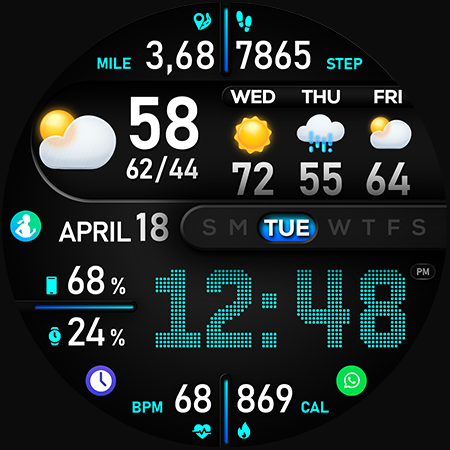
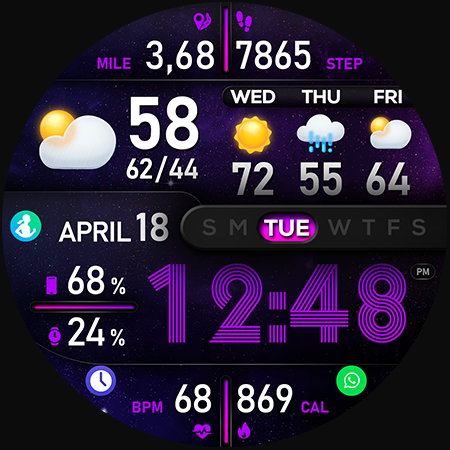
🚀 PER8 Weather Watch Face Digital is an advanced digital watch face designed for Wear OS smartwatches, offering changeable font styles, dynamic day & night visuals, stunning visuals, and forecast weather data. Dynamic Day & Night Visuals 🌞 Day Mode: Calm and peaceful sky animation. 🌌 Night Mode: Stunning northern lights animation. 🎨 Customize your PER8 Weather WatchFace 10 font styles for time 10 backgrounds 10 line colors 20 color combinations Closable/stoppable sky animation Sky animation for the day display Northern lights animation for the night display 7 custom complications 3 custom shortcuts 10 AOD Dims 🔹 Key Features of PER8 Weather WatchFace Digital Weather type and temperature (°F / °C) High & Low temperature (°F / °C) Next 3 days' weather type Next 3 days' temperature (°F / °C) Steps, daily goal & distance (KM / Miles) Phone & watch battery level Active burned calories, floors Heart rate monitor UV index, rain possibility Moon phase, sunset/sunrise Time zone, barometer Next appointment reminder Always-On display with adjustable colors 🛠️ Easy Customization Mode Simply touch and hold to personalize what data you see — weather, sunrise/sunset, time zone, and more. 🔋 For extra complications and widgets like phone battery, calories, or floors, please check the setup guide here: 👉 https://persona-wf.com/installation/ ❓ Weather Not Updating? Seeing a “❓” icon? That means your watch can’t get weather data. Check your internet connection and refresh the watch face. 🌙 Always-On Display (AOD) The watch face has an always-active display. You can change the brightness level in the customization menu. There are 10 levels in total. The colors are synchronized with the normal view. With the new option “AOD Dim” in the customization menu, you can now change the AOD layout. 🌐 More Details: https://persona-wf.com/portfolios/soho/ 📖 Installation Guide Before leaving a review, make sure to check the installation guide and FAQ for a smooth experience: 👉 https://persona-wf.com/installation/ ⌚ Supported Devices Compatible with all Wear OS devices (API Level 34+), including: SAMSUNG: Galaxy Watch8 Classic, Galaxy Watch Ultra, Watch8, 7, 6, 5, 4 GOOGLE: Pixel Watch 1, 2, 3, 4 FOSSIL: Gen 7, Gen 6, Gen 5e series MOBVOI: TicWatch Pro 5, Pro 3, E3, C2 🚀 Exceptional Support Need assistance? We’re here for you 📩 [email protected] 💜 Join Our Community Get the latest designs & exclusive offers 🌐 https://persona-wf.com 📩 Newsletter https://persona-wf.com/register 👍 Facebook https://www.facebook.com/Persona-Watch-Face 📸 Instagram https://www.instagram.com/persona_watch_face 💬 Telegram https://t.me/persona_watchface ▶️ YouTube https://www.youtube.com/c/PersonaWatchFace 💖💖💖 Thank You for Choosing PERSONA! We hope our design brightens your day and your wrist 😊 Designed with love by Ayla GOKMEN

What PER8 Weather WatchFace Digital Is Used For

PER8 Weather WatchFace Digital appears to be a Wear OS watch face app for people who want a more information-rich clock layout on their smartwatch. Based on the metadata, it focuses on showing the time alongside weather details, day and night visuals, and several customizable display options. It is meant for use on Wear OS devices rather than as a general phone utility, so the main context is a smartwatch face that stays visible throughout the day.

Common use cases may include checking current weather and short forecasts at a glance, viewing battery status, tracking basic health or activity data, and quickly accessing selected shortcuts or complications from the watch face. The app also references always-on display support, custom font and color options, and support for sunrise/sunset, moon phase, and appointment reminders. The network permissions suggest it likely needs internet access to retrieve weather data, while body sensor permission indicates it may display health-related watch metrics when connected to supported sensors and system data.

Common uses

  • Shows time in a customizable digital watch face layout
  • Displays current weather and short-term forecast information
  • May present health and activity stats such as steps, heart rate, and calories
  • Offers day and night visual themes for the watch face background
  • Supports always-on display options with adjustable dimming
  • Includes shortcuts and complications for quick access to watch functions
  • Uses network access to fetch weather data and updates
Best for:
Wear OS users watch face customization weather at a glance fitness data display always-on display users

App Details

Package:
com.watchfacestudio.per008_soho
Developer:
PERSONA Watch Face
Version:
Varies with device
Updated:
Mar 6, 2026
Min Android:
Varies with device
Age Rating:
Everyone
Contains Ads:
No
In-App Purchases:
No

Official Listing

  • Official listing available on Google Play
  • Package name: com.watchfacestudio.per008_soho
  • Age rating: Everyone

Explore More

Browse more apps in Personalization or explore the Phone hub .

Related Personalization Apps

[KNA015] CRESCENT icon

[KNA015] CRESCENT

Art & Design KNA TH Watch Faces
Version Varies with device ⭐ 3.00 1,000+ installs

How to Download PER8 Weather WatchFace Digital

If this app is not hosted directly on APKApps official link, then for the safest and most up-to-date version, install it from its official Google Play listing.