PER27 Digital Watch Face icon

Phone

PER27 Digital Watch Face

Personalization PERSONA Watch Face ⭐ 4.10 10,000+
Version Varies with device Everyone

Screenshots

PER27 Digital Watch Face screenshot
Permissions Explained 6 permissions requested View details

This app requests 6 permissions. The table below explains what each permission may allow and what users should review before installing.

Status Permission What it means Why it may be used User safety note
ℹ️ Review View Network Connections view network connections This is an Android permission or app-specific permission requested by the app. The app may use this permission for features related to its category, device support, background behavior, storage, connectivity, or system integration. Review this permission before installing, especially if it does not match the app’s expected purpose.
ℹ️ Review Full Network Access full network access This is an Android permission or app-specific permission requested by the app. The app may use this permission for features related to its category, device support, background behavior, storage, connectivity, or system integration. Review this permission before installing, especially if it does not match the app’s expected purpose.
ℹ️ Review Run At Startup run at startup This is an Android permission or app-specific permission requested by the app. The app may use this permission for features related to its category, device support, background behavior, storage, connectivity, or system integration. Review this permission before installing, especially if it does not match the app’s expected purpose.
ℹ️ Review Control Vibration control vibration This is an Android permission or app-specific permission requested by the app. The app may use this permission for features related to its category, device support, background behavior, storage, connectivity, or system integration. Review this permission before installing, especially if it does not match the app’s expected purpose.
ℹ️ Review Prevent Device From Sleeping prevent device from sleeping This is an Android permission or app-specific permission requested by the app. The app may use this permission for features related to its category, device support, background behavior, storage, connectivity, or system integration. Review this permission before installing, especially if it does not match the app’s expected purpose.
ℹ️ Review Receive Data From Internet receive data from Internet This is an Android permission or app-specific permission requested by the app. The app may use this permission for features related to its category, device support, background behavior, storage, connectivity, or system integration. Review this permission before installing, especially if it does not match the app’s expected purpose.

About PER27 Digital Watch Face

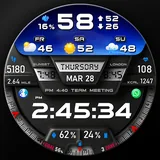
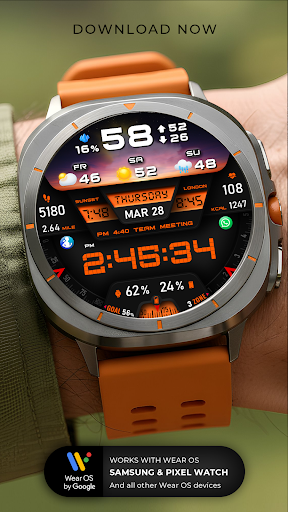
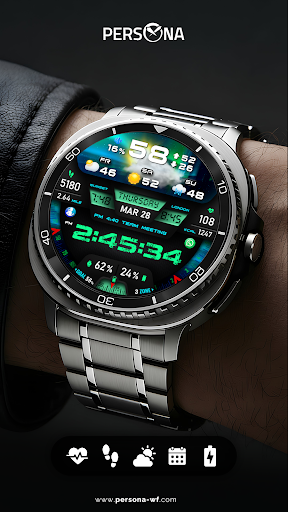
PER27 Digital Watch Face is a modern digital watch face designed for Wear OS. Clean layout, data-rich interface and smooth performance for everyday use. Designed for users who want clear readability, functional data and customization without visual clutter. Key Features • Digital time 12/24h • Weather & 3-day forecast • Steps, daily goal & distance • Heart rate • Calories & floors • Phone & watch battery • UV index, rain probability • Moon phase, sunrise & sunset • Time zone & barometer • Next calendar event • Always-On Display AOD Customization Options • 10 font styles • 10 backgrounds • 10 dial designs • 10 LED color styles • 5 luminance levels • 7 customizable complications • Adjustable AOD dim levels ❓ Troubleshooting Weather Information This is usually related to how the watch fetches weather data. Please follow these steps: 1- Install “Simple Weather” on both phone and watch https://play.google.com/store/apps/details?id=com.thewizrd.simpleweather 2- Set its update interval to 1 hour 3- Wait a few minutes for data to sync If it continues, please email me. Phone Battery Level You’ll need to install a companion app on both your phone and watch: Phone Battery Complication https://play.google.com/store/apps/details?id=com.weartools.phonebattcomp For additional complications, such as phone battery, calories or floors, check the setup guide: https://persona-wf.com/installation/ Easy Customization Touch and hold the watch face. Tap “Customize”. Set colors, complications, and data. Always-On Display Optimized AOD with adjustable dim levels. Colors remain consistent with the main screen. Supported Devices Compatible with all Wear OS devices API 34+ Samsung Galaxy Watch 4–8, Ultra Google Pixel Watch 1–4 Fossil Gen series Mobvoi TicWatch series Support: [email protected] More watch faces: https://persona-wf.com Designed by Ayla Gokmen PERSONA Watch Face

What PER27 Digital Watch Face Is Used For

PER27 Digital Watch Face appears to be a Wear OS watch face built for users who want a readable, information-heavy layout on their smartwatch. Based on the metadata, it is commonly used to show the time in 12/24-hour formats while also keeping everyday data visible at a glance, such as weather, steps, heart rate, calories, battery levels, and calendar events. Because it is a personalization app, the main purpose is changing how the watch screen looks and what information it displays.

It also seems suited for people who rely on their watch during the day and prefer quick status checks without opening separate apps. The listed permissions for network access suggest it may fetch live data such as weather or synced watch information, while startup and sleep-related permissions are likely tied to keeping the watch face updated and responsive. The app’s customization options, including multiple fonts, backgrounds, dial styles, and complication slots, suggest it may be used to tailor the watch face to personal preferences and different wrist-worn device layouts.

Common uses

  • Displays the current time in digital 12/24-hour format
  • Shows common health and activity data like steps, heart rate, calories, and distance
  • May provide weather details including a 3-day forecast and rain probability
  • Can surface watch-related information such as phone battery, time zone, and next calendar event
  • Includes customization options for fonts, backgrounds, dial styles, LED colors, and complications
  • Supports Always-On Display with adjustable dim levels
  • Appears designed for Wear OS smartwatches rather than phones
Best for:
Wear OS users Digital watch face fans Fitness data at a glance Customization-focused users Always-on display users

App Details

Package:
com.watchfacestudio.per27
Developer:
PERSONA Watch Face
Version:
Varies with device
Updated:
Mar 25, 2026
Min Android:
Varies with device
Age Rating:
Everyone
Contains Ads:
No
In-App Purchases:
No

Official Listing

  • Official listing available on Google Play
  • Package name: com.watchfacestudio.per27
  • Age rating: Everyone

Explore More

Browse more apps in Personalization or explore the Phone hub .

Related Personalization Apps

[KNA015] CRESCENT icon

[KNA015] CRESCENT

Art & Design KNA TH Watch Faces
Version Varies with device ⭐ 3.00 1,000+ installs

How to Download PER27 Digital Watch Face

If this app is not hosted directly on APKApps official link, then for the safest and most up-to-date version, install it from its official Google Play listing.