Ask Me Anything - AI Chatbot icon

Phone

Ask Me Anything - AI Chatbot

Productivity EVOLLY HK ⭐ 4.00 5,000,000+
Version 1.9.6 Everyone

Screenshots

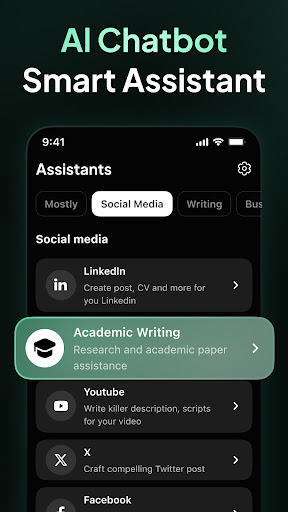
Ask Me Anything - AI Chatbot screenshot
Permissions Explained 8 permissions requested View details

This app requests 8 permissions. The table below explains what each permission may allow and what users should review before installing.

Status Permission What it means Why it may be used User safety note
ℹ️ Review Read The Contents Of Your Usb Storage read the contents of your USB storage This is an Android permission or app-specific permission requested by the app. The app may use this permission for features related to its category, device support, background behavior, storage, connectivity, or system integration. Review this permission before installing, especially if it does not match the app’s expected purpose.
ℹ️ Review Modify Or Delete The Contents Of Your Usb Storage modify or delete the contents of your USB storage This is an Android permission or app-specific permission requested by the app. The app may use this permission for features related to its category, device support, background behavior, storage, connectivity, or system integration. Review this permission before installing, especially if it does not match the app’s expected purpose.
ℹ️ Review Record Audio record audio This is an Android permission or app-specific permission requested by the app. The app may use this permission for features related to its category, device support, background behavior, storage, connectivity, or system integration. Review this permission before installing, especially if it does not match the app’s expected purpose.
ℹ️ Review View Wi Fi Connections view Wi-Fi connections This is an Android permission or app-specific permission requested by the app. The app may use this permission for features related to its category, device support, background behavior, storage, connectivity, or system integration. Review this permission before installing, especially if it does not match the app’s expected purpose.
ℹ️ Review View Network Connections view network connections This is an Android permission or app-specific permission requested by the app. The app may use this permission for features related to its category, device support, background behavior, storage, connectivity, or system integration. Review this permission before installing, especially if it does not match the app’s expected purpose.
ℹ️ Review Allow Wi Fi Multicast Reception allow Wi-Fi Multicast reception This is an Android permission or app-specific permission requested by the app. The app may use this permission for features related to its category, device support, background behavior, storage, connectivity, or system integration. Review this permission before installing, especially if it does not match the app’s expected purpose.
ℹ️ Review Full Network Access full network access This is an Android permission or app-specific permission requested by the app. The app may use this permission for features related to its category, device support, background behavior, storage, connectivity, or system integration. Review this permission before installing, especially if it does not match the app’s expected purpose.
ℹ️ Review Prevent Device From Sleeping prevent device from sleeping This is an Android permission or app-specific permission requested by the app. The app may use this permission for features related to its category, device support, background behavior, storage, connectivity, or system integration. Review this permission before installing, especially if it does not match the app’s expected purpose.

About Ask Me Anything - AI Chatbot

AI Chatbot is an intelligent virtual assistant designed to interact with users in a conversational manner. It uses natural language processing and artificial intelligence to understand user inputs and respond with accurate and helpful information. The app can assist users in a variety of tasks, such as answering questions, providing recommendations, giving advice, and even engaging in casual conversation. The app's knowledge is constantly updated and improved through machine learning, ensuring that it stays current and relevant. Additionally, the app is user-friendly, with a simple interface that makes it easy to communicate with the chatbot. AI Chatbot are capable of performing various tasks, including: Answering questions Writing emails, papers, or essays Composing stories or poems Translating between languages Correcting grammar mistakes Solving mathematical problems Please try it and let us know what you think!

What Ask Me Anything - AI Chatbot Is Used For

Ask Me Anything - AI Chatbot appears to be a conversational AI assistant for phone users who want help with everyday text-based tasks. Based on the metadata, it may be used to answer questions, generate written content, translate between languages, check grammar, and help solve math problems. It also seems suited to casual back-and-forth chat when someone wants a general-purpose assistant on their Android device.

As a productivity app, it may fit use cases where a user wants quick drafting help, idea generation, or simple explanations without switching between multiple tools. The listed permissions suggest it can use network access for online responses, record audio for voice input, and access storage, which may relate to saving or handling files used in the app. Because it is a phone app, it is mainly oriented toward everyday mobile use rather than a large-screen workflow.

Common uses

  • Ask questions and get conversational answers
  • Draft emails, essays, stories, or poems
  • Translate short phrases between languages
  • Check grammar or rewrite text
  • Help with basic math or explanations
  • Use voice input where supported
  • Use on a phone for quick productivity tasks
Best for:
quick answers writing help language support students phone app

App Details

Package:
evolly.ai.chatbot.chatgpt
Category:
Productivity
Developer:
EVOLLY HK
Version:
1.9.6
Updated:
Mar 20, 2026
Min Android:
6.0
Age Rating:
Everyone
Contains Ads:
Yes
In-App Purchases:
Yes

Official Listing

  • Official listing available on Google Play
  • Package name: evolly.ai.chatbot.chatgpt
  • Age rating: Everyone

Explore More

Browse more apps in Productivity or explore the Phone hub .

Related Productivity Apps

Microsoft OneDrive icon

Microsoft OneDrive

Productivity Microsoft Corporation

Securely save and share your favorite memories and files across your devices.

Version Varies with device 89.8 MB ⭐ 4.60 5,000,000,000+ installs
Google One icon

Google One

Productivity Google LLC

Cloud storage, automatic phone backup, and more.

Version 1.302.885140631 25.5 MB ⭐ 4.10 1,000,000,000+ installs
Microsoft Word: Edit Documents icon

Microsoft Word: Edit Documents

Productivity Microsoft Corporation

Craft your story with formatting and grammar tools to ensure it’s right, always

Version Varies with device 120.4 MB ⭐ 4.80 1,000,000,000+ installs
Microsoft Excel: Spreadsheets icon

Microsoft Excel: Spreadsheets

Productivity Microsoft Corporation

Use powerful, industry-leading AI tools to generate visual charts from any data

Version Varies with device 230.4 MB ⭐ 4.80 1,000,000,000+ installs
Microsoft PowerPoint icon

Microsoft PowerPoint

Productivity Microsoft Corporation

Seamlessly integrate data and reports to build your presentation to impress

Version Varies with device 226.3 MB ⭐ 4.80 1,000,000,000+ installs
Microsoft Outlook icon

Microsoft Outlook

Productivity Microsoft Corporation

Stay on top of multiple accounts with emails, calendars & contacts in one place

Version 5.2611.0 106.4 MB ⭐ 4.40 1,000,000,000+ installs

How to Download Ask Me Anything - AI Chatbot

If this app is not hosted directly on APKApps official link, then for the safest and most up-to-date version, install it from its official Google Play listing.