Web Alert (Lifetime Pro) icon

Phone

Web Alert (Lifetime Pro)

Productivity Web Alert ⭐ 4.20 10,000+
Version 2.3 Everyone

Screenshots

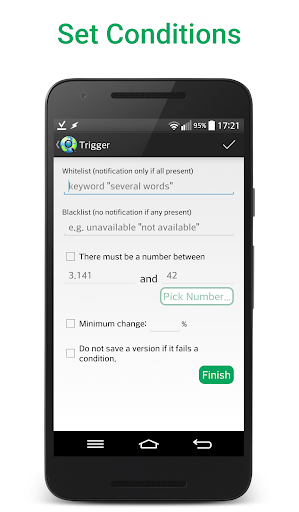
Web Alert (Lifetime Pro) screenshot
Permissions Explained 5 permissions requested View details

This app requests 5 permissions. The table below explains what each permission may allow and what users should review before installing.

Status Permission What it means Why it may be used User safety note
ℹ️ Review View Network Connections view network connections This is an Android permission or app-specific permission requested by the app. The app may use this permission for features related to its category, device support, background behavior, storage, connectivity, or system integration. Review this permission before installing, especially if it does not match the app’s expected purpose.
ℹ️ Review Full Network Access full network access This is an Android permission or app-specific permission requested by the app. The app may use this permission for features related to its category, device support, background behavior, storage, connectivity, or system integration. Review this permission before installing, especially if it does not match the app’s expected purpose.
ℹ️ Review Run At Startup run at startup This is an Android permission or app-specific permission requested by the app. The app may use this permission for features related to its category, device support, background behavior, storage, connectivity, or system integration. Review this permission before installing, especially if it does not match the app’s expected purpose.
ℹ️ Review Prevent Device From Sleeping prevent device from sleeping This is an Android permission or app-specific permission requested by the app. The app may use this permission for features related to its category, device support, background behavior, storage, connectivity, or system integration. Review this permission before installing, especially if it does not match the app’s expected purpose.
ℹ️ Review Google Play License Check Google Play license check This is an Android permission or app-specific permission requested by the app. The app may use this permission for features related to its category, device support, background behavior, storage, connectivity, or system integration. Review this permission before installing, especially if it does not match the app’s expected purpose.

About Web Alert (Lifetime Pro)

A one-time lifetime purchase to add new features to Web Alert. Web Alert can monitor your web pages for changes and notify you when a change was detected (e.g. when the price of a product in an online store has dropped). ✔ Set any custom frequency for checks (e.g. every 5 seconds) ✔ Parallel checks ✔ Filter text, e.g. only watch changes in the text between word … and word … ✔ Monitor a number for changes (e.g. the price of a product) ✔ Define a time range without checks or without notifications ✔ Change notifications only when a certain keyword is present (or absent) ✔ Access websites with SSL certificate problems ✔ Limit alerts to a minimum change percentage ✔ Duplicate alerts ✔ Modify the URL of an alert ✔ Restore alerts deleted by accident ✔ Can notify when a website is down or offline ✔ Export website versions as a zip archive ✔ Export / Import your alerts ✔ View changes already in the notification ✔ Keeps website links inside the changes ✔ Allows to view only the changes and not the unchanged parts Suitable especially for professionals in web development or automation: ✔ Filter content with regular expressions (RegEx) ✔ Use CSS and jQuery selectors ✔ Watch in HTML source code for changes ✔ Plug-in to integrate with Tasker, Automate and Automagic With the extensive Tasker plugin many parts of the app become programmable even without knowledge of a programming language. You still need to have the free Web Alert app installed. Enjoy these new features! :-)

What Web Alert (Lifetime Pro) Is Used For

Web Alert (Lifetime Pro) appears to be an add-on for the Web Alert app, focused on monitoring web pages and sending notifications when content changes. Based on the metadata, it is commonly used for tracking things like price changes, updates to specific text on a page, or whether a website becomes unavailable. The productivity category and phone-app format suggest it is meant for regular mobile use rather than casual browsing.

The listed features point to practical use in web monitoring workflows. It may be useful for people who want frequent checks, text filtering, keyword-based alerts, or support for more advanced selectors such as CSS, jQuery, and regular expressions. Permissions like full network access, run at startup, and prevent device from sleeping fit an app that works in the background and continues checking pages over time. The Tasker, Automate, and Automagic plugin support also suggests it can be connected to automation setups for more customized alert handling.

Common uses

  • Monitor webpages for changes and receive alerts
  • Track product prices or number values over time
  • Watch only specific text, keywords, or page sections
  • Check whether a website is offline or has errors
  • Use background alerts with scheduled or frequent checks
  • Connect with automation tools like Tasker for custom workflows
  • Export, import, or restore saved alerts
Best for:
price tracking website monitoring automation users web developers phone app

App Details

Package:
me.webalert.xp
Category:
Productivity
Developer:
Web Alert
Version:
2.3
Updated:
Oct 6, 2025
Min Android:
5.1
Age Rating:
Everyone
Contains Ads:
No
In-App Purchases:
No

Official Listing

  • Official listing available on Google Play
  • Package name: me.webalert.xp
  • Age rating: Everyone

Explore More

Browse more apps in Productivity or explore the Phone hub .

Related Productivity Apps

Microsoft OneDrive icon

Microsoft OneDrive

Productivity Microsoft Corporation

Securely save and share your favorite memories and files across your devices.

Version Varies with device 89.8 MB ⭐ 4.60 5,000,000,000+ installs
Google One icon

Google One

Productivity Google LLC

Cloud storage, automatic phone backup, and more.

Version 1.302.885140631 25.5 MB ⭐ 4.10 1,000,000,000+ installs
Microsoft Word: Edit Documents icon

Microsoft Word: Edit Documents

Productivity Microsoft Corporation

Craft your story with formatting and grammar tools to ensure it’s right, always

Version Varies with device 120.4 MB ⭐ 4.80 1,000,000,000+ installs
Microsoft Excel: Spreadsheets icon

Microsoft Excel: Spreadsheets

Productivity Microsoft Corporation

Use powerful, industry-leading AI tools to generate visual charts from any data

Version Varies with device 230.4 MB ⭐ 4.80 1,000,000,000+ installs
Microsoft PowerPoint icon

Microsoft PowerPoint

Productivity Microsoft Corporation

Seamlessly integrate data and reports to build your presentation to impress

Version Varies with device 226.3 MB ⭐ 4.80 1,000,000,000+ installs
Microsoft Outlook icon

Microsoft Outlook

Productivity Microsoft Corporation

Stay on top of multiple accounts with emails, calendars & contacts in one place

Version 5.2611.0 106.4 MB ⭐ 4.40 1,000,000,000+ installs

How to Download Web Alert (Lifetime Pro)

If this app is not hosted directly on APKApps official link, then for the safest and most up-to-date version, install it from its official Google Play listing.