Dictate Keyboard (Whisper AI) icon

Phone

Dictate Keyboard (Whisper AI)

Productivity DevEmperor ⭐ 4.70 1,000+
Version 3.2.0 Everyone

Screenshots

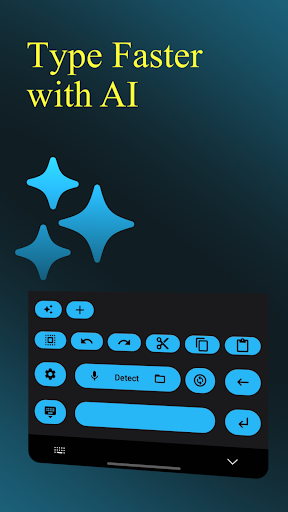
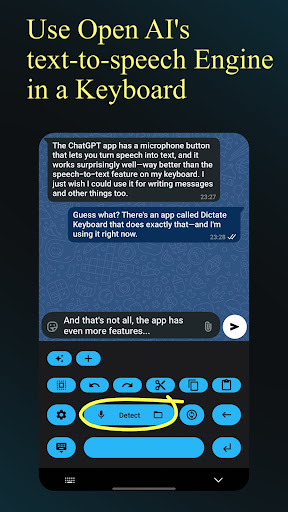
Dictate Keyboard (Whisper AI) screenshot
Permissions Explained 7 permissions requested View details

This app requests 7 permissions. The table below explains what each permission may allow and what users should review before installing.

Status Permission What it means Why it may be used User safety note
ℹ️ Review Record Audio record audio This is an Android permission or app-specific permission requested by the app. The app may use this permission for features related to its category, device support, background behavior, storage, connectivity, or system integration. Review this permission before installing, especially if it does not match the app’s expected purpose.
ℹ️ Review View Network Connections view network connections This is an Android permission or app-specific permission requested by the app. The app may use this permission for features related to its category, device support, background behavior, storage, connectivity, or system integration. Review this permission before installing, especially if it does not match the app’s expected purpose.
ℹ️ Review Pair With Bluetooth Devices pair with Bluetooth devices This is an Android permission or app-specific permission requested by the app. The app may use this permission for features related to its category, device support, background behavior, storage, connectivity, or system integration. Review this permission before installing, especially if it does not match the app’s expected purpose.
ℹ️ Review Full Network Access full network access This is an Android permission or app-specific permission requested by the app. The app may use this permission for features related to its category, device support, background behavior, storage, connectivity, or system integration. Review this permission before installing, especially if it does not match the app’s expected purpose.
ℹ️ Review Change Your Audio Settings change your audio settings This is an Android permission or app-specific permission requested by the app. The app may use this permission for features related to its category, device support, background behavior, storage, connectivity, or system integration. Review this permission before installing, especially if it does not match the app’s expected purpose.
ℹ️ Review Control Vibration control vibration This is an Android permission or app-specific permission requested by the app. The app may use this permission for features related to its category, device support, background behavior, storage, connectivity, or system integration. Review this permission before installing, especially if it does not match the app’s expected purpose.
ℹ️ Review Google Play License Check Google Play license check This is an Android permission or app-specific permission requested by the app. The app may use this permission for features related to its category, device support, background behavior, storage, connectivity, or system integration. Review this permission before installing, especially if it does not match the app’s expected purpose.

About Dictate Keyboard (Whisper AI)

Dictate is a simple yet powerful keyboard, which converts spoken language into text. It uses an extremely powerful speech recognition AI in the background and therefore supports all common national languages. What's more, you don't have to dictate punctuation because Whisper adds it itself. You can even sing in text and it will be recognized correctly. Other features include: - custom rewording instructions (translation, summarizing, style-changing, ...) using GPT-5 (and many other models) 💡 - auto formatting of spoken commands ("new paragraph", "first, second, ...", "Henry with i", etc.) ✨ - switching between different transcriptions models (Whisper, GPT-4o-transcribe, ...) and providers (OpenAI, Groq or your own transcription server) 🔄 - transcription of voice and audio or video files 📄 - recording using phone or Bluetooth microphone 🎧 - easy emoji and number insertion 🥳 - export and import of all your prompts 📤 - setting a system prompt to guide the style of the speech recognition and rewording ✏️ - dark-mode, light-mode and custom theme settings ✨ - direct input, without the typing animation ⏱️ - quick switching to the standard keyboard ⌨️ - haptic feedback 📳 - custom API server and proxy support 🛠️ - simple use and setup process 💪 For the app to be fully functional, every user must create an API key with OpenAI or Groq when setting it up for the first time. This incurs very low fees for each transcription (usually a few cents per month). There is a detailed explanation of this during setup. Dictate is completely open source, the source code is available on GitHub. https://github.com/DevEmperor/Dictate If you have any bugs or suggestions for improvement, just write me an e-mail or open an issue on GitHub. If you like Dictate, I would really appreciate a donation via PayPal. You can find my PayPal-Link on my GitHub page. 😇 Have fun with Dictate! 😊

What Dictate Keyboard (Whisper AI) Is Used For

Dictate Keyboard (Whisper AI) appears to be a productivity app for turning spoken language into text on an Android phone. Based on the metadata, it is used as an alternative keyboard for dictation, where users speak instead of typing. It may be helpful for drafting messages, notes, emails, and other text entry tasks when hands-free input is easier than typing.

The app also appears to go beyond basic speech-to-text by supporting punctuation insertion, spoken formatting commands, and rewording options. The listed permissions, such as recording audio, Bluetooth pairing, and network access, suggest it can capture voice from the device or a Bluetooth microphone and send audio for transcription through online services. Based on the description, it may also support importing audio or video for transcription and switching between transcription providers or models.

Common uses

  • Use voice dictation to convert speech into typed text
  • Insert punctuation and formatting with spoken commands
  • Potentially transcribe audio or video files into text
  • May help with drafting messages, notes, and emails faster
  • Can be used with a phone microphone or Bluetooth microphone
  • Includes options for rewording or summarizing text through AI models
  • Lets users switch back to the standard keyboard when needed
Best for:
Voice dictation Hands-free typing Note taking Productivity Phone app

App Details

Package:
net.devemperor.dictate
Category:
Productivity
Developer:
DevEmperor
Version:
3.2.0
Updated:
Dec 30, 2025
Min Android:
8.0
Age Rating:
Everyone
Contains Ads:
No
In-App Purchases:
No

Official Listing

  • Official listing available on Google Play
  • Package name: net.devemperor.dictate
  • Age rating: Everyone

Explore More

Browse more apps in Productivity or explore the Phone hub .

Related Productivity Apps

Microsoft SwiftKey Beta Keyboard icon

Microsoft SwiftKey Beta Keyboard

Personalization SwiftKey

Get early access to new Microsoft SwiftKey features. Let us know what you think!

Version 9.10.36.19 77.1 MB ⭐ 4.34 5,000,000+ installs

How to Download Dictate Keyboard (Whisper AI)

If this app is not hosted directly on APKApps official link, then for the safest and most up-to-date version, install it from its official Google Play listing.