Polarr: Photo Filters & Editor icon

Phone

Polarr: Photo Filters & Editor

Photography Polarrcan ⭐ 3.80 10,000,000+

Endless aesthetics and effects

Version 6.12.0 79.7 MB Everyone

Screenshots

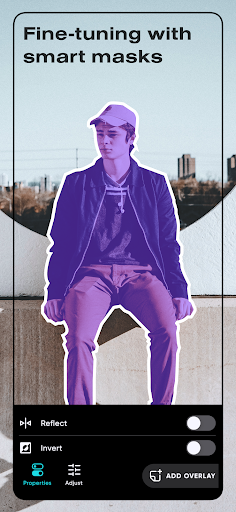
Polarr: Photo Filters & Editor screenshot
Permissions Explained 16 permissions requested View details

This app requests 16 permissions. The table below explains what each permission may allow and what users should review before installing.

Status Permission What it means Why it may be used User safety note
⚠️ Sensitive Read external storage android.permission.READ_EXTERNAL_STORAGE Allows the app to read files from shared device storage. Used by media players, file managers, backup apps, editors, upload tools, and document apps. Sensitive permission. Review carefully if the app does not need access to files or media.
Common Internet access android.permission.INTERNET Allows the app to open network connections and communicate with online services. Commonly used for streaming, syncing, login, ads, analytics, downloads, cloud features, and app updates. Common permission. Review the app’s behavior if it does not appear to need online access.
⚠️ Sensitive Camera access android.permission.CAMERA Allows the app to use the device camera. Used for QR scanning, taking photos, video calls, document capture, AR features, or profile images. Sensitive permission. Grant only when camera features are expected.
ℹ️ Review Use Credentials android.permission.USE_CREDENTIALS This is an Android permission or app-specific permission requested by the app. The app may use this permission for features related to its category, device support, background behavior, storage, connectivity, or system integration. Review this permission before installing, especially if it does not match the app’s expected purpose.
⚠️ Sensitive Modify external storage android.permission.WRITE_EXTERNAL_STORAGE Allows the app to write or modify files in shared device storage. Used for saving downloads, media files, exports, edited documents, backups, or cached content. Sensitive permission. Make sure file access matches the app’s purpose.
ℹ️ Review Access Media Location android.permission.ACCESS_MEDIA_LOCATION This is an Android permission or app-specific permission requested by the app. The app may use this permission for features related to its category, device support, background behavior, storage, connectivity, or system integration. Review this permission before installing, especially if it does not match the app’s expected purpose.
ℹ️ Review Vending Billing com.android.vending.BILLING This is an Android permission or app-specific permission requested by the app. The app may use this permission for features related to its category, device support, background behavior, storage, connectivity, or system integration. Review this permission before installing, especially if it does not match the app’s expected purpose.
Common View network status android.permission.ACCESS_NETWORK_STATE Allows the app to check whether the device is connected to Wi-Fi, mobile data, or another network. Often used to avoid loading content when offline or to adjust loading based on connection quality. Generally low risk by itself.
ℹ️ Review Send notifications android.permission.POST_NOTIFICATIONS Allows the app to send notifications to the device. Used for alerts, reminders, messages, account activity, updates, or media controls. Review notification settings if the app sends too many alerts.
ℹ️ Review Read Media Images android.permission.READ_MEDIA_IMAGES This is an Android permission or app-specific permission requested by the app. The app may use this permission for features related to its category, device support, background behavior, storage, connectivity, or system integration. Review this permission before installing, especially if it does not match the app’s expected purpose.
ℹ️ Review Keep device awake android.permission.WAKE_LOCK Allows the app to prevent the device from sleeping while a task is running. Used for media playback, downloads, navigation, alarms, calls, or long-running background tasks. Review battery usage if the app keeps the device awake too often.
ℹ️ Review C2dm Permission Receive com.google.android.c2dm.permission.RECEIVE This is an Android permission or app-specific permission requested by the app. The app may use this permission for features related to its category, device support, background behavior, storage, connectivity, or system integration. Review this permission before installing, especially if it does not match the app’s expected purpose.
ℹ️ Review Gms Permission Ad Id com.google.android.gms.permission.AD_ID This is an Android permission or app-specific permission requested by the app. The app may use this permission for features related to its category, device support, background behavior, storage, connectivity, or system integration. Review this permission before installing, especially if it does not match the app’s expected purpose.
ℹ️ Review Finsky Permission Bind Get Install Referrer Service com.google.android.finsky.permission.BIND_GET_INSTALL_REFERRER_SERVICE This is an Android permission or app-specific permission requested by the app. The app may use this permission for features related to its category, device support, background behavior, storage, connectivity, or system integration. Review this permission before installing, especially if it does not match the app’s expected purpose.
ℹ️ Review Foreground Service android.permission.FOREGROUND_SERVICE This is an Android permission or app-specific permission requested by the app. The app may use this permission for features related to its category, device support, background behavior, storage, connectivity, or system integration. Review this permission before installing, especially if it does not match the app’s expected purpose.
ℹ️ Review Photo Editor Polarr Dynamic Receiver Not Exported Permission photo.editor.polarr.DYNAMIC_RECEIVER_NOT_EXPORTED_PERMISSION This is an Android permission or app-specific permission requested by the app. The app may use this permission for features related to its category, device support, background behavior, storage, connectivity, or system integration. Review this permission before installing, especially if it does not match the app’s expected purpose.

About Polarr: Photo Filters & Editor

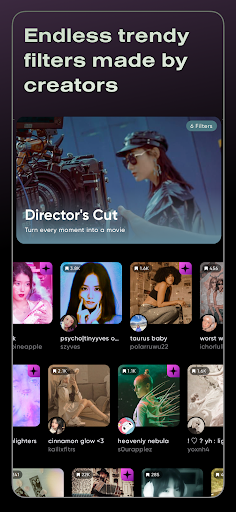
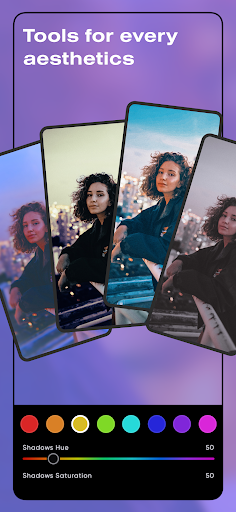
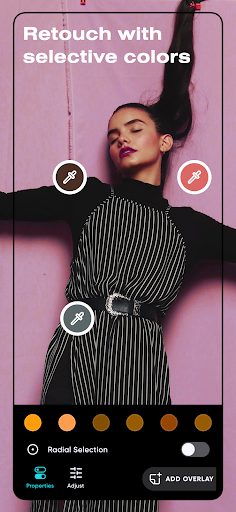
Discover millions of Polarr filters made by Polarr Creators around the world, or create and share your own filters with your friends. Polarr filters are much more than your regular filters. In addition to editing colors, you can include your own overlays, face adjustments, or change particular objects with AI in your Polarr filter. Polarr filters can also be applied on videos with Polarr 24FPS. With Polarr, it's never been easier to share your filters and aesthetics. Main features: • Search and discover trendy, new Polarr filters • Weekly updated Polarr filter collections and Creator Spotlights • Create and share your own Polarr filters • Scan or produce Polarr filters as QR codes • Synchronize all your Polarr filters with a Polarr account, for both Polarr and Polarr 24FPS Included effects for Polarr Filters: • Selective AI objects: Sky, Person, Background, Vegetation, Building, Ground, Animal, etc • Selective masks: Brush, Radial, Gradient, Color, Luminance • Overlays: Gradient, Duotone, Weather, Texture, Backdrops, Custom Overlay, etc • Retouch: Skin, Liquify, Face shapes (mouth, teeth, nose, chin, etc) • Global adjustments: Light, Color, HSL, Toning, Effects, Fringing, Details, Curves, Vignette, Grain, LUT • Productivity: Batch photo exports, Face detection, A.I. object segmentation =============================== Polarr Subscription Options: =============================== $3.99 per month $19.99 per year You can subscribe to get access to all premium Polarr offered in Polarr. Subscribing to Polarr also unlocks Polarr 24FPS through your Polarr account. When you start your Polarr subscription with a free trial, once the trial is over, you’ll be charged a subscription fee. Subscriptions are billed monthly or annually at the rate selected depending on the subscription plan. Monthly or yearly subscriptions unlock the same features in Polarr. Pricing in other countries may vary, and charges may be converted to your local currency depending on the country you live in. Subscriptions auto-renew at the cost of the chosen package, unless canceled 24-hours in advance before the end of the current period. The subscription fee is charged to your Google Play Store account at confirmation of purchase. You may manage your subscription and turn off auto-renewal by going to your Account Settings after purchase. Any unused portion of a free trial period will be forfeited when the user purchases a subscription during free trial. Terms of use: https://www.polarr.com/policy/termsofservice_v3_en.html Privacy policy: https://www.polarr.com/policy/privacy_v3_en.html

What Polarr: Photo Filters & Editor Is Used For

Polarr: Photo Filters & Editor appears to be a photography app for editing photos with filters, color adjustments, and layered effects. Based on the metadata, it is commonly used when someone wants to improve the look of images on a phone, apply a consistent aesthetic, or experiment with creator-made filter styles. The app also mentions tools for selective edits, face adjustments, AI object selection, and batch exports, which suggests it may be useful for both casual edits and more detailed image work.

The app’s permissions point to typical editor functions such as accessing stored photos, using the camera, and reading media images. It also includes internet access, which fits the filter discovery and account sync features described in the metadata. Because the app supports QR code scanning and sharing of filters, it may be used by people who want to save, exchange, or reuse editing presets across photos and videos, especially on a phone-sized screen.

Common uses

  • Edit photos with filters, color controls, and effects
  • Apply creator-made looks or build custom filter styles
  • Adjust specific parts of an image, such as sky, people, or background
  • Retouch facial details and refine portraits
  • Use batch export tools for multiple photos
  • Scan or share filters with QR codes
  • Apply supported filter styles to video through Polarr 24FPS
Best for:
photo editing portrait retouching filter creators social content phone app

App Details

Package:
photo.editor.polarr
Category:
Photography
Developer:
Polarrcan
Version:
6.12.0
Updated:
Feb 3, 2026
Min Android:
8.0
Age Rating:
Everyone
Contains Ads:
Yes
In-App Purchases:
Yes

Official Listing

  • Official listing available on Google Play
  • Package name: photo.editor.polarr
  • Age rating: Everyone

Explore More

Browse more apps in Photography or explore the Phone hub .

Related Photography Apps

Picsart AI Photo Editor, Video icon

Picsart AI Photo Editor, Video

Photography PicsArt, Inc.

Remove and swap backgrounds in your photos and remove unwanted objects

Version 29.5.13 34.1 MB ⭐ 4.00 1,000,000,000+ installs
Video Editor & Maker - InShot icon

Video Editor & Maker - InShot

Photography InShot Video Editor

AI video editor with music! Edit video with effects, slideshow & slow motion

Version 2.196.1529 80.1 MB ⭐ 4.80 500,000,000+ installs
B612 AI Photo&Video Editor icon

B612 AI Photo&Video Editor

Photography SNOW Corporation

Meet trendy effects, filters, and stickers!

Version Varies with device 144.8 MB ⭐ 4.10 500,000,000+ installs
FaceApp: Perfect Face Editor icon

FaceApp: Perfect Face Editor

Photography FaceApp Technology Ltd

Natural Beauty, Selfie Retouch

Version Varies with device 84.1 MB ⭐ 4.30 500,000,000+ installs
Remini - AI Photo Enhancer icon

Remini - AI Photo Enhancer

Photography Bending Spoons

Create AI Photos, Improve and restore quality of blurry, old or damaged pics.

Version 3.7.1301.202520348 52.8 MB ⭐ 4.10 500,000,000+ installs
BeautyPlus-Selfie Photo Editor icon

BeautyPlus-Selfie Photo Editor

Photography PIXOCIAL TECHNOLOGY (SINGAPORE) PTE. LTD.

Snap perfect selfies every time. AI Auto-beautification for that flawless look.

Version 7.33.1 269.4 MB ⭐ 4.60 500,000,000+ installs

How to Download Polarr: Photo Filters & Editor

If this app is not hosted directly on APKApps official link, then for the safest and most up-to-date version, install it from its official Google Play listing.