Receipt Scanner by Saldo Apps icon

Phone

Receipt Scanner by Saldo Apps

Finance Saldo Apps ⭐ 4.40 100,000+
Version 2.5.1 Everyone

Screenshots

Receipt Scanner by Saldo Apps screenshot
Permissions Explained 9 permissions requested View details

This app requests 9 permissions. The table below explains what each permission may allow and what users should review before installing.

Status Permission What it means Why it may be used User safety note
ℹ️ Review Read The Contents Of Your Usb Storage read the contents of your USB storage This is an Android permission or app-specific permission requested by the app. The app may use this permission for features related to its category, device support, background behavior, storage, connectivity, or system integration. Review this permission before installing, especially if it does not match the app’s expected purpose.
ℹ️ Review Take Pictures And Videos take pictures and videos This is an Android permission or app-specific permission requested by the app. The app may use this permission for features related to its category, device support, background behavior, storage, connectivity, or system integration. Review this permission before installing, especially if it does not match the app’s expected purpose.
ℹ️ Review View Wi Fi Connections view Wi-Fi connections This is an Android permission or app-specific permission requested by the app. The app may use this permission for features related to its category, device support, background behavior, storage, connectivity, or system integration. Review this permission before installing, especially if it does not match the app’s expected purpose.
ℹ️ Review View Network Connections view network connections This is an Android permission or app-specific permission requested by the app. The app may use this permission for features related to its category, device support, background behavior, storage, connectivity, or system integration. Review this permission before installing, especially if it does not match the app’s expected purpose.
ℹ️ Review Full Network Access full network access This is an Android permission or app-specific permission requested by the app. The app may use this permission for features related to its category, device support, background behavior, storage, connectivity, or system integration. Review this permission before installing, especially if it does not match the app’s expected purpose.
ℹ️ Review Run At Startup run at startup This is an Android permission or app-specific permission requested by the app. The app may use this permission for features related to its category, device support, background behavior, storage, connectivity, or system integration. Review this permission before installing, especially if it does not match the app’s expected purpose.
ℹ️ Review Control Vibration control vibration This is an Android permission or app-specific permission requested by the app. The app may use this permission for features related to its category, device support, background behavior, storage, connectivity, or system integration. Review this permission before installing, especially if it does not match the app’s expected purpose.
ℹ️ Review Prevent Device From Sleeping prevent device from sleeping This is an Android permission or app-specific permission requested by the app. The app may use this permission for features related to its category, device support, background behavior, storage, connectivity, or system integration. Review this permission before installing, especially if it does not match the app’s expected purpose.
ℹ️ Review Receive Data From Internet receive data from Internet This is an Android permission or app-specific permission requested by the app. The app may use this permission for features related to its category, device support, background behavior, storage, connectivity, or system integration. Review this permission before installing, especially if it does not match the app’s expected purpose.

About Receipt Scanner by Saldo Apps

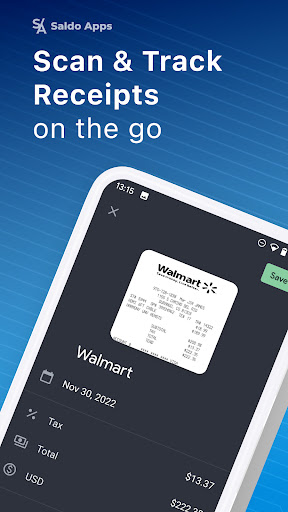
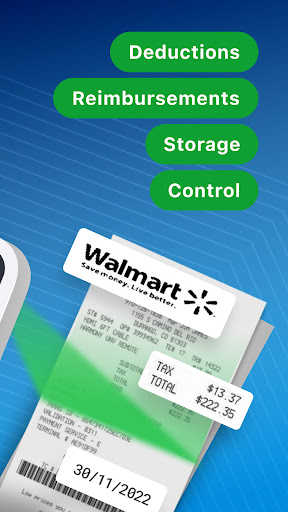
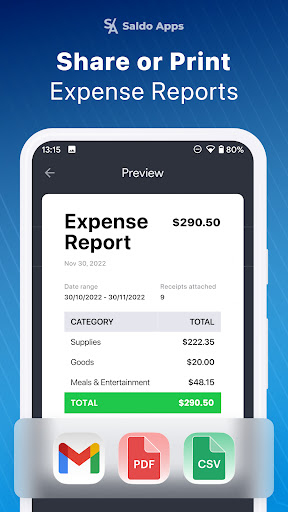
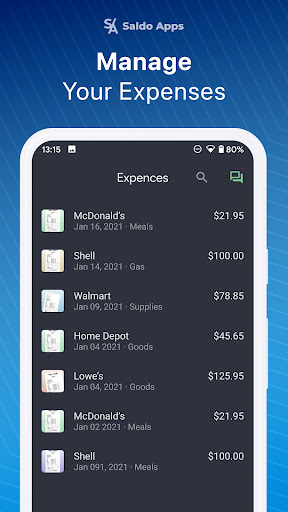
Try our digital Receipt Scanner app, a convenient receipt keeper equipped with a bill scanner. Easily scan receipts on the go and manage your business and personal accounting through detailed expense reports. At Saldo Apps, we know how hard and time-consuming it can be to manage paper expense receipts. No need to pile personal and business receipts up anymore! We can help you ride the wave of the latest bookkeeping and expense-tracking technology. Receipt Scanner by Saldo Apps is a great expense tracker solution for: 👉 Self employed freelancers 👉 Contractors 👉 Small business owners With our receipt app you can: 🤖 Automatically scan receipts with AI technology ✓ The digital receipt app captures the supplier's name, date, and the total amount for easy categorization. ✓ With the secure receipt keeper you can store your personal and business receipts in the cloud, for access at any time from any device. 🌓 Enjoy light and dark themes ✓ Customize the digital receipt app experience based on preference or surrounding lighting conditions. ✓ The scanner app ensures optimal readability and usability in any environment. 📝 Add details and keep receipts under control ✓ Pick an expense category or create a new one. ✓ Take a quick photo or add a picture of a business tax receipt to certify the expense. ✓ Add and edit notes to the expense and business receipt. 📊 Generate reports and share or print it ✓ Make business related or personal budget reports based on logged expenses. ✓ Email, share online, or print PDF reports. ✓ Automatic currency conversion for travel expense management. ✓ Preview reports before sharing or printing them. 🌐 Use Receipt Scanner without an internet connection ✓ The scan app stays accessible whether you're online or offline. ✓ Your image stays in the bill app until you regain a connection, then it uploads automatically. And even more features are coming soon for your small business accounting and personal bookkeeping purposes! Receipt Scanner is your free business expense tracker, bill scanner and receipt keeper. Get started with a free receipt scanner plan, then upgrade to a Pro account for unlimited expense tracking. Terms of use: https://saldoapps.com/saldo-apps-terms-of-use Privacy policy: https://saldoapps.com/saldo-apps-privacy-policy by S/A Saldo Apps Join us as we navigate the forefront of modern bookkeeping and expense tracking innovations, ensuring you stay ahead in managing your finances. Saldo Apps offers a solution to the hassle of managing paper business receipts with Receipt Scanner - a user-friendly bill scanner and receipt keeper!

What Receipt Scanner by Saldo Apps Is Used For

Receipt Scanner by Saldo Apps appears to be a finance app for turning paper receipts into digital expense records on a phone. Based on the metadata, people may use it to capture receipt details such as merchant name, date, and total amount, then organize those records for personal budgeting or business bookkeeping. It is especially relevant for freelancers, contractors, and small business owners who need a simple way to track expenses over time.

The app also appears to support report generation, which may help users review spending by category and prepare summaries for sharing, printing, or record keeping. Its ability to work with photos, cloud storage, and offline capture suggests it is designed for day-to-day use when handling receipts at the point of purchase, then syncing later when a connection is available. The listed permissions also fit this use case, since the app may need camera access for scanning, storage access for saving receipt images, and network access for syncing and report features.

Common uses

  • Scan receipts and save them as digital expense records
  • Track personal or business spending by category
  • Create expense reports for budgeting or bookkeeping
  • Add notes and extra details to receipt entries
  • Store receipt images for later review or syncing
  • Use it on the go with phone-based receipt capture
  • Support travel expenses with currency conversion
Best for:
Freelancers Small business owners Expense tracking Receipt organization Phone users

App Details

Package:
saldo.receiptscanner.app
Category:
Finance
Developer:
Saldo Apps
Version:
2.5.1
Updated:
Aug 21, 2025
Min Android:
8.0
Age Rating:
Everyone
Contains Ads:
No
In-App Purchases:
Yes

Official Listing

  • Official listing available on Google Play
  • Package name: saldo.receiptscanner.app
  • Age rating: Everyone

Explore More

Browse more apps in Finance or explore the Phone hub .

Related Finance Apps

How to Download Receipt Scanner by Saldo Apps

If this app is not hosted directly on APKApps official link, then for the safest and most up-to-date version, install it from its official Google Play listing.