Routin Smart Route Planner icon

Phone

Routin Smart Route Planner

Maps & Navigation Routin Inc ⭐ 4.70 1,000,000+
Version 5.2.6 Everyone

Screenshots

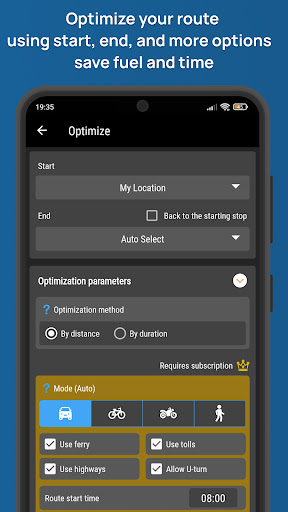
Routin Smart Route Planner screenshot
Permissions Explained 12 permissions requested View details

This app requests 12 permissions. The table below explains what each permission may allow and what users should review before installing.

Status Permission What it means Why it may be used User safety note
ℹ️ Review Read Your Contacts read your contacts This is an Android permission or app-specific permission requested by the app. The app may use this permission for features related to its category, device support, background behavior, storage, connectivity, or system integration. Review this permission before installing, especially if it does not match the app’s expected purpose.
ℹ️ Review Approximate Location (network Based) approximate location (network-based) This is an Android permission or app-specific permission requested by the app. The app may use this permission for features related to its category, device support, background behavior, storage, connectivity, or system integration. Review this permission before installing, especially if it does not match the app’s expected purpose.
ℹ️ Review Precise Location (gps And Network Based) precise location (GPS and network-based) This is an Android permission or app-specific permission requested by the app. The app may use this permission for features related to its category, device support, background behavior, storage, connectivity, or system integration. Review this permission before installing, especially if it does not match the app’s expected purpose.
ℹ️ Review Read The Contents Of Your Usb Storage read the contents of your USB storage This is an Android permission or app-specific permission requested by the app. The app may use this permission for features related to its category, device support, background behavior, storage, connectivity, or system integration. Review this permission before installing, especially if it does not match the app’s expected purpose.
ℹ️ Review Take Pictures And Videos take pictures and videos This is an Android permission or app-specific permission requested by the app. The app may use this permission for features related to its category, device support, background behavior, storage, connectivity, or system integration. Review this permission before installing, especially if it does not match the app’s expected purpose.
ℹ️ Review View Network Connections view network connections This is an Android permission or app-specific permission requested by the app. The app may use this permission for features related to its category, device support, background behavior, storage, connectivity, or system integration. Review this permission before installing, especially if it does not match the app’s expected purpose.
ℹ️ Review Full Network Access full network access This is an Android permission or app-specific permission requested by the app. The app may use this permission for features related to its category, device support, background behavior, storage, connectivity, or system integration. Review this permission before installing, especially if it does not match the app’s expected purpose.
ℹ️ Review Draw Over Other Apps draw over other apps This is an Android permission or app-specific permission requested by the app. The app may use this permission for features related to its category, device support, background behavior, storage, connectivity, or system integration. Review this permission before installing, especially if it does not match the app’s expected purpose.
ℹ️ Review Control Vibration control vibration This is an Android permission or app-specific permission requested by the app. The app may use this permission for features related to its category, device support, background behavior, storage, connectivity, or system integration. Review this permission before installing, especially if it does not match the app’s expected purpose.
ℹ️ Review Prevent Device From Sleeping prevent device from sleeping This is an Android permission or app-specific permission requested by the app. The app may use this permission for features related to its category, device support, background behavior, storage, connectivity, or system integration. Review this permission before installing, especially if it does not match the app’s expected purpose.
ℹ️ Review Google Play License Check Google Play license check This is an Android permission or app-specific permission requested by the app. The app may use this permission for features related to its category, device support, background behavior, storage, connectivity, or system integration. Review this permission before installing, especially if it does not match the app’s expected purpose.
ℹ️ Review Receive Data From Internet receive data from Internet This is an Android permission or app-specific permission requested by the app. The app may use this permission for features related to its category, device support, background behavior, storage, connectivity, or system integration. Review this permission before installing, especially if it does not match the app’s expected purpose.

About Routin Smart Route Planner

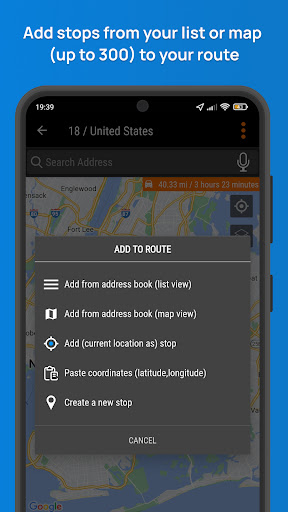
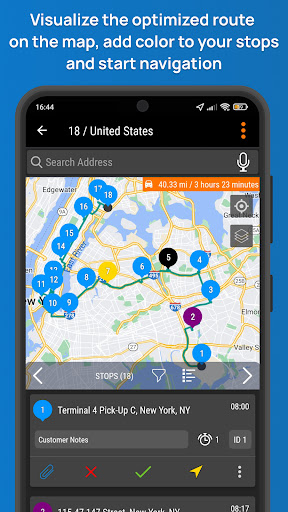
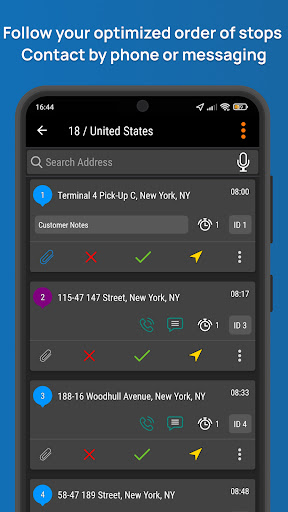
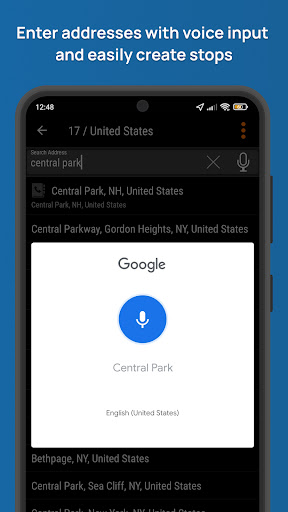
Multi Stop Route Planner and Optimizer Routin is a route planning app. It is quite useful for drivers who should visit many addresses daily. By using Routin, you can sort your stops/jobs optimally according to the chosen locations and finish your jobs in a shorter time. CREATE A ROUTE, ADD STOPS AND CLICK OPTIMIZE! ROUTIN PLANS YOUR ROUTE FOR YOU!! Select the starting and ending stops or let Routin select the ending stop for you. Optimized order of stops can be seen in a list or on map. You can follow along your optimized route via a selected navigation app and enjoy your ride! Key Features - You can add 300 stops per route and optimize them for free. If your credit is not enough, you can continue using the app by watching video ads, purchasing credits, or subscribing. - By optimizing your route, you can increase your daily deliveries and save time and fuel - Fast and reliable optimization algorithm. Don't wait for optimization. Optimize 100 stops under 5 seconds - In your own language, you can use the voice input feature to add stops or notes - You can use Google Maps, Yandex Maps, Waze, Here WeGo or any other GPS navigation apps - Using notifications, you can confirm the delivery and start navigating to your next stop without leaving the navigation app - You can add extra information to stops such as phone number, email address, group, note, photo etc. - You can define a default note or message template. So, you can send a message quickly - You can start the optimization from your current location or from any stop on your route - You can quickly create your routes by pressing down on the map or searching for addresses - When adding addresses, you can quickly add them just by searching by street name and number - You can add stops by postcode in supporting countries (such as Great Britain, Singapore) Address Book Routin helps you to manage your contacts, customers, delivery or visit addresses using an Address Book Store names, phone numbers, photos, locations (latitude, longitude) and addresses of your stops. Import multiple stops data using a file (CSV, KML, GPX, XLS). Import Google Maps starred locations. Filter your stops according to name, address, or phone number. Visit Records Take notes and photos of your visit to a stop on a route. Share visit details and display past visit data. Share your route details, display summary report about your routes and planned distances for a selected period. The application is used extensively for the following sectors and jobs - Cargo services: Package delivery or package picking - Health services: Patient examination or care visits - Aid services: Municipalities or associations delivering aid packages or meals - Sales / Marketing services: Customer visits, product distribution - Personnel / Student transportation: Planning the shuttle routes - Tourism: Planning tourist services, creating a travel route - Planning of supply chain routes - Food delivery: Food delivery by motor courier - On-site…

What Routin Smart Route Planner Is Used For

Routin Smart Route Planner appears to be a route-planning app for people who need to visit multiple locations in one day. Based on the metadata, it is commonly used to create multi-stop routes, organize addresses in an efficient order, and then follow that route with a separate navigation app. This makes it relevant for delivery drivers, field workers, service visits, and anyone managing repeated stops across a workday.

The app also seems useful as a lightweight address and stop manager. It can store contact details, notes, photos, and location information for stops, and it supports importing route data from files such as CSV, KML, GPX, and XLS. The location permissions suggest it may help start routing from your current position and optimize around where you are now. Access to contacts and storage appears to support importing or managing customer and stop data, while camera access may be used for adding photos to entries.

Overall, this is a phone app focused on planning, sorting, and managing routes rather than providing turn-by-turn navigation itself. It appears designed to work alongside other map apps, letting you optimize stop order first and then navigate with the app you already prefer.

Common uses

  • Create and optimize routes with many stops
  • Plan delivery or service visits in a better order
  • Store customer or stop details like phone numbers and notes
  • Import stop lists from common file formats
  • Use your current location as a routing starting point
  • Send the optimized route to another navigation app
  • Manage recurring addresses in an address book
Best for:
delivery drivers field workers route planners phone app users navigation support

App Details

Package:
tr.com.ussal.smartrouteplanner
Developer:
Routin Inc
Version:
5.2.6
Updated:
Mar 31, 2026
Min Android:
8.0
Age Rating:
Everyone
Contains Ads:
Yes
In-App Purchases:
Yes

Official Listing

  • Official listing available on Google Play
  • Package name: tr.com.ussal.smartrouteplanner
  • Age rating: Everyone

Explore More

Browse more apps in Maps & Navigation or explore the Phone hub .

Related Maps & Navigation Apps

Multi-Stop Route Planner icon

Multi-Stop Route Planner

Maps & Navigation MapoScope - Delivery Route Optimization Experts
Version 26.03.18.01 ⭐ 4.60 1,000,000+ installs
HERE WeGo icon

HERE WeGo

Maps & Navigation HERE Europe B.V.

Enjoy the journey

Version 4.12.000 61.1 MB ⭐ 3.26 10,000,000+ installs

How to Download Routin Smart Route Planner

If this app is not hosted directly on APKApps official link, then for the safest and most up-to-date version, install it from its official Google Play listing.