Shopping List - SoftList icon

Phone

Shopping List - SoftList

Shopping Martins Softwares ⭐ 4.60 1,000,000+
Version Varies with device Everyone

Screenshots

Shopping List - SoftList screenshot
Permissions Explained 10 permissions requested View details

This app requests 10 permissions. The table below explains what each permission may allow and what users should review before installing.

Status Permission What it means Why it may be used User safety note
ℹ️ Review Read Your Contacts read your contacts This is an Android permission or app-specific permission requested by the app. The app may use this permission for features related to its category, device support, background behavior, storage, connectivity, or system integration. Review this permission before installing, especially if it does not match the app’s expected purpose.
ℹ️ Review Read The Contents Of Your Usb Storage read the contents of your USB storage This is an Android permission or app-specific permission requested by the app. The app may use this permission for features related to its category, device support, background behavior, storage, connectivity, or system integration. Review this permission before installing, especially if it does not match the app’s expected purpose.
ℹ️ Review Modify Or Delete The Contents Of Your Usb Storage modify or delete the contents of your USB storage This is an Android permission or app-specific permission requested by the app. The app may use this permission for features related to its category, device support, background behavior, storage, connectivity, or system integration. Review this permission before installing, especially if it does not match the app’s expected purpose.
ℹ️ Review Take Pictures And Videos take pictures and videos This is an Android permission or app-specific permission requested by the app. The app may use this permission for features related to its category, device support, background behavior, storage, connectivity, or system integration. Review this permission before installing, especially if it does not match the app’s expected purpose.
ℹ️ Review View Network Connections view network connections This is an Android permission or app-specific permission requested by the app. The app may use this permission for features related to its category, device support, background behavior, storage, connectivity, or system integration. Review this permission before installing, especially if it does not match the app’s expected purpose.
ℹ️ Review Full Network Access full network access This is an Android permission or app-specific permission requested by the app. The app may use this permission for features related to its category, device support, background behavior, storage, connectivity, or system integration. Review this permission before installing, especially if it does not match the app’s expected purpose.
ℹ️ Review Run At Startup run at startup This is an Android permission or app-specific permission requested by the app. The app may use this permission for features related to its category, device support, background behavior, storage, connectivity, or system integration. Review this permission before installing, especially if it does not match the app’s expected purpose.
ℹ️ Review Control Vibration control vibration This is an Android permission or app-specific permission requested by the app. The app may use this permission for features related to its category, device support, background behavior, storage, connectivity, or system integration. Review this permission before installing, especially if it does not match the app’s expected purpose.
ℹ️ Review Prevent Device From Sleeping prevent device from sleeping This is an Android permission or app-specific permission requested by the app. The app may use this permission for features related to its category, device support, background behavior, storage, connectivity, or system integration. Review this permission before installing, especially if it does not match the app’s expected purpose.
ℹ️ Review Receive Data From Internet receive data from Internet This is an Android permission or app-specific permission requested by the app. The app may use this permission for features related to its category, device support, background behavior, storage, connectivity, or system integration. Review this permission before installing, especially if it does not match the app’s expected purpose.

About Shopping List - SoftList

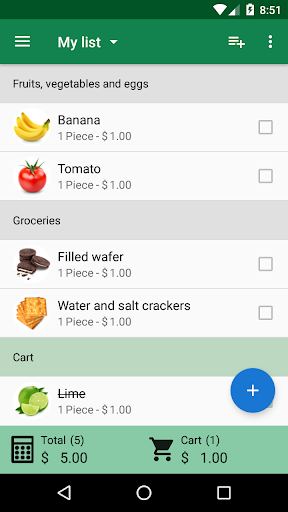
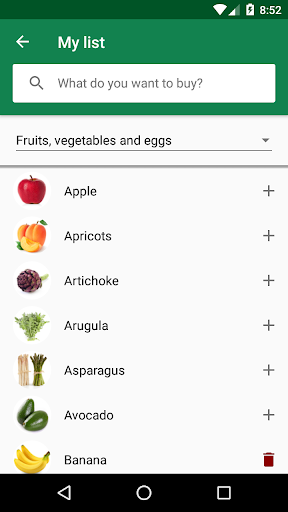
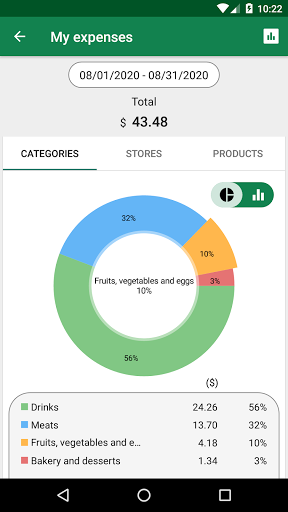
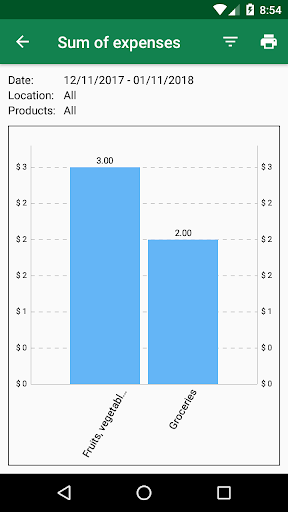
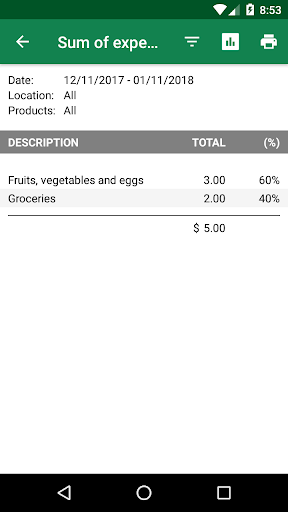
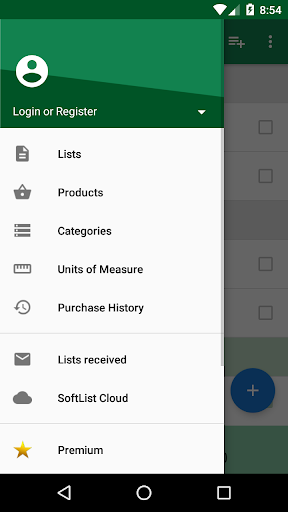
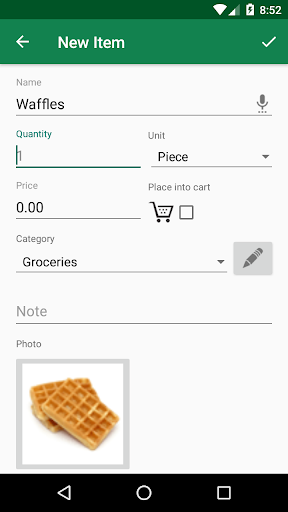
SoftList offers an extensive set of features with a modern and intuitive visual. Speed and convenience. Create your shopping list quickly using our product catalog and with the help of the autocomplete resource. Simple and complete. You can create lists by just adding the names of the products or complete lists by adding price, unit of measure, category, observation and photo. Follow your purchase. Add the price of the products and let SoftList calculate the total purchase for you. Purchase history By saving the history of your purchases, you can perform an analysis of your expenses, and if you have purchased the same product in different stores, perform price comparisons. Control your expenses. SoftList is the only shopping list app that has reports and charts to analyze your expenses. You can analyze various information, such as which product or category had more expenses. Just save the history of your purchases and generate reports. Cloud services. With cloud services you can synchronize your data between multiple devices, share lists with others and keep all your data saved in the cloud through automatic backups. To use the cloud services you need to create a SoftList account. You can create this account at any time, even after creating your lists. Features: - Register and manage your shopping lists. - Catalog of products with images. - Register items manually, using voice command or by scanning the barcode. - Add images to the products. - Products arranged by categories. - Possibility to define the order in which categories will be displayed. - Share your shopping list by email, SMS or WhatsApp. - Copy and move items between lists. - Add price to the products and see the total purchase. - Save your purchase history. - Reports for monitoring expenses. - Reports to compare prices. - Share lists with others. - Automatic backups using cloud services. - Synchronize your data between multiple devices. Compatible with Wear OS

What Shopping List - SoftList Is Used For

Shopping List - SoftList appears to be a phone app for creating, organizing, and sharing grocery or general shopping lists. Based on the metadata, it is designed for everyday shopping tasks such as adding items quickly, grouping them by category, and keeping track of what needs to be bought. The app also seems suited to users who want a more structured list with product details like price, unit, notes, or photos.

The metadata also suggests the app may help with budgeting and purchase tracking. By entering item prices, users can see an estimated total for a trip and save purchase history for later expense review or price comparisons across stores. Its cloud and sharing features indicate it may be useful for households or small groups that want to sync lists across devices or send them by email, SMS, or WhatsApp. Permissions such as network access and contacts access appear consistent with sharing, syncing, and online backup functions, while camera access may support adding product photos or scanning items.

Common uses

  • Create and organize shopping lists on a phone
  • Add items with prices, categories, notes, or photos
  • Track estimated total spending while shopping
  • Save purchase history for expense review and price comparison
  • Share lists with others by message or email
  • Sync lists and back up data through cloud services
  • Use barcode scanning or voice entry for faster item input
Best for:
grocery planning household lists expense tracking shared shopping phone app Wear OS users

App Details

Package:
br.com.ridsoftware.shoppinglist
Category:
Shopping
Developer:
Martins Softwares
Version:
Varies with device
Updated:
Jan 29, 2026
Min Android:
Varies with device
Age Rating:
Everyone
Contains Ads:
No
In-App Purchases:
Yes

Official Listing

  • Official listing available on Google Play
  • Package name: br.com.ridsoftware.shoppinglist
  • Age rating: Everyone

Explore More

Browse more apps in Shopping or explore the Phone hub .

Related Shopping Apps

Amazon Shopping icon

Amazon Shopping

Shopping Amazon Mobile LLC

Browse, search & buy millions of products right from your Android device.

Version 32.6.0.100 67.5 MB ⭐ 4.40 1,000,000,000+ installs
OfferUp - Shop. Buy. Sell. icon

OfferUp - Shop. Buy. Sell.

Shopping OfferUp Inc.

Buy & sell local items. Find amazing deals. Join the largest mobile marketplace!

Version 2026.13.1 90.8 MB ⭐ 4.40 50,000,000+ installs
السوق المفتوح - OpenSooq icon

السوق المفتوح - OpenSooq

Shopping OpenSooq FZ-LLC

Cars, Real Estate, Electronics,and Jobs in your country. More than 60M Downloads

Version 12.1.01 53.4 MB ⭐ 4.60 10,000,000+ installs
Shpock: Buy & Sell Marketplace icon

Shpock: Buy & Sell Marketplace

Shopping Shpock

Buying & selling nearby. From fashion to electronics. Local, easy, secondhand.

Version 9.20.1 26.7 MB ⭐ 2.80 10,000,000+ installs
Méliuz: Cashback e Nota Fiscal icon

Méliuz: Cashback e Nota Fiscal

Shopping Méliuz

Earn money back with Méliuz Nota Fiscal and cashback in online stores

Version 7.193.1 61.2 MB ⭐ 4.60 10,000,000+ installs
Carousell: Sell and Buy icon

Carousell: Sell and Buy

Shopping Carousell

Buy and sell fashion & luxury items, electronics, home services, cars or houses

Version 2.447.7 52.7 MB ⭐ 4.10 10,000,000+ installs

How to Download Shopping List - SoftList

If this app is not hosted directly on APKApps official link, then for the safest and most up-to-date version, install it from its official Google Play listing.