NotanIzer icon

Phone

NotanIzer

Art & Design bigpantsgroup ⭐ 4.30 5,000+
Version Varies with device Everyone

Screenshots

NotanIzer screenshot
Permissions Explained 7 permissions requested View details

This app requests 7 permissions. The table below explains what each permission may allow and what users should review before installing.

Status Permission What it means Why it may be used User safety note
ℹ️ Review Read The Contents Of Your Usb Storage read the contents of your USB storage This is an Android permission or app-specific permission requested by the app. The app may use this permission for features related to its category, device support, background behavior, storage, connectivity, or system integration. Review this permission before installing, especially if it does not match the app’s expected purpose.
ℹ️ Review Take Pictures And Videos take pictures and videos This is an Android permission or app-specific permission requested by the app. The app may use this permission for features related to its category, device support, background behavior, storage, connectivity, or system integration. Review this permission before installing, especially if it does not match the app’s expected purpose.
ℹ️ Review View Network Connections view network connections This is an Android permission or app-specific permission requested by the app. The app may use this permission for features related to its category, device support, background behavior, storage, connectivity, or system integration. Review this permission before installing, especially if it does not match the app’s expected purpose.
ℹ️ Review Full Network Access full network access This is an Android permission or app-specific permission requested by the app. The app may use this permission for features related to its category, device support, background behavior, storage, connectivity, or system integration. Review this permission before installing, especially if it does not match the app’s expected purpose.
ℹ️ Review Prevent Device From Sleeping prevent device from sleeping This is an Android permission or app-specific permission requested by the app. The app may use this permission for features related to its category, device support, background behavior, storage, connectivity, or system integration. Review this permission before installing, especially if it does not match the app’s expected purpose.
ℹ️ Review Google Play License Check Google Play license check This is an Android permission or app-specific permission requested by the app. The app may use this permission for features related to its category, device support, background behavior, storage, connectivity, or system integration. Review this permission before installing, especially if it does not match the app’s expected purpose.
ℹ️ Review Read Google Service Configuration read Google service configuration This is an Android permission or app-specific permission requested by the app. The app may use this permission for features related to its category, device support, background behavior, storage, connectivity, or system integration. Review this permission before installing, especially if it does not match the app’s expected purpose.

About NotanIzer

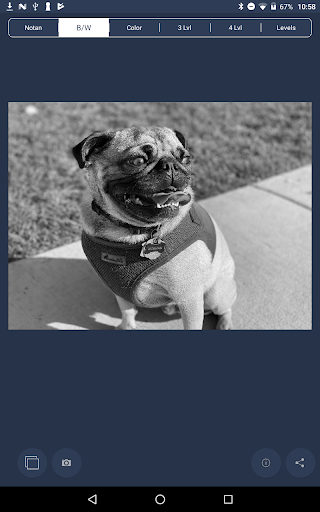
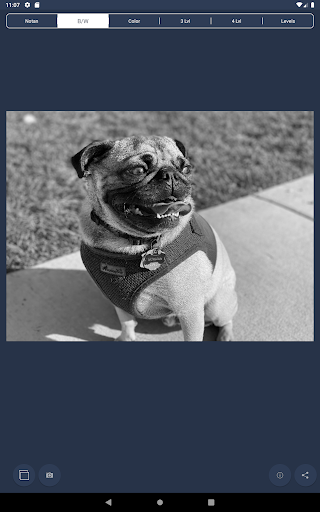
Nōtan is a Japanese design concept involving the play and placement of light and dark elements next to the other in the composition of art and imagery. The Yin Yang symbol is an example of this design philosophy. The use of Nōtan in art composition is a powerful tool to help the artist identify the light and dark portions of the image they want to incorporate into their project. NotanIzer does this in 3 ways. The first function simply divides the image at 50% of bright/dark. You can then use the slider to move that line to enhance detail that may otherwise be obscured. The second function displays the image in a grayscale color palette so the artist can focus on the structure and design of the image. The third is a 3 level version. Breaks down your image into 3 adjustable levels of brightness. The fourth is a 4 level version just like the 3 level. And finally there is the new Levels. Breaks it down into even levels from 3 to 10. And of course, share your image in many ways. Any artist will benefit from seeing their work in a different light. NotanIzer is that light. PLEASE NOTE: Make sure there is at least 20mb of memory available on your device as making adjustments can be memory intensive.

What NotanIzer Is Used For

NotanIzer appears to be a phone app for artists and designers who want to study an image’s light and dark structure. Based on the metadata, it is centered on the Japanese Notan concept, which helps users evaluate contrast and composition by separating bright and dark areas in different ways. This makes it useful when sketching, planning a painting, refining illustration ideas, or checking whether key shapes still read clearly after simplifying an image.

The app seems to offer several viewing modes for this kind of analysis, including a simple two-tone split, grayscale viewing, 3-level and 4-level brightness breakdowns, and a more adjustable levels mode. That suggests it may be used as a visual aid rather than a full editing suite. The listed permissions, such as access to storage and camera, fit an app that can open, process, and share images from the device, while the memory note indicates it may work best on phones with enough available resources.

Common uses

  • Analyze the balance of light and dark areas in reference images.
  • Simplify an image into grayscale or tone levels for composition study.
  • Adjust brightness thresholds to reveal shapes that may be harder to see.
  • Use it as a visual reference tool while planning art or design work.
  • Share processed images with others for feedback or review.
  • Capture or import images from device storage for tone analysis.
Best for:
Artists Design students Illustrators Composition study Phone app

App Details

Package:
com.bigpantsgroup.notanizer
Category:
Art & Design
Developer:
bigpantsgroup
Version:
Varies with device
Min Android:
Varies with device
Age Rating:
Everyone
Contains Ads:
No
In-App Purchases:
No

Official Listing

  • Official listing available on Google Play
  • Package name: com.bigpantsgroup.notanizer
  • Age rating: Everyone

Explore More

Browse more apps in Art & Design or explore the Phone hub .

Related Art & Design Apps

Canva: AI Photo & Video Editor icon

Canva: AI Photo & Video Editor

Art & Design Canva

Graphic design and content creation app for mobile.

Version 2.354.1 43.1 MB ⭐ 4.80 500,000,000+ installs
ibis Paint X icon

ibis Paint X

Art & Design ibis inc.
Version 14.0.0 ⭐ 4.50 100,000,000+ installs
Sketchbook icon

Sketchbook

Art & Design Sketchbook
Version Varies with device 41.2 MB ⭐ 4.00 100,000,000+ installs
Crafto icon

Crafto

Art & Design Kutumb App

Get quotes with your name and photos daily

Version 10.6.4 168.5 MB ⭐ 4.60 100,000,000+ installs
Adobe Express: AI Photo, Video icon

Adobe Express: AI Photo, Video

Art & Design Adobe

AI-powered photo & video creation—fast, fun, and effortless with Quick Actions

Version 30.0.0 99.6 MB ⭐ 4.60 100,000,000+ installs
FlipaClip: Draw 2D Animation icon

FlipaClip: Draw 2D Animation

Art & Design Visual Blasters LLC

Kickstart your animation journey in a few moments!

Version 4.2.25 25.4 MB ⭐ 4.40 50,000,000+ installs

How to Download NotanIzer

If this app is not hosted directly on APKApps official link, then for the safest and most up-to-date version, install it from its official Google Play listing.