Home Inventory & Food: InvenDo icon

Phone

Home Inventory & Food: InvenDo

House & Home Chester Software (Xaltos Technologies Ltd) ⭐ 4.70 50,000+
Version 1.0.4 Everyone

Screenshots

Home Inventory & Food: InvenDo screenshot
Permissions Explained 10 permissions requested View details

This app requests 10 permissions. The table below explains what each permission may allow and what users should review before installing.

Status Permission What it means Why it may be used User safety note
ℹ️ Review Read The Contents Of Your Usb Storage read the contents of your USB storage This is an Android permission or app-specific permission requested by the app. The app may use this permission for features related to its category, device support, background behavior, storage, connectivity, or system integration. Review this permission before installing, especially if it does not match the app’s expected purpose.
ℹ️ Review Modify Or Delete The Contents Of Your Usb Storage modify or delete the contents of your USB storage This is an Android permission or app-specific permission requested by the app. The app may use this permission for features related to its category, device support, background behavior, storage, connectivity, or system integration. Review this permission before installing, especially if it does not match the app’s expected purpose.
ℹ️ Review Take Pictures And Videos take pictures and videos This is an Android permission or app-specific permission requested by the app. The app may use this permission for features related to its category, device support, background behavior, storage, connectivity, or system integration. Review this permission before installing, especially if it does not match the app’s expected purpose.
ℹ️ Review View Network Connections view network connections This is an Android permission or app-specific permission requested by the app. The app may use this permission for features related to its category, device support, background behavior, storage, connectivity, or system integration. Review this permission before installing, especially if it does not match the app’s expected purpose.
ℹ️ Review Control Flashlight control flashlight This is an Android permission or app-specific permission requested by the app. The app may use this permission for features related to its category, device support, background behavior, storage, connectivity, or system integration. Review this permission before installing, especially if it does not match the app’s expected purpose.
ℹ️ Review Full Network Access full network access This is an Android permission or app-specific permission requested by the app. The app may use this permission for features related to its category, device support, background behavior, storage, connectivity, or system integration. Review this permission before installing, especially if it does not match the app’s expected purpose.
ℹ️ Review Run At Startup run at startup This is an Android permission or app-specific permission requested by the app. The app may use this permission for features related to its category, device support, background behavior, storage, connectivity, or system integration. Review this permission before installing, especially if it does not match the app’s expected purpose.
ℹ️ Review Control Vibration control vibration This is an Android permission or app-specific permission requested by the app. The app may use this permission for features related to its category, device support, background behavior, storage, connectivity, or system integration. Review this permission before installing, especially if it does not match the app’s expected purpose.
ℹ️ Review Prevent Device From Sleeping prevent device from sleeping This is an Android permission or app-specific permission requested by the app. The app may use this permission for features related to its category, device support, background behavior, storage, connectivity, or system integration. Review this permission before installing, especially if it does not match the app’s expected purpose.
ℹ️ Review Read Google Service Configuration read Google service configuration This is an Android permission or app-specific permission requested by the app. The app may use this permission for features related to its category, device support, background behavior, storage, connectivity, or system integration. Review this permission before installing, especially if it does not match the app’s expected purpose.

About Home Inventory & Food: InvenDo

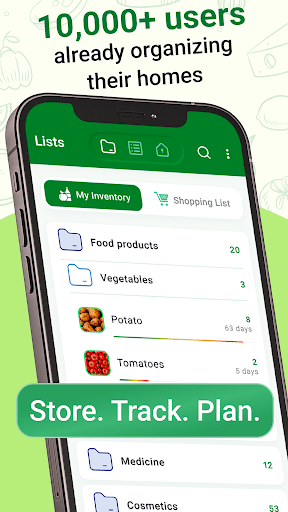
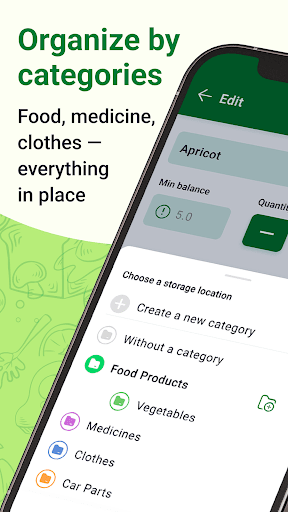
This app is the ultimate tool for keeping all your things in order and streamlining your shopping processes. Organize things in your flat, home, fridge, pantry, garage, basement, or anywhere else. With the ability to create storage places and categorize items within them, you'll always know where everything is and be able to find it quickly and easily. Plus, with the capability to sort your shopping list by store, you'll never have to waste time running back and forth between different shops to get everything on your list. - Scan and record barcodes to speed up things - Set Minimum quantity values to get alerts when your stock is low - Record expiration dates and get notified when if a product will expire soon - Add photos to keep a visual representation of an item This app can be used for a wide range of things, including: Food products: - Keep track of the food supplies in your fridge, pantry, and basement, and never miss an expiry date again. Get notified about low stock levels and expiring items, and replenish in time. Clothes: - Know what you own, so you don't end up buying duplicates or forgetting about items you already have. Homeware: - Keep your home organized and never misplace anything again. Know exactly where to find your tools, appliances, and other items. Hobby collections: - Organize your collection into categories (folders), make photos of the items, and create a convenient catalog. Cosmetics: - Create a list of your cosmetic products to know what you have and what you need, and never use expired products again. Medicines: - Keep track of your medicines and make sure you always have enough of the ones you need with a proper shelf life. One of the most useful features of the app is the ability to add photos or images of the items in your inventory. This makes it even easier to identify and locate the items you're looking for, and helps you keep track of what you have in a more visual and intuitive way. The app also has the ability to scan and record barcodes. If you've added a barcode to an item, you can later scan it to add or remove the item from your inventory. This makes it easy and convenient to keep track of what you have Another key feature is the ability to share data with other people and use the app together with your family. Whether you're living with roommates, a partner, or children, this app makes it easy to collaborate and keep everyone on the same page. Finally, the app also allows you to export your lists to Excel, giving you even more flexibility and control over your inventory and shopping processes. Whether you want to keep a backup of your data or use it in other apps and software, the option to export to Excel is a powerful and convenient feature. We're always glad to hear your suggestions and are here to help if you need support. If you have any questions or concerns, please don't hesitate to contact us at [email protected]. So why wait? Download the app today and start taking control of…

What Home Inventory & Food: InvenDo Is Used For

Based on the metadata, Home Inventory & Food: InvenDo appears to be a home inventory and shopping-list app for phones. It is commonly used to track household items across places like a fridge, pantry, garage, basement, or storage area, so users can record what they own and where it is kept. The category and description also suggest it is meant to help with organizing everyday household management rather than general note-taking.

The app may be especially useful for food and supplies, since it mentions barcode scanning, low-stock alerts, and expiration-date tracking. That makes it relevant for people who want to monitor groceries, medicines, cosmetics, tools, or hobby collections and avoid buying duplicates or forgetting what needs replacing. The metadata also indicates shopping-list sorting by store, which suggests it can help users plan errands more efficiently.

Relevant permissions such as camera access, storage access, network access, and startup behavior appear consistent with adding item photos, scanning barcodes, saving inventory data, and supporting reminders or sync-related functions. Based on the metadata, this is a phone app intended for practical household organization and stock tracking.

Common uses

  • Track items in rooms, shelves, and storage areas
  • Monitor food, medicine, or household supply quantities
  • Use barcode scanning to add or remove items faster
  • Set minimum stock levels and low-item alerts
  • Record expiration dates for perishables or products with shelf life
  • Attach photos to help identify inventory items
  • Organize shopping lists by store for errand planning
Best for:
Home organization Food tracking Shopping lists Barcode scanning Phone users

App Details

Package:
com.chestersw.homelist
Category:
House & Home
Developer:
Chester Software (Xaltos Technologies Ltd)
Version:
1.0.4
Updated:
Mar 29, 2026
Min Android:
6.0
Age Rating:
Everyone
Contains Ads:
No
In-App Purchases:
Yes

Official Listing

  • Official listing available on Google Play
  • Package name: com.chestersw.homelist
  • Age rating: Everyone

Explore More

Browse more apps in House & Home or explore the Phone hub .

Related House & Home Apps

Shopping List - Listonic icon

Shopping List - Listonic

Shopping Listonic - Smart Grocery Shopping

Grocery list app for quick and easy shopping list creation and management

Version 9.9.4 49.6 MB ⭐ 4.70 10,000,000+ installs

How to Download Home Inventory & Food: InvenDo

If this app is not hosted directly on APKApps official link, then for the safest and most up-to-date version, install it from its official Google Play listing.