PixVerse: AI Video Generator icon

Phone

PixVerse: AI Video Generator

Photography PixVerse ⭐ 4.50 50,000,000+
Version 3.15.1 Teen

Screenshots

PixVerse: AI Video Generator screenshot
Permissions Explained 12 permissions requested View details

This app requests 12 permissions. The table below explains what each permission may allow and what users should review before installing.

Status Permission What it means Why it may be used User safety note
ℹ️ Review Read Phone Status And Identity read phone status and identity This is an Android permission or app-specific permission requested by the app. The app may use this permission for features related to its category, device support, background behavior, storage, connectivity, or system integration. Review this permission before installing, especially if it does not match the app’s expected purpose.
ℹ️ Review Read The Contents Of Your Usb Storage read the contents of your USB storage This is an Android permission or app-specific permission requested by the app. The app may use this permission for features related to its category, device support, background behavior, storage, connectivity, or system integration. Review this permission before installing, especially if it does not match the app’s expected purpose.
ℹ️ Review Modify Or Delete The Contents Of Your Usb Storage modify or delete the contents of your USB storage This is an Android permission or app-specific permission requested by the app. The app may use this permission for features related to its category, device support, background behavior, storage, connectivity, or system integration. Review this permission before installing, especially if it does not match the app’s expected purpose.
ℹ️ Review Take Pictures And Videos take pictures and videos This is an Android permission or app-specific permission requested by the app. The app may use this permission for features related to its category, device support, background behavior, storage, connectivity, or system integration. Review this permission before installing, especially if it does not match the app’s expected purpose.
ℹ️ Review Record Audio record audio This is an Android permission or app-specific permission requested by the app. The app may use this permission for features related to its category, device support, background behavior, storage, connectivity, or system integration. Review this permission before installing, especially if it does not match the app’s expected purpose.
ℹ️ Review View Wi Fi Connections view Wi-Fi connections This is an Android permission or app-specific permission requested by the app. The app may use this permission for features related to its category, device support, background behavior, storage, connectivity, or system integration. Review this permission before installing, especially if it does not match the app’s expected purpose.
ℹ️ Review View Network Connections view network connections This is an Android permission or app-specific permission requested by the app. The app may use this permission for features related to its category, device support, background behavior, storage, connectivity, or system integration. Review this permission before installing, especially if it does not match the app’s expected purpose.
ℹ️ Review Full Network Access full network access This is an Android permission or app-specific permission requested by the app. The app may use this permission for features related to its category, device support, background behavior, storage, connectivity, or system integration. Review this permission before installing, especially if it does not match the app’s expected purpose.
ℹ️ Review Control Vibration control vibration This is an Android permission or app-specific permission requested by the app. The app may use this permission for features related to its category, device support, background behavior, storage, connectivity, or system integration. Review this permission before installing, especially if it does not match the app’s expected purpose.
ℹ️ Review Prevent Device From Sleeping prevent device from sleeping This is an Android permission or app-specific permission requested by the app. The app may use this permission for features related to its category, device support, background behavior, storage, connectivity, or system integration. Review this permission before installing, especially if it does not match the app’s expected purpose.
ℹ️ Review Google Play License Check Google Play license check This is an Android permission or app-specific permission requested by the app. The app may use this permission for features related to its category, device support, background behavior, storage, connectivity, or system integration. Review this permission before installing, especially if it does not match the app’s expected purpose.
ℹ️ Review Receive Data From Internet receive data from Internet This is an Android permission or app-specific permission requested by the app. The app may use this permission for features related to its category, device support, background behavior, storage, connectivity, or system integration. Review this permission before installing, especially if it does not match the app’s expected purpose.

About PixVerse: AI Video Generator

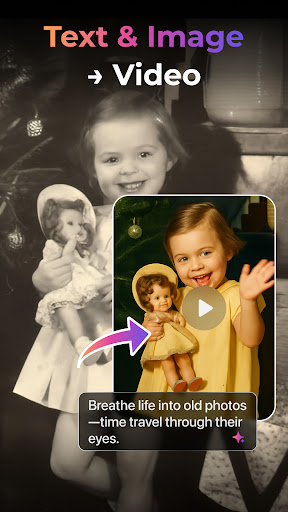
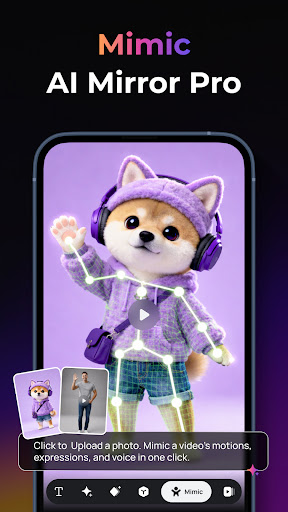
Looking for the best AI video generator? PixVerse is your all-in-one AI video maker that turns text to video and image to video in seconds. Whether you want to animate photos, create cinematic AI videos, or try the latest AI dance trends, PixVerse makes professional video creation easy for everyone. 🚀 Powerful AI Video Creation Tools - Text to Video: Type a prompt and watch our AI video generator craft cinematic masterpieces. - Image to Video: Breathe life into static photos with advanced AI animation and physics. - AI Video Modify: The easiest way to edit AI videos using simple text prompts. Solve complex technical editing challenges instantly - just tell the AI what to change! - Video Extension: Seamlessly extend your clips with intelligent AI continuity. - Key Frame Control: Use first and last frames for precise AI video editing and stability. - Fusion Mode: Combine up to 3 images into one stunning AI-generated video. 🔥 Trending AI Video Effects & Templates - Old Photo Revival: Bring frozen memories back to life. Animate old photos and convert vintage images into nostalgic AI videos to relive those heartwarming moments. - AI Dance Revolution: Transform any pose into electrifying AI dance sequences. - Magic Transformation: Access viral AI filters! From Victoria's Secret wings and floral gowns to MV-style covers, British Cafe aesthetics, and personalized birthday or holiday greetings. - AI Beauty & Skin Tone: Get the perfect look with one tap. Achieve healthy sunkissed skin, or smooth, firm, and tweak your skin color exactly how you want for a flawless finish. Muscle Pro: Experience the bodybuilder AI effect for instant physical transformations. ✨ Why choose PixVerse AI Video Generator? - Lightning Speed: Get HD results in just 5 seconds flat. - Hyper-Real AI: Advanced physics simulations for realistic movements and cinematic quality. User-Friendly: No technical skills needed to be a pro AI creator. Simple, fast, and powerful. Join millions of creators worldwide and redefine storytelling with PixVerse. Download now – where imagination becomes reality! Join 100M+ creators worldwide and redefine storytelling with AI magic. Download PixVerse now – where imagination becomes reality! Continue your creative journey with PixVerse across platforms: 🛠 Official Hub: https://app.pixverse.ai 💡 API Integration: https://platform.pixverse.ai 🔥 Stay ahead with PixVerse's viral-worthy updates: https://www.tiktok.com/@pixverse https://www.instagram.com/pixverse_official https://www.youtube.com/@PixVerse_Official https://x.com/pixverse_ Terms of Service: https://docs.pixverse.ai/Terms-of-Service-5a019460172240b09bc101b7a12fafea Privacy Policy: https://docs.pixverse.ai/Privacy-Policy-97a21aaf01f646ad968e8f6a0e1a2400

What PixVerse: AI Video Generator Is Used For

PixVerse: AI Video Generator appears to be a mobile app for creating and editing AI-generated videos from text prompts, photos, and short clips. Based on the metadata, it is commonly used for turning still images into animated videos, generating cinematic scenes from written ideas, and applying preset AI effects or templates to transform the look and motion of content.

The app seems aimed at phone-based creators who want quick, guided video generation without traditional editing tools. Its listed permissions suggest it may work with media stored on the device, allow capturing photos or video, and handle audio for content creation. Network access also indicates it likely needs an internet connection for AI processing and downloading results, while storage access may support saving or modifying media files during creation.

Common use cases may include animating portraits or old photos, making short social-style clips, extending videos, or testing AI-driven visual styles such as dance animations and transformation effects. Based on the category and feature list, it looks most relevant for users who want fast, template-based AI video creation on an Android phone rather than advanced manual editing.

Common uses

  • Generate short videos from text prompts
  • Animate photos or still images
  • Apply AI video effects and templates
  • Extend existing clips with AI continuity
  • Use key frames to guide video motion
  • Create social media-style visual content
  • Edit and export media on a phone
Best for:
AI video creation Photo animation Short-form content Phone editing Social video makers

App Details

Package:
com.pixverseai.pixverse
Category:
Photography
Developer:
PixVerse
Version:
3.15.1
Updated:
Mar 30, 2026
Min Android:
7.0
Age Rating:
Teen
Contains Ads:
Yes
In-App Purchases:
Yes

Official Listing

  • Official listing available on Google Play
  • Package name: com.pixverseai.pixverse
  • Age rating: Teen

Explore More

Browse more apps in Photography or explore the Phone hub .

Related Photography Apps

Picsart AI Photo Editor, Video icon

Picsart AI Photo Editor, Video

Photography PicsArt, Inc.

Remove and swap backgrounds in your photos and remove unwanted objects

Version 29.5.13 34.1 MB ⭐ 4.00 1,000,000,000+ installs
Video Editor & Maker - InShot icon

Video Editor & Maker - InShot

Photography InShot Video Editor

AI video editor with music! Edit video with effects, slideshow & slow motion

Version 2.196.1529 80.1 MB ⭐ 4.80 500,000,000+ installs
B612 AI Photo&Video Editor icon

B612 AI Photo&Video Editor

Photography SNOW Corporation

Meet trendy effects, filters, and stickers!

Version Varies with device 144.8 MB ⭐ 4.10 500,000,000+ installs
FaceApp: Perfect Face Editor icon

FaceApp: Perfect Face Editor

Photography FaceApp Technology Ltd

Natural Beauty, Selfie Retouch

Version Varies with device 84.1 MB ⭐ 4.30 500,000,000+ installs
Remini - AI Photo Enhancer icon

Remini - AI Photo Enhancer

Photography Bending Spoons

Create AI Photos, Improve and restore quality of blurry, old or damaged pics.

Version 3.7.1301.202520348 52.8 MB ⭐ 4.10 500,000,000+ installs
BeautyPlus-Selfie Photo Editor icon

BeautyPlus-Selfie Photo Editor

Photography PIXOCIAL TECHNOLOGY (SINGAPORE) PTE. LTD.

Snap perfect selfies every time. AI Auto-beautification for that flawless look.

Version 7.33.1 269.4 MB ⭐ 4.60 500,000,000+ installs

How to Download PixVerse: AI Video Generator

If this app is not hosted directly on APKApps official link, then for the safest and most up-to-date version, install it from its official Google Play listing.