About Markup R-XP
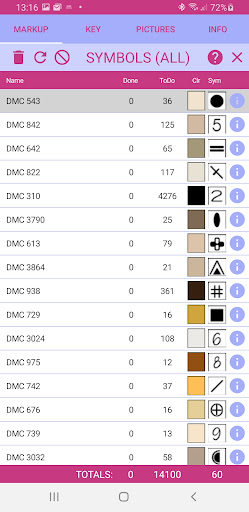
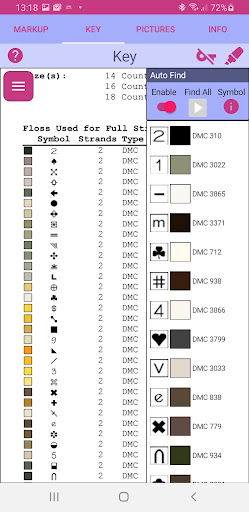
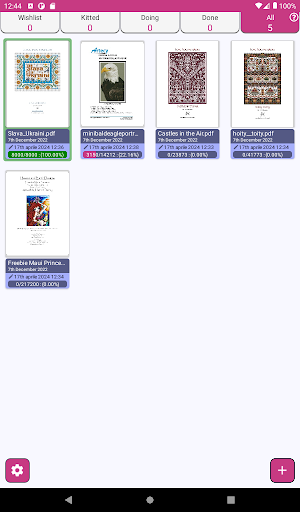
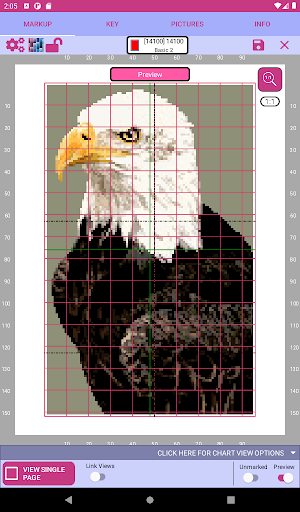
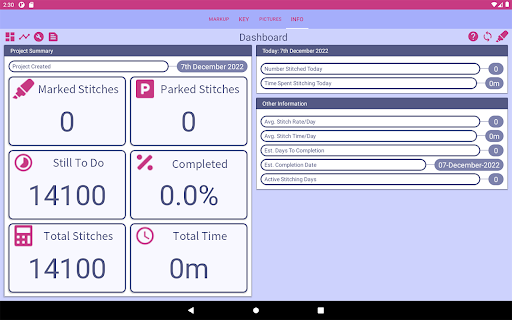
Welcome to Markup R-XP, the premier app for marking up any stitch chart. The Best Choice for Marking Up with Android Devices Markup R-XP does everything other markup apps do and a whole lot more! Why not switch to Markup R-XP and see what it can do for you – you won’t be disappointed. No need to check for “Supported Designers” as Markup R-XP loads all charts from all designers. Markup R-XP is recommended and approved by many leading chart designers and producers making it far and away the leading markup app available Markup Made Simple Markup R-XP allows stitchers to load any chart in PDF or image form and will magically locate the grids, symbols and colours and then allow them to be marked up on screen. You can even take a photo of a chart and Markup R-XP will find the grid and symbols and allow you to mark it up. If your chart consists of multiple pages, Markup R-XP will stitch the pages together to make one large chart. This means you can easily see your full markup progress and won’t be held up at page edges. There are even tools to let you quickly find those final few unmarked symbols across the whole chart. Extra Help with Tricky Charts If you have a chart picture which is not completely clear or slightly rotated, you can still use Markup R-XP. The integrated editing tools can be used to assist Markup R-XP to create the perfect grid to fit over your chart and then detect the symbols and colours for you. Automatic Symbol & Thread Colour Detection Markup R-XP recognises the symbols in your chart and can tell you how many are stitched and left to stitch. If you chart has a key, Markup R-XP can also automatically determine the thread colour for each symbol. If there is no key, no problem, you can also simply assign up to four thread colours to a symbol. Built In Shade Cards Markup your chart using thread colours from DMC, Anchor and Madeira selected from the built-in shade cards. Keys, Finished Samples and Notes Multiple Keys can be captured separately and are stored alongside each project for easy referral as you stitch. Likewise, pictures can be captured from your uploaded chart for quick reference whilst markup is underway. There is even a notes section to keep a track of any important details for each project. Comprehensive Progress & Statistics Projects can be organised into different categories to help track the progress of your stitching. Markup R-XP can also estimate the number of stitches in your chart and keep you updated on progress. Markup Your Way Markup R-XP allows you to customize the way Markup R-XP works and looks. Options include grid settings, centre lines, diagonal grid lines, colours, sizes and much more. Helpful Assistance, Active Usergroups & Regular Updates Help is available throughout Markup R-XP which give detailed information on how to use each feature. Why not join our thriving FaceBook Users group for handy hints and tips, see https://www.facebook.com/groups/markuprxpusers We listen to our users and regularly…
What Markup R-XP Is Used For
Markup R-XP appears to be a phone app for marking up cross-stitch or other stitch charts on Android devices. Based on the metadata, it is used to open charts in PDF or image form, place a markup layer over symbols and grid lines, and track progress as stitching is completed. It may be especially useful for people who work from printed or digital needlework patterns and want to manage multiple charts in one place.
The app also appears to support chart images taken with the camera, which fits with its permission to take pictures and videos. Its storage permissions suggest it can read and save chart files from device storage, which would be relevant for importing PDFs, images, and project notes. Network access may relate to loading content or app features tied to online services, though the metadata does not specify exactly how. Overall, the app seems focused on helping users organize, view, and annotate stitch charts on a phone rather than general image editing.
Common uses
- Import stitch charts from PDF or image files
- Mark completed symbols directly on screen
- Track how many symbols are finished or still needed
- Work with multi-page charts as a single project
- Use camera-captured chart photos for markup
- Reference keys, notes, and finished-sample images
- Store projects and chart files on device storage
App Details
Package:
uk.co.kewinlawsonsmith.markup
Developer:
Kewin Lawson Smith Limited
Version:
0.8.24108.44003
Updated:
Apr 17, 2024
Min Android:
5.1
Age Rating:
Everyone
Contains Ads:
No
In-App Purchases:
Yes
Official Listing
-
Official listing available on
Google Play
-
Package name:
uk.co.kewinlawsonsmith.markup
-
Age rating:
Everyone
Related Art & Design Apps
Art & Design
•
Canva
Graphic design and content creation app for mobile.
Version 2.354.1
43.1 MB
⭐ 4.80
500,000,000+ installs
Art & Design
•
ibis inc.
Version 14.0.0
⭐ 4.50
100,000,000+ installs
Art & Design
•
Sketchbook
Version Varies with device
41.2 MB
⭐ 4.00
100,000,000+ installs
Art & Design
•
Kutumb App
Get quotes with your name and photos daily
Version 10.6.4
168.5 MB
⭐ 4.60
100,000,000+ installs
Art & Design
•
Adobe
AI-powered photo & video creation—fast, fun, and effortless with Quick Actions
Version 30.0.0
99.6 MB
⭐ 4.60
100,000,000+ installs
Art & Design
•
Visual Blasters LLC
Kickstart your animation journey in a few moments!
Version 4.2.25
25.4 MB
⭐ 4.40
50,000,000+ installs
How to Download Markup R-XP
If this app is not hosted directly on APKApps official link,
then for the safest and most up-to-date version, install it from its official Google Play listing.